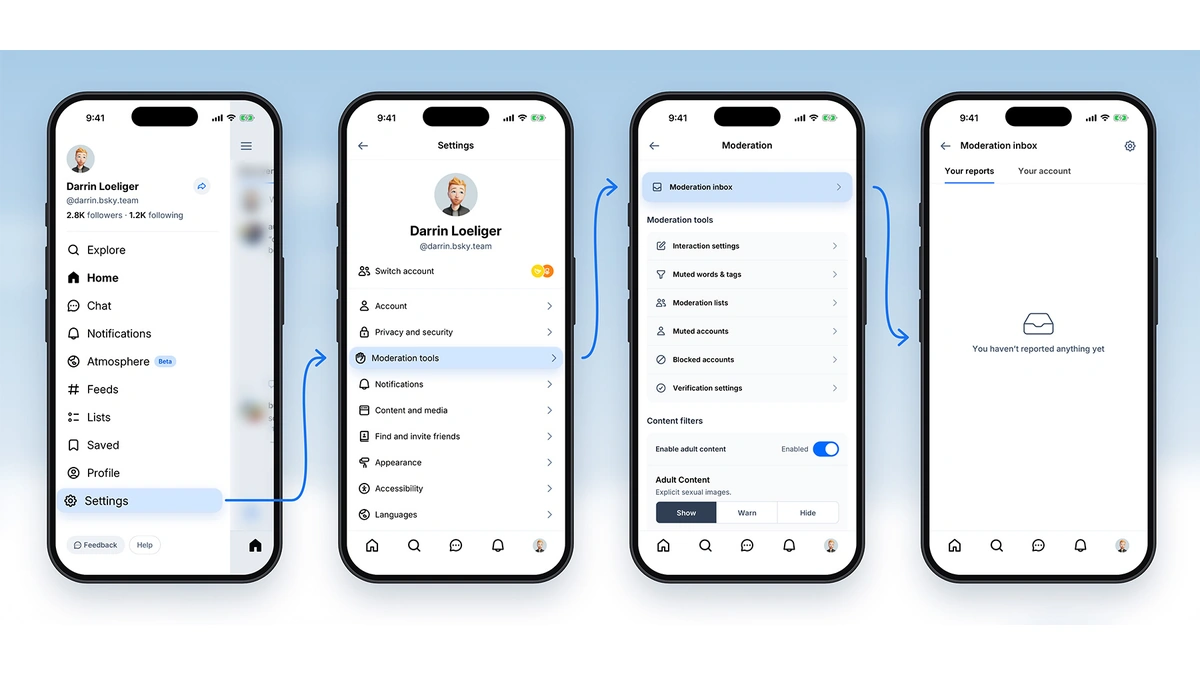
The Bluesky moderation inbox is now in beta, bringing the reports a user files, the actions taken against their account and appeals into one place inside the app. Users can also see their account standing, whether in good shape or at risk of suspension.
Until now, most moderation messages went out by email, and that channel was thin. Bluesky says it could mail only the most serious decisions, mainly account and content takedowns, and that adult-content labels came in such volume that they usually arrived with no message at all. Accounts on an independent server (PDS) could not be reached by Bluesky at all. Because the Bluesky moderation inbox lives in the app, anyone who uses the app can see their reports and account notices there, whichever server hosts the account.
The inbox has three parts:
- Reports: a record of each report the user filed, plus an update once Bluesky has reviewed it, saying whether it acted. A comment on the report explaining the Community Guidelines violation helps the review.
- Account actions: moderation actions on the account or its content, with an appeal option in the same place.
- Account status: the account's overall standing, any strikes, and whether it is at risk of permanent suspension.
Appeals change too. In a November 2025 post on its moderation process, Bluesky told users to email moderation@blueskyweb.xyz to appeal a post takedown, while suspension appeals already ran through the app. The same post named a moderation inbox as an upcoming project to move notices off email. Users in the beta can now appeal takedowns and other account actions from the moderation inbox. Suspended users still appeal from the login screen, since a suspension locks them out of the account and the inbox with it.
The status banner is meant to show how a suspension builds up. A suspension can look like the result of one post when it is really the sum of several violations over time. In November 2025, Bluesky described a strike system that rates each violation by potential harm in four levels, from low risk to critical risk, with an immediate permanent ban for a critical violation. Strikes drop off a record over time, and Bluesky says it will publish more detail on how the system works. The moderation inbox starts empty even for accounts that already carry strikes, but the banner shows current status from day one, and no banner means good standing.
Notifications in the Bluesky moderation inbox are on by default during the beta, with separate switches for updates on reports, notices about the account and labels added to posts. The beta is meant to surface problems first; Bluesky says a general release follows as soon as it can, with no date given. To try it, a user opens Settings, selects Beta features and Enable beta features, then goes to Moderation tools and taps Moderation inbox at the top of the screen.