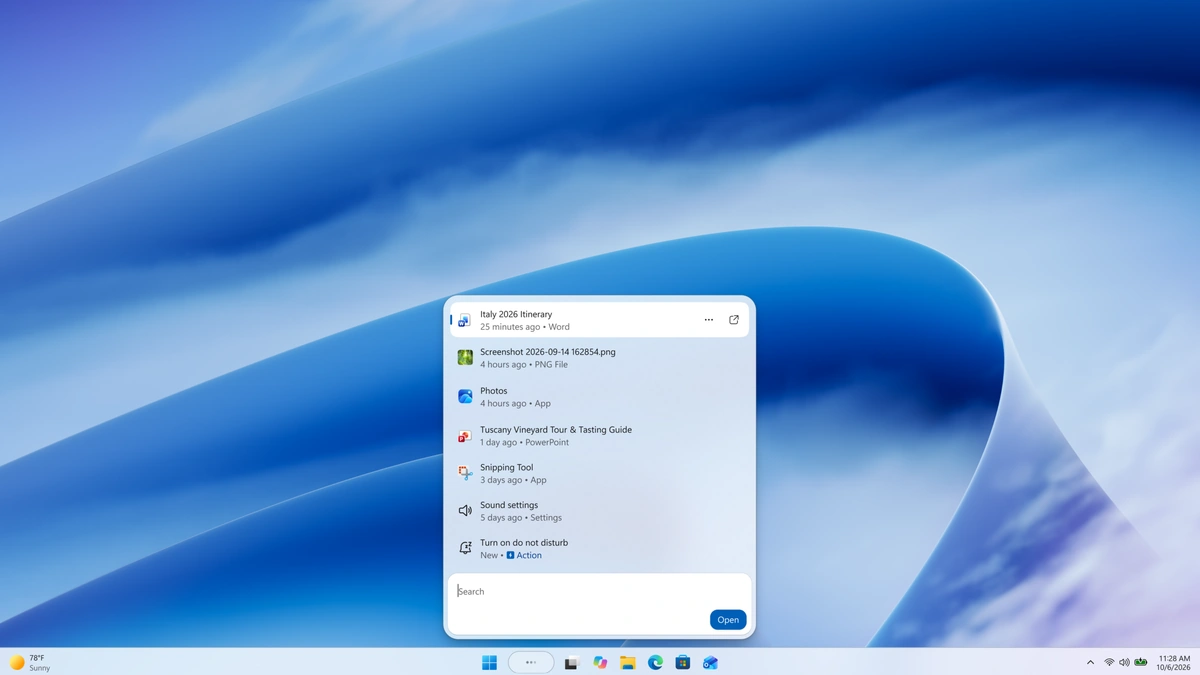
Windows Search is getting a rebuild, and Microsoft has begun testing it with Windows Insiders. The new taskbar search box merges results into one list and can carry out simple commands, so typing "mute" or "turn on Bluetooth" changes the setting without a trip through the Settings app.
Testers get the WinUI 3 version through the Experimental channel, in English only, starting October 7. Microsoft names build 26340.9616 for the main Experimental channel and build 28120.3181 for Experimental (26H1). After installing either one, a tester has to check for updates again and restart before a feature flag called New Windows Search Experience shows up under Settings, Windows Update, Windows Insider Program. Rollout is gradual, so the flag is the way to get Windows Search in its new form sooner.
Speed is the main claim. Microsoft says early testing of the new Windows Search shows substantial gains in performance and memory use, which it ties to the new framework base and a wider push to modernize core Windows interfaces. It published no benchmark figures, so the size of the improvement cannot be judged yet.
The redesign follows a July cleanup that stripped promotional content from web results and let users decide whether web and Microsoft Store suggestions appear. Its layout choice rests on click data: nearly all clicks in the old design landed on the results list, not the large preview pane beside it, so the new version folds everything into a single scannable list. Better matching for typos and synonyms is also in the build, with tuning planned over the coming weeks.
Actions are the bigger shift. Microsoft's examples include toggles ("switch to dark mode," "turn on night light"), quick adjustments ("dim my screen," "mute") and window management ("minimize all my windows," "arrange windows on screen"). Phone Link actions, such as sending a text from a connected phone, are listed as coming soon. For anyone who already types setting names into the taskbar, part of Settings now lives inside the search box.
More is queued. Before the end of 2026, Windows Search is due inline previews for Office files and photos, web answers for queries like weather or a landmark's height, and filters for browsing a category such as files. Work on a Start menu version and on adapting to other taskbar positions is slated for next year, with Copilot integrations mentioned as a goal. Until then, early previews keep the old search in the Start menu, which means Windows will run two search designs side by side depending on where a user types.