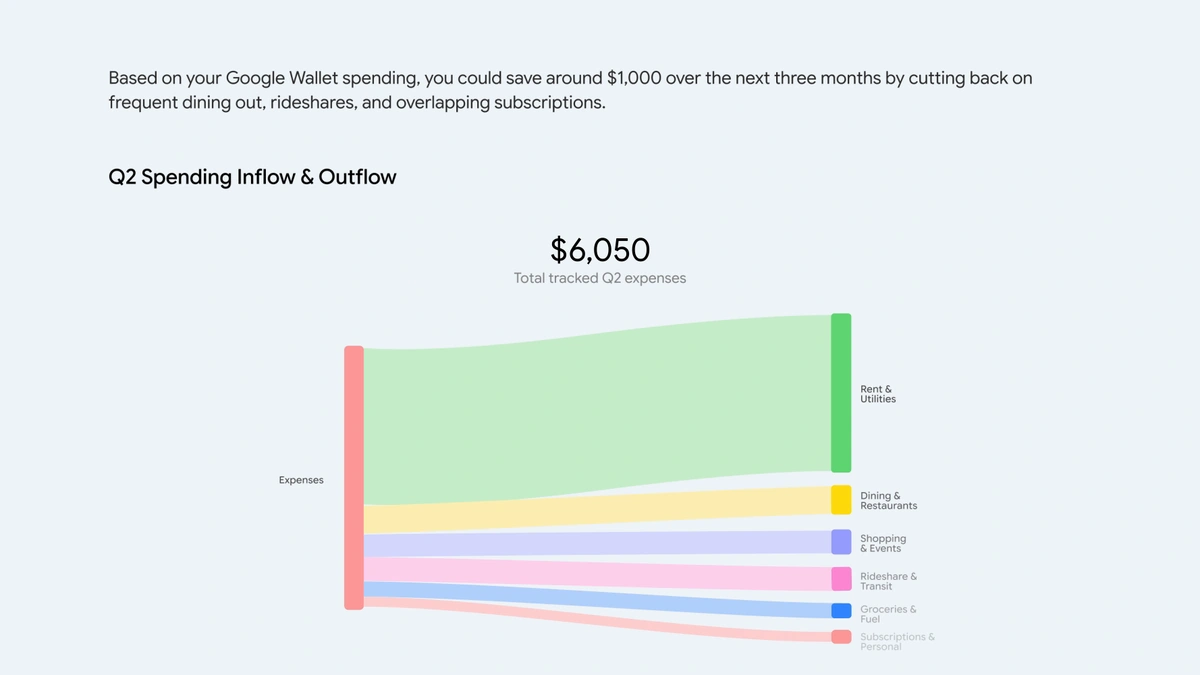
Gemini app users in the U.S. can now connect Google Wallet and get answers shaped by their own spending, according to Google. The connection is rolling out across web, Android and iOS, and it joins Gmail, Photos, YouTube and Search among the apps that Gemini's Personal Intelligence feature can draw on.
A user asks about budgeting or spending, and Google suggests tagging @Google Wallet in the prompt if Gemini does not use the app on its own. For transaction-level answers, users can also link credit card and bank accounts to Wallet through services such as Plaid. With Google Wallet connected, Gemini can build charts of cash flow, asset allocation and budgets inside the chat. Google's examples include a prompt that hunts across linked accounts for subscriptions still being paid and flags any that went up in price, and another that reviews last year's gift and travel spending to propose a holiday budget. Google also lists rewards and offers: Gemini can check and summarize the ones tied to the cards and passes saved in Google Wallet, and it can pull up items such as a boarding pass or airline loyalty number.
Google limits who qualifies and, for now, where the feature works.
| Requirement | Detail |
|---|---|
| User | 18 or older, in the U.S. |
| Account | Personal Google Account, with Keep Activity turned on |
| Where | Gemini mobile app and gemini.google.com |
| Language | English only, for now |
| Not available in | Features like Gems and Gemini Live; work or school accounts |
The access is read-only. Gemini can only read information from the accounts and cannot move, manage or invest money. Google adds that it cannot make payments with the cards in a user's Wallet or edit linked financial accounts. Connecting is opt-in under Connected Apps in the Personal Intelligence settings, and it can be switched off at any time. Anyone who linked accounts through Plaid can unlink them in Google Wallet settings. Google also says it is making the feature available gradually, so it might not be available to some users yet.
Alongside the Wallet connection, Google added a Memory Summary to Personal Intelligence: a single readable view of the preferences, interests and ongoing goals Gemini has saved about a user. It sits under Profile, then Personal Intelligence, then Memory Summary, where each detail can be edited or removed, and it is live on web and mobile for every Gemini app user where Personal Intelligence is available.