SIM swapping is an account takeover attack in which a criminal gets a mobile carrier to move your phone number to a SIM or eSIM the criminal controls, so your calls and text messages, including one-time passcodes, arrive on their phone instead of yours. The attacker never touches your phone. The weak point is the carrier's account process, and the prize is every account that accepts a text message as proof of who you are.
What SIM swapping is
SIM swapping is a takeover of your mobile number rather than of your device. ENISA, the European Union Agency for Cybersecurity, describes the attack as an attacker asking the mobile operator to link the real subscriber's number to a SIM card under the attacker's control. Once the change goes through, the legitimate subscriber drops off the network and the attacker receives that person's SMS messages and voice calls. The agency's Countering SIM-Swapping study lists the measures operators can take and makes recommendations for policymakers.
No malware is involved, and nothing gets installed on the victim's phone. An eSIM changes nothing about the mechanics: moving a number to a new eSIM profile on an embedded eUICC chip is the same attack on a different SIM format. The Subscriber Identity Module concept goes back to GSM, and every network generation since has kept one rule that the attacker relies on. Whoever holds the active SIM gets the number's traffic.
The number matters because so many services treat it as a stand-in for you. Banks, email providers and social networks send password resets to it, and that link between a person and a phone number sits at the center of how your digital identity is tied to accounts and phone numbers. Whoever controls the number inherits those trust relationships.
How a SIM swap attack works, step by step
A SIM swap attack follows a predictable sequence, and most of it is social engineering rather than technical skill. CISA's advisory on Scattered Spider reports that the group convinced cellular carriers to transfer a targeted user's number to a SIM card in its possession, which gave the attackers access to MFA prompts. CISA lists SIM swaps among the techniques those actors use to obtain credentials, install remote access tools and bypass multi-factor authentication (MFA).
- Reconnaissance. The attacker collects your name, birth date, address, phone number and carrier from leaked data, social media profiles and phishing.
- Impersonation. The attacker turns social engineering on carrier support, posing as you, or, as the FBI warns, pays off a carrier employee to make the change.
- The transfer. Your number moves to a physical SIM or eSIM the attacker holds, either through a SIM change at your own carrier or through port-out fraud, where the number is ported to another carrier.
- Your phone goes quiet. Your SIM is deactivated, so calls and texts stop arriving.
- Account takeover. The attacker requests password resets for your Google Account and Gmail inbox, your Apple Account and your financial apps, and the SMS reset codes land on the attacker's phone.
Port-out fraud is the variant that moves the number off your carrier entirely. Getting it back then involves two companies instead of one.
Why attackers want your phone number
A SIM swap is worth the effort because of what the number unlocks. ENISA notes that SIM swapping attacks usually target banking transactions but also hit the cryptocurrency community, social media and email accounts, and that fraudsters use them to bypass two-factor authentication. A stolen number typically opens:
- Online banking, where SMS codes approve logins and transfers.
- Cryptocurrency exchange accounts and the funds held in them.
- Social media profiles that recover access by text message.
- Email inboxes such as Gmail, which in turn can reset almost everything else.
- Account recovery flows at Google, Microsoft and other providers that fall back to an SMS code.
SMS is the weak link. CISA's Mobile Communications Best Practice Guidance advises moving away from SMS-based MFA, because Short Message Service texts are not encrypted and a threat actor with access to a telecommunication provider's network can read the ones it intercepts. CISA also says SMS MFA is not phishing-resistant. A SIM swap skips interception altogether, since the codes are delivered to the attacker as if the attacker were the owner. Knowing how multi-factor authentication differs from single sign-on sharpens the point: a single sign-on account guarded only by a text code puts every connected app behind one stolen number.
Signs you have been SIM swapped
The clearest sign you have been SIM swapped is a sudden loss of mobile service while people near you still have signal. Other warning signs tend to follow:
- Your iPhone or Android phone shows no service, or emergency calls only, in a place where it normally connects.
- An email or app notice from your carrier about a SIM change, eSIM activation or port-out you did not request.
- Password-reset messages or one-time passcode texts you did not trigger.
- Lockouts from your email, bank or Apple Account after the passwords change.
- Security alerts from your Google Account or Apple about sign-ins from devices you do not recognize.
Any two of these at once are reason enough to treat the situation as an active attack and move to the steps below.
What to do if it happens to you
Speed matters after a SIM swap, because every hour the attacker holds your number allows another round of password resets. Work through these steps from a different phone or computer:
- Call your carrier from another line, report the unauthorized SIM change or port-out fraud, and ask for the number to be restored to your SIM and for further changes to be frozen.
- Change your email password first, since email resets everything else, then your banking and exchange passwords. Sign out all other sessions on your Google Account, Apple Account and Microsoft account.
- Switch those accounts off SMS recovery and onto an authenticator app or a security key.
- Contact the fraud teams at your bank and at any cryptocurrency exchange you use, so they can review or block transactions.
- File a complaint with the Federal Communications Commission through the FCC Consumer Help Center, which lists number porting among the phone issues it handles, and report the theft to local law enforcement and to the FBI's Internet Crime Complaint Center (IC3).
Write down when service dropped and save every alert you received. The carrier, the bank and the police will each ask for that timeline.
How to prevent SIM swapping
Preventing SIM swapping takes two moves: make the carrier harder to fool, and stop letting a text message prove who you are. The first four steps follow CISA's mobile communications guidance, and the last follows the FBI's SIM swap advice:
- Set a Telco PIN and add MFA to your carrier account. CISA describes the Telco PIN as an extra PIN or passcode a carrier requires for account login and for sensitive operations such as porting a number. Ask your carrier as well whether it offers a lock that blocks SIM changes and number transfers until you turn it off.
- Move accounts off SMS codes to an authenticator app. Apps such as Google Authenticator and Microsoft Authenticator generate Time-based One-Time Password (TOTP) codes on the device itself, so a SIM swap cannot capture them. CISA rates these codes better than SMS but still phishable, because a convincing fake login page can collect them.
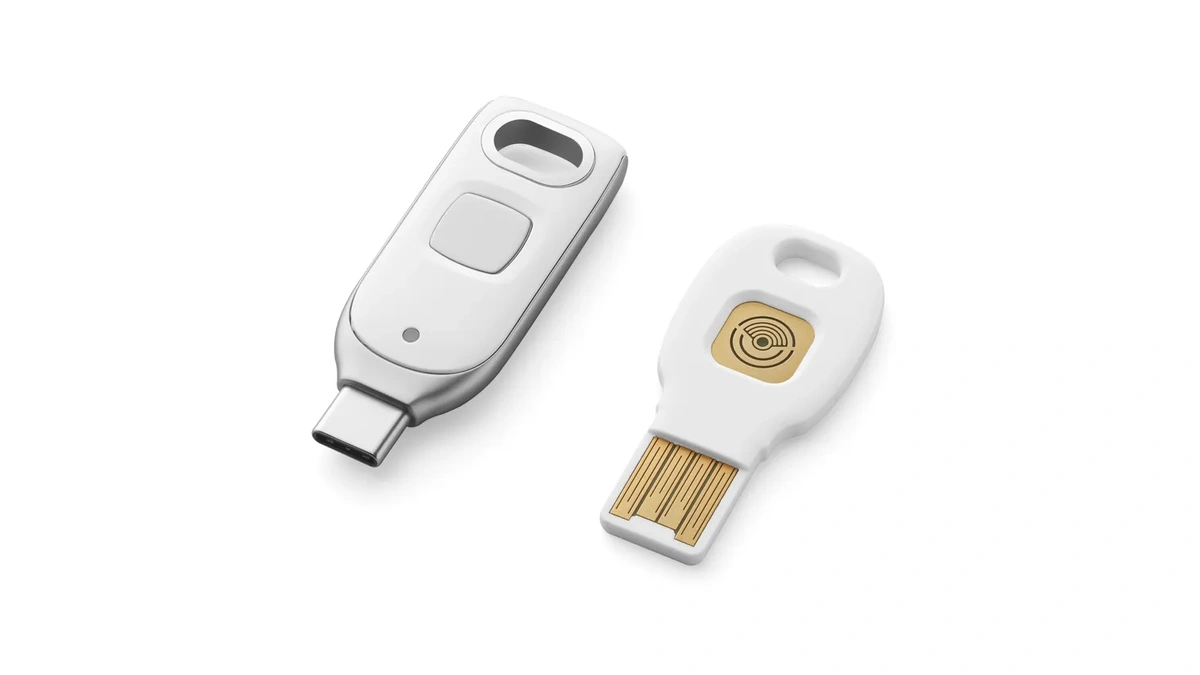
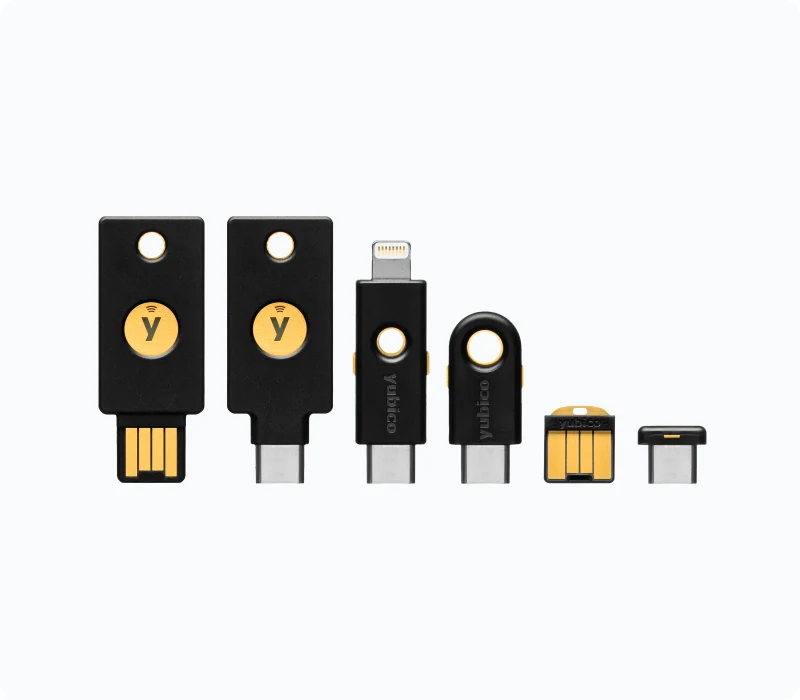
- Enroll a FIDO security key or a passkey. CISA names hardware FIDO security keys, such as a YubiKey from Yubico or a Google Titan key, as the most effective option and FIDO passkeys as an acceptable alternative. Both build on FIDO2 and the WebAuthn standard, the basis of passkeys and security keys that do not rely on SMS codes, and both deliver phishing-resistant authentication.
- Remove the SMS fallback. CISA warns that enrolling an authenticator does not unenroll SMS, which can linger as a weak fallback, and that some services default to SMS during account recovery. Once the stronger method works, disable the text option and any other less secure MFA method, as CISA advises.
- Shrink what an impersonator can learn. Keep your birth date, address and carrier account number off public profiles, and treat any caller who asks for your carrier account PIN or a one-time passcode as an attacker.
Phone-side settings help at the margins. The device passcode, the protection on SIM and eSIM settings, and the account that authorizes an eSIM transfer differ by platform, as the breakdown of how iOS and Android handle device security differently shows. None of them stops a carrier employee from moving your number. The account-level steps carry the weight, and phishing-resistant authentication is the one that removes the payoff: even if the carrier is fooled, a stolen number no longer opens your accounts.
SIM swap, SS7 and IMSI catchers: three different attacks
SIM swapping is often grouped with two network-level attacks that work in a different way and fool no one at a carrier's help desk. Signaling System No. 7 (SS7) is the signaling system carriers use to set up calls and exchange control information between networks; ITU-T Recommendation Q.700 is the International Telecommunication Union's introduction to it. Abuse of SS7 signaling requires access to that inter-carrier network, not a position near the target. The ITU's Financial Inclusion Global Initiative (FIGI) has published a Technical report on SS7 vulnerabilities and mitigation measures for digital financial services transactions for the financial sector.
An IMSI catcher works at the radio edge instead. NIST testimony on IMSI catcher threats describes rogue base stations, also known as Cell-Site Simulators, Stingrays or IMSI catchers, as unlicensed devices not owned or operated by a licensed mobile network operator. They passively collect device identities that travel unencrypted. In 4G LTE, the attach message carrying the International Mobile Subscriber Identity (IMSI) goes out unprotected before security is established. Many of these devices broadcast 2G GSM, which lacks mutual authentication and uses weak cryptography, and NIST notes that the hardware is inexpensive and the software open source.
| Attack | What the attacker needs | Who is fooled | What it gains | Best defense |
|---|---|---|---|---|
| SIM swap | Your personal details and a carrier process that can be talked around | Carrier staff or account systems | Your number, so calls, texts and SMS codes | Telco PIN plus MFA that does not use SMS |
| SS7 abuse | Access to the SS7 signaling network between carriers | The trust built into inter-carrier signaling | In principle, location tracking or interception of calls and texts | Carrier-side signaling filters; not relying on SMS codes |
| IMSI catcher | Physical proximity and a rogue base station | Your phone | Your IMSI, plus the ability to push the phone down to 2G | Turning off 2G where the phone allows it; end-to-end encrypted apps |
Only the SIM swap knocks your own phone off the network, which is why it is the attack most victims notice. SS7 abuse and an IMSI catcher leave service running while they track or listen. For those quieter attacks, protecting the content is the common defense: Signal, WhatsApp and Apple's iMessage use end-to-end encryption, and the explainer on how end-to-end encryption keeps message contents private covers why an intercepted message reveals little. A plain SMS or a regular phone call has no such layer.
What 5G changes, and what it does not
5G changes nothing about SIM swapping, but it does add a concealed subscriber identifier (SUCI) aimed at IMSI catchers, and how much that helps depends on how the network is built. The 5G vs 4G security comparison sets out which 5G security protections depend on a standalone 5G core, and the terms below follow its description of the 3GPP design:
- SUPI
- The Subscription Permanent Identifier: the permanent subscriber identity tied to the SIM, the 5G counterpart of the IMSI.
- SUCI
- The Subscription Concealed Identifier: the SUPI with its subscriber part encrypted under the home network's public key, sent in place of the permanent identity when the phone first registers or is asked to identify itself (a temporary 5G-GUTI is used the rest of the time). Unless the operator has left the protection switched off (the "null scheme"), a passive observer on the radio link cannot recover the SUPI from it.
- Standalone 5G
- 5G radio connected to a 5G Core.
- Non-Standalone 5G
- 5G radio anchored on the 4G Evolved Packet Core (EPC), which still handles signaling.
The concealed subscriber identifier protects users from IMSI catchers only when the connection is on a standalone 5G core. On non-standalone 5G, the network still relies on the 4G core and its exposures, and a phone that is pushed down to 2G or 4G is not protected by SUCI. The same comparison places the residual risk in non-standalone deployments, where the 4G core handles signaling.
SUCI does nothing against a SIM swap. That attack goes through the carrier's account process, and a carrier that moves your number to a new SIM hands the attacker a fully valid subscription that the 5G network treats like any other. Against SIM swapping, the protections that count remain a Telco PIN on the carrier account and a security key on everything the number used to unlock.
Further reading
Frequently Asked Questions
How do you know if someone SIM swapped you?
The first sign is usually sudden loss of mobile service: no signal, no calls and no texts while others nearby still have coverage. Next come carrier notices about a SIM or eSIM change you did not request, password-reset messages you did not trigger, and accounts that suddenly lock you out. If any of these happen together, call your carrier from another phone right away and treat your email and financial accounts as exposed.
How worried should I be about SIM swapping?
Worry in proportion to what an SMS code protects: if your bank, email or crypto accounts send reset codes by text, the risk is real. A SIM swap needs a persuaded carrier employee or a weak account process, not a hacked phone, so it is not random. The fix is cheap: set a carrier PIN and move your important accounts to a security key or passkey.
Can I swap between SIM cards?
Yes, you can move your own number to a new physical SIM or eSIM through your carrier, and doing so is routine. What makes a SIM swap an attack is that someone else triggers the transfer by impersonating you or abusing carrier access. Your carrier's identity checks and an account PIN are what separate the two.
Does removing a SIM card from an iPhone delete everything?
No, taking the SIM out does not erase the phone's storage, apps or photos. The SIM holds your subscriber identity, so the phone loses cellular service until a SIM is back in, and any contacts saved on the card itself leave with it. Removing your SIM also does not stop an attacker who has already moved your number to another SIM or eSIM.
Is a SIM swap the same as an SS7 or IMSI-catcher attack?
No, they are three different attacks. A SIM swap tricks the carrier into moving your number, an SS7 attack abuses trust between carrier networks, and an IMSI catcher is a rogue base station that sits near your phone. Only the SIM swap makes your own phone lose service, which is why it is the one most victims notice.