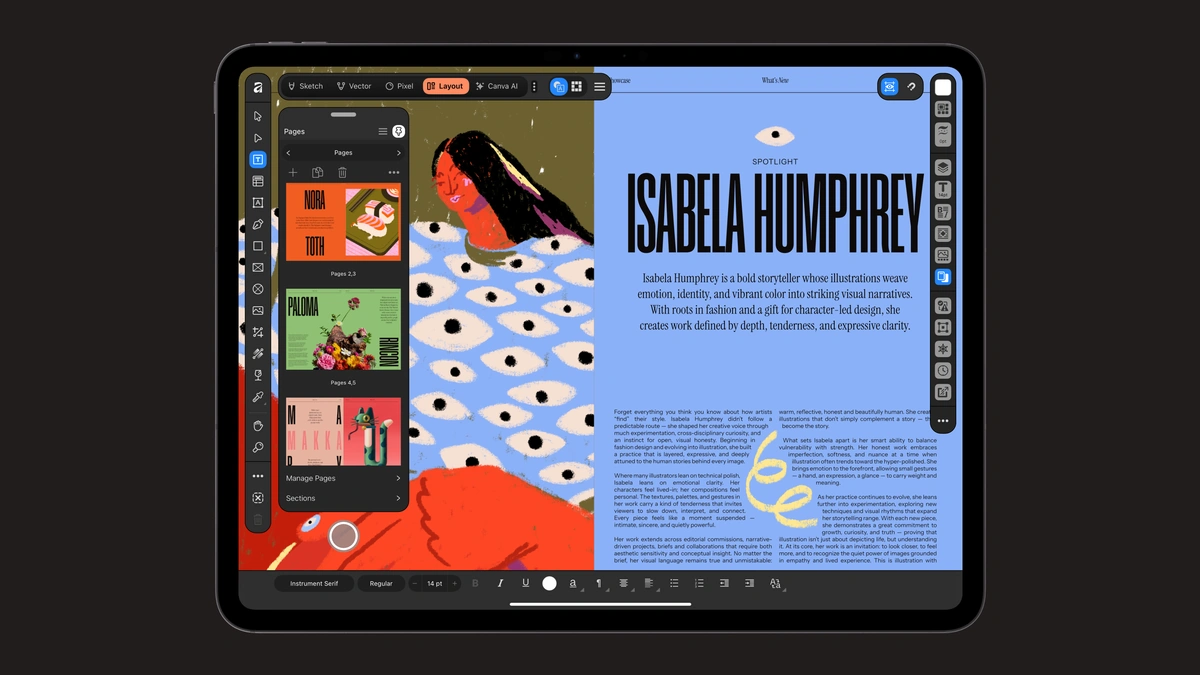
Affinity released its iPad app on November 2, 2026, and individuals can use every core tool in it without paying. The app folds vector design, photo editing, page layout and sketching into one program, available as a free download from the App Store.
Everything sits in one place: an Affinity project lives in a single .af file, so a pencil sketch can become a vector shape and then part of a print layout without leaving the document. The Sketch Studio ships with more than 350 editable brushes that react to Apple Pencil pressure, tilt and barrel roll. Affinity says the app runs at up to 120fps, zooms to 1,000,000% and keeps up on files above 100 megapixels, with live edits that keep working offline.
In practice, you open a document, pick the Sketch, Vector, Pixel or Layout studio, and switch between them as the job changes. Existing work comes along. The app opens PSD, AI, INDD, IDML, PDF and SVG files, and it exports JPEG, PNG, WebP, PDF, SVG, EPUB and INDD. Affinity warns that smart objects and advanced filters may flatten on import from Photoshop, as may appearance stacks, masks and advanced effects from Illustrator. GREP styles, anchored objects and tables from InDesign may need manual cleanup.
Individuals get every tool in the four studios plus all customization and export features with no restrictions, and Affinity says the app will keep receiving free updates.
Some desktop features are not on iPad at launch. Affinity names, among them, the Books, Batch, Data Merge, Quick Adjustments, Info and Scope panels, macro recording and Astrophotography Studio, and points to its release notes for what arrives next. Desktop versions remain available on Mac and Windows, and the same .af files open across devices.
Signing in takes a Canva account, since Affinity now comes from Canva; a free account is enough for the core tools. The Canva AI Studio, which handles grain removal, rescuing blurry shots and background cutouts, needs a premium Canva plan (Pro, Business, Enterprise or Education). Affinity says local Affinity files are not used to train AI features, and users can manage preferences for content they upload to Canva. Organizations that want Affinity with single sign-on are pointed to Canva Enterprise or Canva Education.