HubSpot positions itself as the enterprise CRM for organizations that want a unified data model without a dedicated technical administrator to maintain it. The HubSpot Sales Hub Enterprise tier adds capabilities that close the gap with more complex platforms: custom objects for non-standard data models, predictive lead scoring powered by historical deal data, conversation intelligence that transcribes and analyzes sales calls, and the HubSpot Breeze AI copilot for drafting follow-ups, summarizing contacts, and flagging pipeline risk. Sales pipeline management in HubSpot is configured through a visual drag-and-drop interface rather than through declarative code, which reduces the learning curve for RevOps teams building their first enterprise deployment.
Pricing for HubSpot Sales Hub Enterprise starts at approximately $150 per seat per month based on published pricing as of May 2026; verify current pricing at hubspot.com/pricing/sales before a procurement decision. A mandatory onboarding fee applies to the Enterprise tier and is not included in per-seat pricing. The workflow automation engine available at this tier supports multi-branch logic and cross-object enrollment, covering most enterprise automation scenarios without requiring a developer.
For a broader look at how CRM platforms drive value across sales, marketing, and support functions, see Benefits of CRM in Sales, Marketing, and Customer Service.
Key HubSpot Enterprise Differentiators
- Unified contact, company, deal, and ticket data model on a single database with no object duplication across hubs
- Object extensibility for modeling proprietary data types, including subscriptions, properties, and equipment records, without external middleware
- Breeze AI copilot with native sales call summarization and email generation available across all Sales Hub Enterprise seats
- Predictive lead scoring using deal history and engagement signals, configurable without Apex code or a developer
- Native conversation intelligence with automatic call transcription and coaching insights
- Required onboarding managed by HubSpot-certified partners, with scoped engagements typically running four to eight weeks
What Salesforce Brings to the Enterprise Table
HubSpot and Salesforce diverge on architecture: Salesforce built its enterprise CRM position on deep configurability and ecosystem breadth that most organizations cannot replicate with HubSpot alone. Sales Cloud Enterprise and Unlimited tiers expose a metadata-driven architecture that a skilled Salesforce admin can extend into almost any business process: custom objects with complex field relationships, territory hierarchies, approval chains, and revenue lifecycle management. The AppExchange marketplace lists more than 7,000 apps and integrations, making Salesforce the default choice for organizations with existing investments in ISV (independent software vendor) tools that require certified connectors.
The Salesforce Flow automation builder covers declarative workflow automation across any standard or custom object, and Einstein AI adds predictive scoring and opportunity insights within Sales Cloud. The Agentforce platform, introduced at Dreamforce 2024, extends autonomous AI agents into sales motions: follow-up sequencing, qualification routing, and account research without human initiation. These AI-powered features position Salesforce above HubSpot for organizations running high-volume, autonomous pipeline workflows.
Sales Cloud Enterprise starts at approximately $165 per user per month; Sales Cloud Unlimited starts at approximately $330 per user per month, based on published pricing as of May 2026. Verify current figures at salesforce.com/sales before finalizing a budget. Most Enterprise deployments require at least one full-time certified Salesforce admin, a structural cost that does not appear in per-seat license comparisons.
Key Salesforce Enterprise Differentiators
- Metadata-driven architecture allowing Salesforce admin teams to build complex approval chains, territory models, and multi-currency pipelines without custom code
- An ecosystem of 7,000+ certified integrations spanning CPQ, ERP, billing, and marketing operations, accessible through AppExchange
- Agentforce autonomous AI agents for sales qualification, pipeline follow-up, and account research, available on Unlimited tier
- Salesforce Flow for declarative workflow automation across any standard or custom object
- Native CPQ (configure, price, quote) tooling with Revenue Cloud for enterprise contract management
- Einstein AI for opportunity scoring, activity capture, and forecasting across Sales Cloud Enterprise and above
Head-to-Head: Feature Comparison for Enterprise Buyers
The table below compares HubSpot and Salesforce on the dimensions that matter most to enterprise procurement teams. Cells reflect public vendor documentation; where one platform requires a third-party app or paid add-on to match a native feature, that is noted explicitly. For real-time reporting and analytics capability depth, see also Realtime Analytics in CRM and Sales Platforms.
| Feature Dimension | HubSpot Sales Hub Enterprise | Salesforce Sales Cloud Enterprise |
|---|---|---|
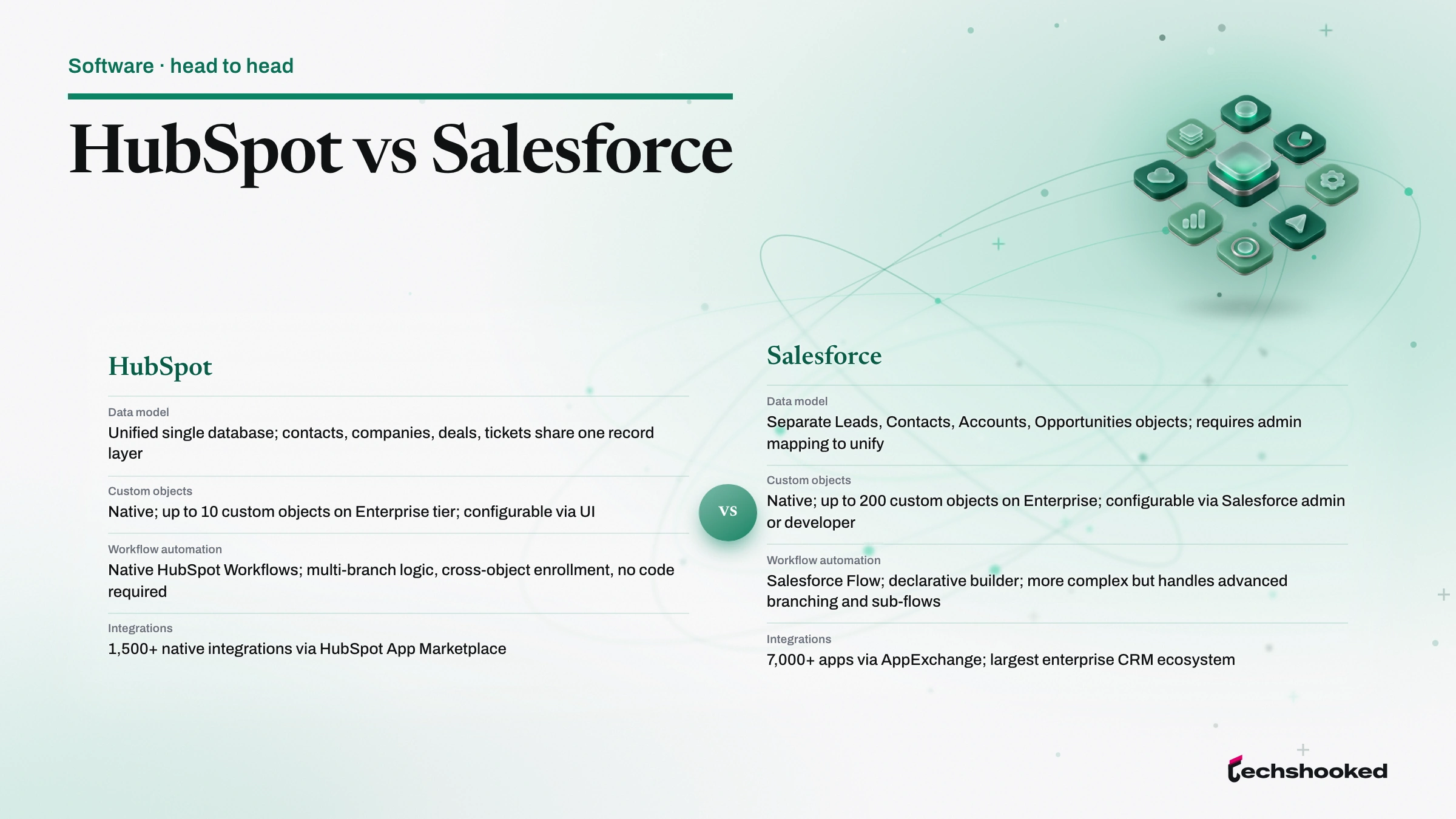
| Contact and account data model | Unified single database; contacts, companies, deals, tickets share one record layer | Separate Leads, Contacts, Accounts, Opportunities objects; requires admin mapping to unify |
| Custom objects | Native; up to 10 custom objects on Enterprise tier; configurable via UI | Native; up to 200 custom objects on Enterprise; configurable via Salesforce admin or developer |
| Workflow automation | Native HubSpot Workflows; multi-branch logic, cross-object enrollment, no code required | Salesforce Flow; declarative builder; more complex but handles advanced branching and sub-flows |
| Reporting and analytics | Native custom report builder; multi-object reports; dashboards with up to 30 reports each | Native report builder plus CRM Analytics (formerly Tableau CRM); advanced analytics require add-on license |
| AI-powered features: copilot and autonomous agents | Breeze AI copilot (call summaries, email drafts, deal risk); no autonomous agent tier | Einstein AI (scoring, forecasting) plus Agentforce autonomous agents on Unlimited tier |
| Native integration ecosystem | 1,500+ native integrations via HubSpot App Marketplace | 7,000+ apps via AppExchange; largest enterprise CRM ecosystem |
| SSO and user permissions | SAML SSO, field-level permissions, team-based access; native on Enterprise | SAML SSO, profile and permission sets, field-level security; native on Enterprise |
| Mobile app | HubSpot mobile app; full deal and contact access; offline mode limited | Salesforce mobile app; full object access; offline Einstein activity capture |
| CPQ and contract tooling | HubSpot Quotes (native); CPQ via third-party add-ons (DealHub, PandaDoc) | Salesforce CPQ native (Revenue Cloud); enterprise contract lifecycle management included |
| Starting price per user per month | Approx. $150 (as of May 2026; see hubspot.com/pricing/sales) | Approx. $165 Enterprise; approx. $330 Unlimited (as of May 2026; see salesforce.com/sales) |
Total Cost of Ownership: Licensing Is Only the Start
HubSpot and Salesforce both carry costs beyond the per-seat license, and the total cost of ownership calculation for enterprise CRM diverges sharply once staffing is included. Both platforms carry implementation, administration, and integration costs that dwarf the license line item. All figures below are ranges drawn from publicly available data as of the author's research date (May 2026) and are subject to change; verify current figures against vendor quotes and job market data before a procurement decision.
Salesforce Total Cost of Ownership Components
- License fees: Salesforce Sales SKU product Enterprise at approximately $165 per user per month; Unlimited at approximately $330. A 100-seat Enterprise deployment runs roughly $198,000 per year in base licenses before add-ons.
- Administrator salary: A certified Salesforce Administrator earns $80,000 to $130,000 annually in the US market based on Lightcast compensation data (2025 research cutoff). Most Enterprise deployments require at least one dedicated specialist; large organizations often carry two or three.
- Implementation partner fees: Mid-size Enterprise deployments with standard configuration typically run $50,000 to $250,000. Complex deployments involving Revenue Cloud, multi-org architecture, or third-party integrations can exceed $500,000.
- Third-party add-on costs: CPQ, territory management, advanced reporting and analytics, and data enrichment tools each carry separate license fees. A typical enterprise Salesforce stack adds $15 to $60 per user per month in add-on costs sourced through AppExchange.
- Ongoing platform administration: Continuous configuration, release management, and user training require sustained specialized capacity beyond go-live. This cost is structurally higher for Salesforce than for HubSpot because the platform surface area is larger.
HubSpot Total Cost of Ownership Components
- License fees: HubSpot Sales Hub Enterprise at approximately $150 per seat per month. A 100-seat deployment runs roughly $180,000 per year.
- Mandatory onboarding fee: HubSpot requires a paid onboarding engagement for Enterprise tier, approximately $6,000 as of May 2026 research cutoff. Partner-led implementations run higher.
- RevOps staffing: HubSpot does not require a certified Salesforce admin equivalent, but a trained HubSpot administrator or revenue operations specialist is still needed for pipeline upkeep, custom object management, and reporting maintenance.
- Third-party add-ons: CPQ, advanced data enrichment, and some enterprise telephony integrations require paid third-party tools where Salesforce carries native options.
At 50 to 500 seats, HubSpot frequently wins on three-year total cost of ownership once staffing costs are included in the Salesforce calculation. Above 500 seats with heavy customization, Salesforce's configurability advantage and AppExchange depth can justify the cost difference. Run the full revenue operations cost model, not just the license comparison, before signing either contract.
CRM Migration: Moving Between HubSpot and Salesforce
HubSpot and Salesforce use different underlying data models, making CRM migration between them operationally significant regardless of direction. Custom entities and historical activity records do not map cleanly between the two systems, and migration timelines depend heavily on the volume of custom configuration accumulated in the source system. For buyers also evaluating a three-platform shortlist that includes Zoho, see CRM Tools Compared: Salesforce, HubSpot, Zoho and More for the broader competitive context.
Salesforce to HubSpot Migration Checklist
- Enable HubSpot's native Salesforce integration to run bidirectional sync during the cutover window; this reduces risk of data loss during the transition period
- Map Salesforce Leads and Contacts to HubSpot Contacts, and Salesforce Opportunities to HubSpot Deals; reconcile duplicate records before sync begins
- Audit user-defined objects in Salesforce and determine which have direct HubSpot equivalents versus which require net-new schema creation in HubSpot
- Recreate Salesforce Flow automations as HubSpot Workflows; expect logic gaps where Flow sub-flows have no direct HubSpot equivalent
- Plan for activity history truncation: HubSpot imports Salesforce activity records, but call logs and email threads may be capped depending on record age
- Run parallel systems for two to four weeks post-cutover; typical data migration timelines run four to twelve weeks depending on data volume and object complexity
HubSpot to Salesforce Migration Checklist
- Map HubSpot Deals to Salesforce Opportunities and HubSpot Companies to Salesforce Accounts; a SFDC admin should own the field-level mapping document
- Export all custom object records and rebuild the object schema in Salesforce before importing data; field type mismatches are the most common failure point
- Use AppExchange migration tools such as Trujay or Migrate.io for bulk data migration; manual export-import via CSV introduces deduplication errors at scale
- Recreate HubSpot enrollment trigger logic in Salesforce Flow; many trigger conditions require equivalent entry criteria configuration in Flow
- Rebuild reporting and analytics dashboards from scratch; HubSpot report structures do not export to Salesforce report formats
- Budget Administrator time for post-migration cleanup: field validation rules, page layout adjustments, and permission set assignments typically take two to four weeks after go-live
Which Platform Fits Your Enterprise Situation
HubSpot and Salesforce each fit distinct enterprise CRM scenarios; the right choice depends on existing team structure, revenue operations maturity, and tolerance for ongoing administrative complexity. Four scenarios cover most real procurement situations.
- RevOps team with dedicated Admin roles and deep App marketplace dependency: Stay on Salesforce or move to Salesforce from another platform. The investment in certified administrator expertise and ISV ecosystem connections compounds in value over time; migrating away forfeits that asset. Salesforce Sales edition SKU is the right enterprise CRM for organizations where that admin layer is already staffed and productive.
- Enterprise with a unified sales-marketing-service motion and no appetite for a specialist admin layer: HubSpot Sales Hub Enterprise is the stronger fit. The single data model reduces the coordination overhead between sales pipeline management, marketing automation, and support operations. A trained revenue operations generalist can maintain the platform without SFDC administratoristration certification.
- Organization requiring complex CPQ, territory management, and autonomous AI agents: Salesforce Unlimited covers all three natively: Revenue Cloud for CPQ and contract lifecycle, territory hierarchy management for large field sales teams, and Agentforce for autonomous pipeline automation. HubSpot does not have native equivalents at this depth.
- Enterprise planning to exit Salesforce due to licensing costs: Model the full three-year TCO before committing to the CRM migration. Include data migration services, administrator offboarding costs, and HubSpot onboarding fees in the comparison. HubSpot often wins on three-year TCO at 50 to 500 seats, but organizations above 500 seats with deep customization frequently find migration costs and lost configurability offset the license savings.
The Forrester Wave for Sales Force Automation Solutions recognizes both Salesforce and HubSpot as top-tier platforms (Forrester Wave: SFA). Analyst positioning confirms both are capable; the decision belongs to the specifics of your org chart, your existing tech stack, and the TCO model that accounts for people costs, not just per-seat pricing.
Further reading
- Benefits of CRM in Sales, Marketing, and Customer Service , hub resource covering CRM value across the full revenue lifecycle
- CRM Tools Compared: Salesforce, HubSpot, Zoho and More , three-platform comparison for buyers with a broader shortlist
- Realtime Analytics in CRM and Sales Platforms , deep dive on reporting and analytics capabilities across CRM vendors
- HubSpot Sales Hub Pricing (HubSpot official) , current tier and per-seat pricing
- Predictive Analytics in Business Intelligence: Forecasting with BI Tools
Spec refs: W3C Content Security Policy; IETF RFC 7159 JSON.