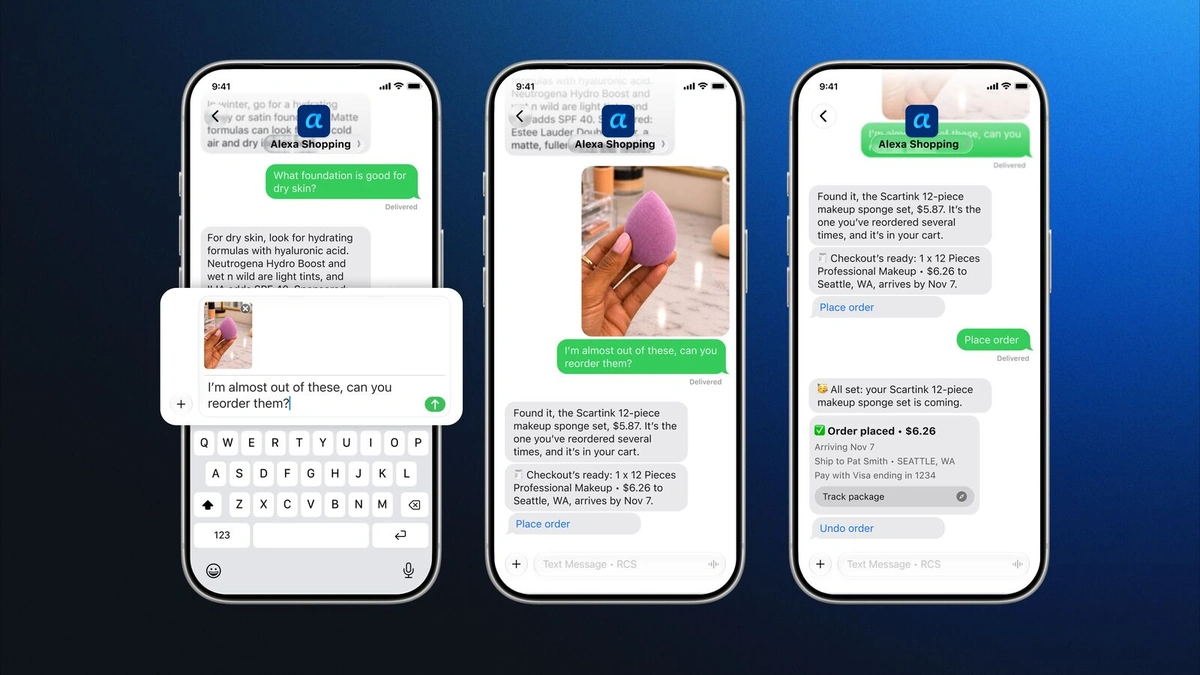
An AI agent is a software system that plans and executes multi-step tasks toward a goal by selecting tools, calling APIs, and adjusting its approach based on intermediate results. Robotic process automation, or RPA, sits on the other side of a clean architectural line: it executes a fixed, rule-based script against the UI layer of an existing application. The two categories of automation are often confused because both promise to remove human effort from business workflows, but the decision logic each uses is fundamentally different. An RPA bot follows instructions written for it; an AI agent pursues goals set for it. Vendors including UiPath, Automation Anywhere, and Microsoft Power Automate now ship both capabilities in the same platform, which has muddied the comparison further. The substantive shift is not that agents have replaced RPA, but that the boundary between deterministic and goal-directed automation has become a design choice rather than a vendor choice. For wider context on how reasoning systems sit inside this category, see how modern generative AI systems work.
What RPA Was Built to Do
An AI agent operates in a fundamentally different mode from robotic process automation, so understanding what RPA was originally designed to do is the clearest way to see where the boundary falls. RPA was developed to solve high-volume, repetitive enterprise work that was too tedious for humans but did not require intelligence to complete, per TechRadiant's automation comparison (TechRadiant, AI agents versus traditional automation). The early UiPath, Automation Anywhere, and Blue Prism deployments targeted invoice posting, order entry, claims keying, and HR onboarding: stable, rule-based processes with structured inputs and a predictable UI. The defining technical constraint was the UI layer itself. An RPA bot mimics human clicks and keystrokes against an existing screen, which means the script breaks the moment a button moves, a field renames, or a dropdown adds an option. RPA platforms invested heavily in selectors, OCR, and image matching to make those interactions less brittle, but the underlying model remained deterministic. The bot does exactly what the script says, no more and no less. For an adjacent example of how deterministic automation chains run in production, the article on how automated threat response workflows are built walks through a comparable rule-driven pattern in security operations.
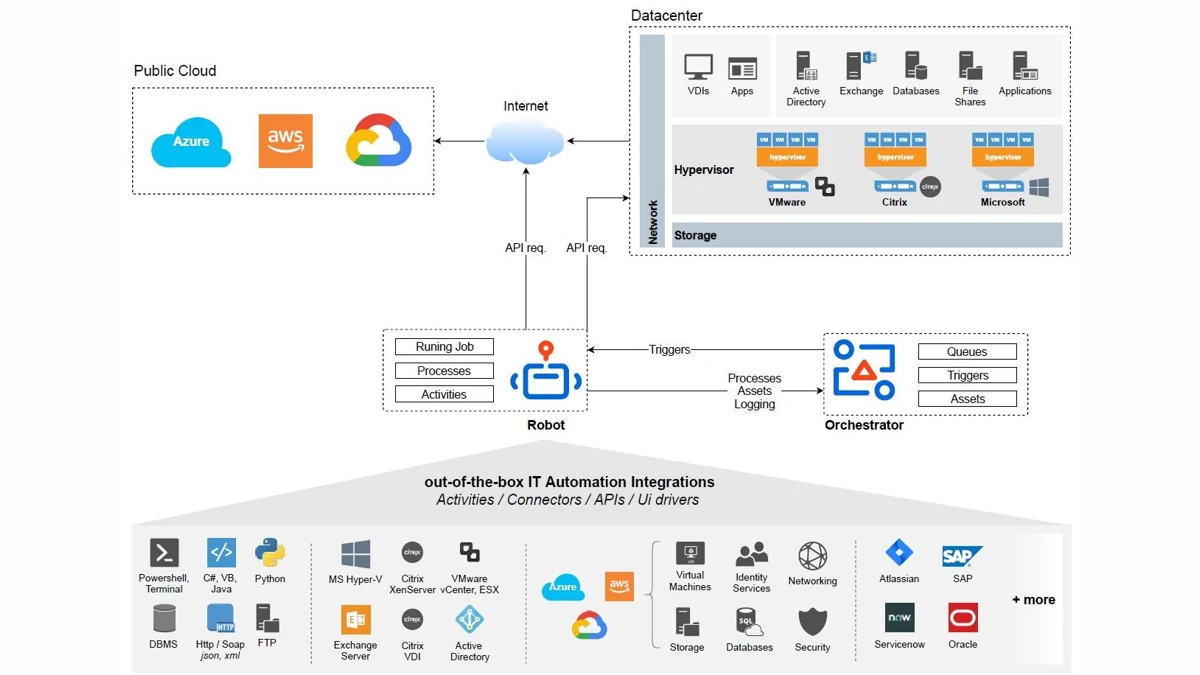
- Rule-based execution: every step is encoded as an explicit instruction; the bot cannot deviate when the input shifts.
- UI layer interaction: the bot drives the same screens a human would, often via selectors, OCR, or coordinate clicks.
- Structured inputs: data arrives in a known schema, such as a CSV column, a form field, or a fixed-position record.
- Deterministic output: identical inputs produce identical actions, which makes RPA auditable but also rigid.
How an AI Agent Works Differently
An AI agent does not follow a fixed script; it receives a goal, selects tools through dynamic tool use via function calling, interprets intermediate outputs, and replans until the task is complete. The reasoning engine is a large language model, or LLM, and the connection to external systems happens through function calling. OpenAI describes function calling as a way for its models to interface with external systems and access data outside their training data, and documents the tool-calling flow as five high-level steps with JSON Schema definitions for each function's input arguments (OpenAI Developer Platform, Function calling guide). In practice this means the agent reads the goal, decides which registered tool is appropriate, fills in the JSON arguments, invokes the API, reads the response, and chooses the next step. Anthropic has pushed the same pattern further with its computer-use capability, which lets a model perceive a screen and operate a keyboard and mouse via its API (Anthropic, Claude 3.5 models and computer use). The deeper mechanics of how the system plans, picks tools, and recovers from errors are covered in how autonomous AI agents work.
- Receive goal: the agent reads a natural-language instruction such as "schedule the customer for next Tuesday".
- Plan: the LLM decomposes the goal into sub-steps and picks an initial tool from a registered list.
- Call tool: the agent issues a function call with structured JSON arguments matching the tool's schema.
- Read result: the API response is fed back into the model's context for interpretation.
- Replan or finish: the agent either selects the next tool, retries, or returns the final answer to the user.
Key Differences: Architecture and Decision Logic
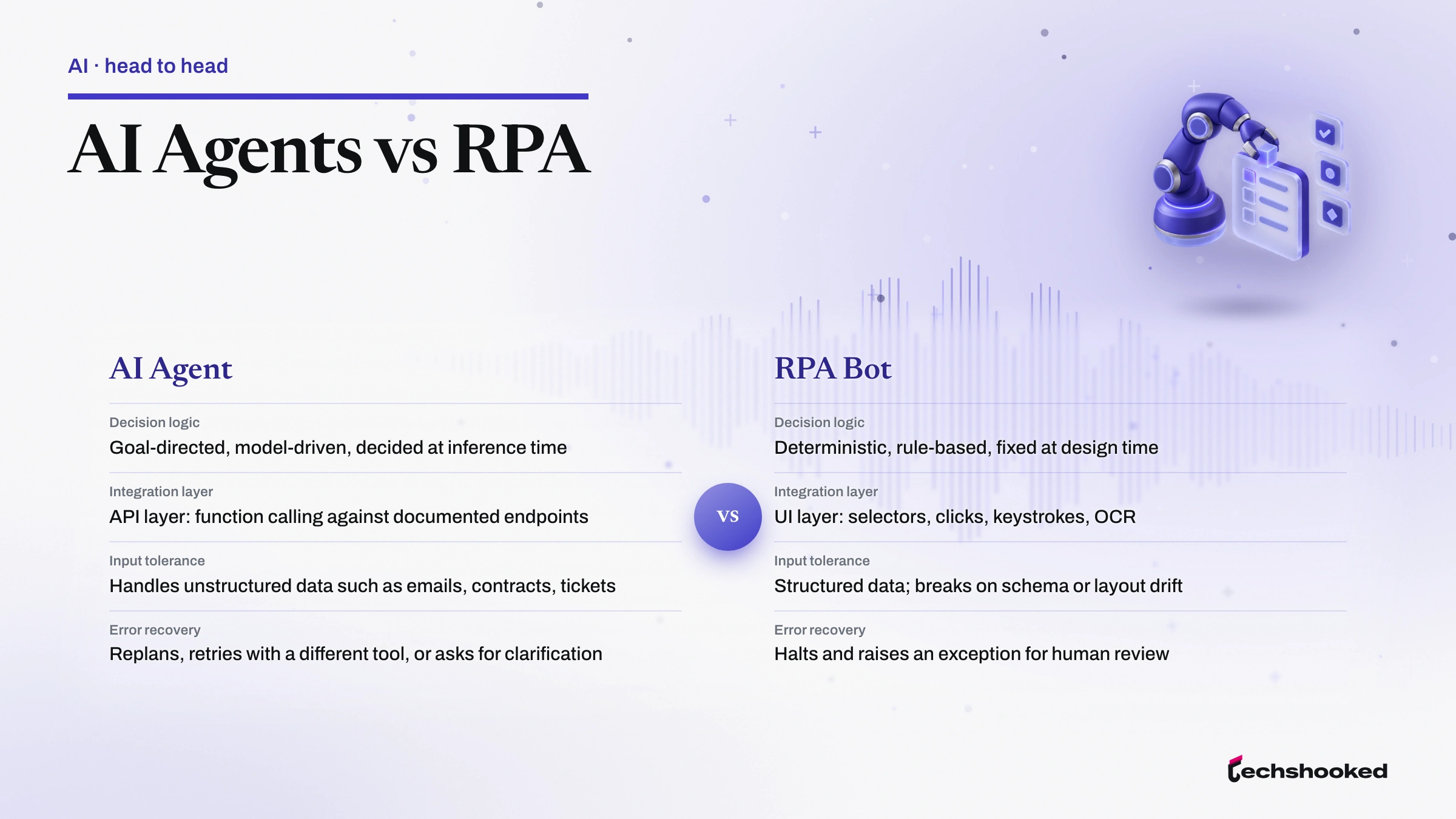
The sharpest distinction between an AI agent and an RPA bot is not speed or cost but the decision logic each uses to handle variability in inputs. An RPA script encodes the decision tree at design time: if field A equals X, click button B. An agent defers decisions to inference time and uses the LLM to choose tools based on the current state of the workflow. That single difference cascades into how each system handles unstructured data, error recovery, and orchestration across multiple back ends. RPA interacts at the UI layer and mimics human clicks; agents interact primarily through APIs and do not depend on screen interfaces remaining stable, per the same TechRadiant analysis. Where RPA needs OCR add-ons to read an invoice PDF, an agent can ingest the document directly and extract the line items through model inference. For the model-architecture context that shapes what an agent can reason over, see how large language model architecture shapes what agents can reason over.
| Dimension | RPA bot | AI agent |
|---|---|---|
| Decision logic | Deterministic, rule-based, fixed at design time | Goal-directed, model-driven, decided at inference time |
| Integration layer | UI layer: selectors, clicks, keystrokes, OCR | API layer: function calling against documented endpoints |
| Input tolerance | Structured data; breaks on schema or layout drift | Handles unstructured data such as emails, contracts, tickets |
| Error recovery | Halts and raises an exception for human review | Replans, retries with a different tool, or asks for clarification |
| Orchestration scope | One workflow per bot; chained via scheduler | Multi-step, multi-tool, multi-system in a single run |
| Auditability | Every step is logged as a discrete action | Trace plus tool-call log; reasoning is harder to audit |
Vendor Landscape: UiPath, Automation Anywhere, and Power Automate
An AI agent capability layer is now embedded in all three major robotic process automation platforms, but the depth of that integration varies significantly across UiPath, Automation Anywhere, and Microsoft Power Automate. Microsoft's Power Automate release plans document a steady expansion of its automation feature set, and Microsoft is layering Copilot and agent capabilities across the broader Power Platform that hosts it (Microsoft Learn, Power Automate planned features). UiPath publishes a separate Agents Automation Cloud product with documented constraints on what the AI agent layer can and cannot do inside the broader UiPath platform (UiPath Docs, Agents Automation Cloud limitations). Automation Anywhere positions its agentic capability around document-heavy workflows and back-office orchestration. The practical implication for buyers is that "AI agent" is no longer a category that competes with RPA; it is a feature flag inside the RPA platform you already license. For a wider view of where agent-style automation is being applied across business functions, see how AI tools are applied across business functions for efficiency.
- UiPath Autopilot and Agents: a dedicated agent layer published with explicit documented limitations, sitting alongside the classic UiPath robot fleet.
- Microsoft Power Automate plus Copilot Studio: Copilot agent features arriving as a roadmap item inside the existing Power Automate flow engine, per Microsoft Learn.
- Automation Anywhere agentic automation: agent capabilities focused on unstructured document processing and back-office orchestration alongside the established RPA bot library.
- Independent agent frameworks: OpenAI's Assistants API, Anthropic's tool use and computer use, and LangChain-style orchestrators run outside the RPA platform and call into existing bots as tools.
When to Use an AI Agent vs RPA
Choosing an AI agent over RPA comes down to one diagnostic question: does the input vary enough that a fixed rule set breaks under normal operating conditions? If the answer is no, RPA is the cheaper and more auditable option. If the answer is yes, an agent is the architecture that pays back the additional complexity. Email triage, contract review, support-ticket classification, and any workflow that touches unstructured data fits the agent side of the line. Invoice posting against a stable ERP screen, payroll runs, and bulk record updates fit the RPA side. OpenAI's Retell case study illustrates the agent side directly: Retell voice agents use function calling to schedule appointments, qualify leads, and resolve administrative issues, with GPT-4o reaching a 70%+ success rate in multi-turn function calling on that specific deployment (OpenAI, Retell AI case study). That figure is case-specific rather than a universal benchmark, but it shows the shape of work where the agent model fits: variable conversational inputs, multiple tool calls per session, and a goal the bot has to reach rather than a script it has to replay. For an applied view of where this lands in a single business function, see where AI automation applies in marketing operations.
- Pick RPA when: the input schema is stable, the UI rarely changes, and the workflow runs at high volume against the same screens.
- Pick an AI agent when: the input is unstructured, the path through the workflow varies per case, or the system has to choose between multiple downstream tools.
- Pick a hybrid when: a judgment step sits between deterministic upstream and downstream legs, and the agent only needs to handle the variable middle.
- Avoid an agent when: the process is regulated and every decision must be auditable to a fixed rule rather than to a model's reasoning trace.
Hybrid Architectures: Running AI Agents Alongside RPA
An AI agent does not need to replace an existing RPA bot; the two can run as a hybrid stack where the agent handles judgment calls and the bot executes structured downstream steps. The orchestration pattern is straightforward. The agent ingests the variable input, decides what kind of case it is, extracts the structured fields it needs, and then calls the existing RPA workflow as a tool through function calling. UiPath documents this orchestration boundary directly, exposing its existing automations to the agent layer as callable tools, per the Agents Automation Cloud documentation. The bot keeps doing what it has always done well: deterministic, auditable execution against the UI layer of a legacy system. The agent adds the cognitive front end the bot never had. The combination is also a migration path: organizations do not retire UiPath, Automation Anywhere, or Power Automate investments to adopt agents; they wrap them. For the retrieval side of the pattern, where the agent pulls in external knowledge before acting, see how retrieval-augmented generation feeds agents with external knowledge.
- Front-end pattern: the AI agent classifies and extracts from unstructured input, then hands a clean payload to the RPA bot.
- Back-end pattern: the RPA bot fetches structured data from a legacy system, and the agent reasons over the result.
- Tool-wrapper pattern: existing UiPath or Automation Anywhere workflows are registered as tools the agent can call via function calling.
- Escalation pattern: the agent handles the variable case, the bot handles the steady-state case, and either can hand off to a human reviewer.
Choosing the Right Automation Path
An AI agent is the right starting point when your process involves judgment, unstructured inputs, or multi-system orchestration that a rule-based bot cannot resolve without manual intervention. The wrong starting point is to treat every existing RPA workflow as a candidate for replacement. The evidence from vendor documentation across UiPath, Automation Anywhere, and Microsoft Power Automate is that agentic automation and classical RPA are complementary tiers of the same stack, not successor and predecessor. The right architectural question is which tier owns each step of the workflow, not which platform owns the contract.
- Map the workflow: list each step and label it deterministic or judgment-based before picking a tool.
- Match the tier: assign deterministic steps to RPA and judgment steps to an AI agent; expect most workflows to be mixed.
- Pick the platform: if you already run UiPath, Automation Anywhere, or Power Automate, evaluate the in-platform agent layer before adopting a separate framework.
- Instrument from day one: log every tool call and decision so the agent's reasoning trace is auditable alongside the RPA action log.
References
- OpenAI Developer Platform, Function calling guide
- OpenAI, Retell AI case study
- Microsoft Learn, Power Automate planned features
- Anthropic, Claude 3.5 models and computer use
- UiPath Docs, Agents Automation Cloud limitations
Further reading
Frequently Asked Questions
What is the difference between an AI agent and RPA?
An AI agent uses a large language model to reason over goals and pick tools through dynamic tool use. RPA executes a fixed, rule-based script that drives UI elements at the screen layer. The core distinction is whether the system follows deterministic instructions or pursues a goal with adaptive decision logic.
When should you use an AI agent instead of RPA?
Use an AI agent when inputs are unstructured, such as emails, contracts, or support tickets, or when the process involves judgment calls that a rule set cannot cover. RPA remains the stronger choice for stable, high-volume, structured workflows where the UI and data format do not change.
Can AI agents and RPA run together in the same workflow?
Yes. A common hybrid pattern routes unstructured or variable inputs through an AI agent for interpretation and decision-making, then hands off deterministic downstream steps to an RPA bot. UiPath and Automation Anywhere both expose orchestration APIs that support this pattern.
Does switching from RPA to AI agents require replacing existing bots?
No. Most organizations add AI agent capabilities on top of existing RPA infrastructure rather than replacing it. Vendors including UiPath and Microsoft Power Automate embed agent layers that call existing bot workflows as tools, leaving the RPA layer intact.