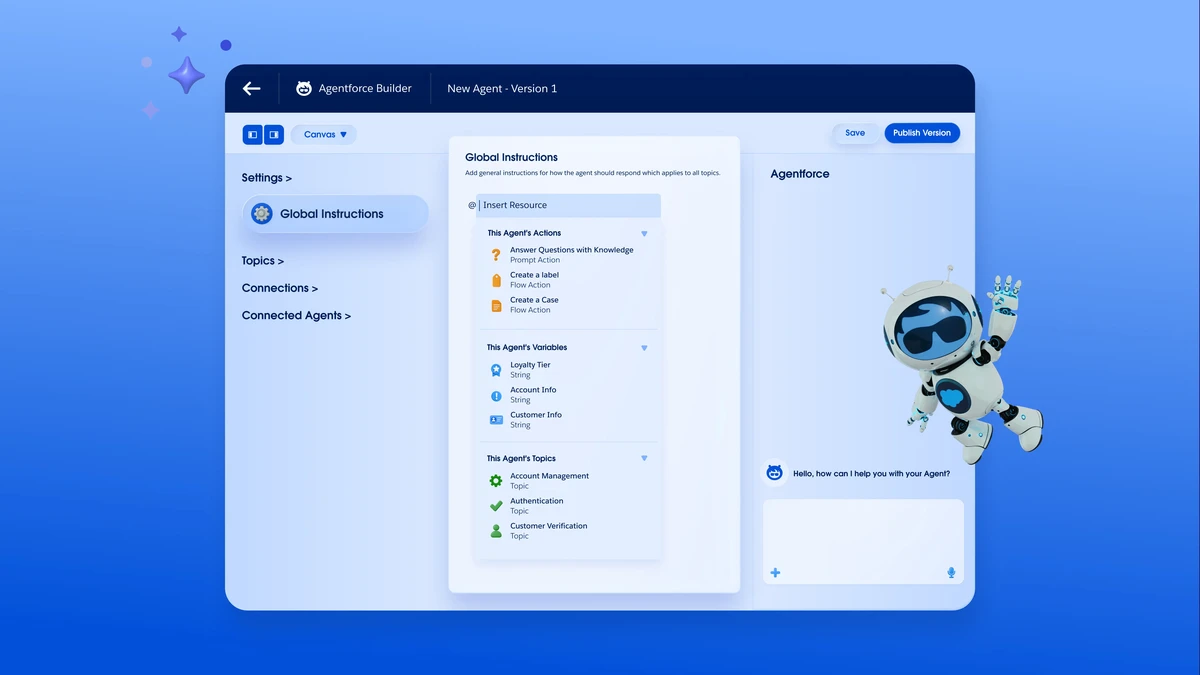
CRM technology is a customer data platform that has evolved from a static system of record into a proactive, AI-driven workflow engine. That architectural shift is visible now in production deployments at Salesforce, Microsoft Dynamics 365, and HubSpot, where AI agents surface deal risks during live calls, flag customer churn before a renewal window closes, and draft follow-up emails without prompting. The vendors driving this change frame it under a single organizing idea: customer relationship management should act on data, not merely store it.
From Rolodex to AI-Native Platform: How CRM Technology Evolved
CRM technology began as a digital Rolodex and has since passed through three distinct architectural generations. Understanding that sequence explains why the current AI-native tier is structurally different from anything that came before, rather than an incremental upgrade.

- Contact database era (1990s). Early customer relationship management tools stored names, addresses, and call notes in flat files or on-premise databases. Siebel Systems and ACT! defined this category. The system of record was the product's primary value, and queries required a separate reporting layer.
- SaaS CRM era of the 2000s and 2010s. Salesforce moved the system of record to the cloud, eliminating the on-premise installation cycle and making real-time sync across sales teams possible. HubSpot and Zoho extended the model to smaller organizations. Workflow automation appeared in this period as rule-based sequences: if deal stage changes, send email.
- AI-native platform era (current). CRM technology now embeds large language model inference and predictive ML directly into the workflow layer. The system of record persists, but the platform's primary value has shifted to what it initiates: scored leads, churn alerts, auto-generated meeting summaries, and proactive next-best-action suggestions that reach the sales rep before they open the record.
The third generation does not replace the database function; it subordinates it. Storing the contact is a prerequisite. Acting on the contact, at the right moment, without waiting for a manual trigger, is the competitive differentiator in current SaaS CRM platforms.
AI Agents Inside CRM: What They Actually Do
AI agents embedded in CRM technology perform four categories of work that previously required manual effort from sales and service teams. Knowing which category a specific agent capability falls into helps teams evaluate vendor claims against actual workflow impact.
- Lead prioritization. AI agents apply lead scoring models trained on closed-won and closed-lost history to rank inbound contacts in real time. The agent updates scores as new interaction data arrives, meaning a prospect who opens three emails and visits the pricing page in one hour gets promoted in the queue without a rep touching the record. This is where data enrichment from third-party sources (firmographic data, technographic signals) feeds the model.
- Churn detection. Agents monitor product usage signals, support ticket frequency, and contract renewal timelines to flag customer churn risk. Salesforce Einstein and HubSpot's AI health scores both surface this as an account-level alert inside the CRM dashboard, giving customer success teams a window to intervene before the renewal conversation starts.
- Natural language generation. AI agents draft call summaries, follow-up emails, and deal status reports from recorded conversations and CRM activity logs. Natural language processing converts audio transcripts and email threads into structured summaries that populate the contact record automatically.
- Autonomous task execution. The most recent generation of AI agents can execute multi-step sequences: schedule a follow-up, update the deal stage, send a templated proposal, and log the activity, all triggered by a single qualifying condition. OpenAI's Frontier platform, announced for enterprise integrations, extends this agentic pattern to CRM workflows through API connectors (OpenAI Frontier).
The CRM as a system of record for sales, marketing, and service lays out the underlying data architecture these agents operate on. The agent layer requires a clean record layer beneath it; organizations that skipped CRM data hygiene find that AI agents amplify bad data as efficiently as good data.
Ambient Intelligence: The Design Principle Reshaping CRM
Ambient intelligence is a design principle, not a product, defined by Salesforce as AI that is always on, aware, adaptive, and anticipatory. Where a traditional AI feature waits for a user to click a button, an ambient intelligence layer operates continuously across every customer touchpoint, surfacing relevant context without being asked (Salesforce: Ambient Intelligence Design Principle).
Four attributes define what ambient intelligence means in CRM technology:
- Always on
- The AI layer processes signals continuously, not on a scheduled batch. A rep on a discovery call gets real-time suggestions in a sidebar panel as the conversation develops, without pausing to run a query.
- Aware
- The system of action draws context from every connected channel: email, calendar, CRM activity log, support tickets, and product usage data. Awareness is cross-channel, not limited to the open record. This is the system of action in practice.
- Adaptive
- Models update based on rep feedback and outcome signals. A suggestion that a rep consistently ignores gets weighted down; one that correlates with closed deals gets weighted up. This keeps the ambient intelligence layer relevant without manual retraining by an admin.
- Anticipatory
- Rather than responding to what a rep asks, an anticipatory system surfaces what the rep needs before the question forms. Salesforce describes this as moving CRM technology from reactive to prescriptive, a frame that vendors now use to differentiate AI-native tiers from standard workflow automation.
Salesforce's published AI trends research notes that the shift from reactive to ambient design is already underway across enterprise deployments, with customers reporting reduced time-to-close when AI surfaces next-best-action prompts during the sales cycle (Salesforce: AI Trends for Enterprise).
Microsoft Dynamics 365 Copilot: Augmenting an Existing CRM
Microsoft's Dynamics 365 architecture adds Copilot capabilities to an existing CRM rather than requiring a platform replacement. That design choice matters for organizations already committed to Salesforce, ServiceNow, or a vertical-specific CRM: they can layer Dynamics 365 Copilot features on top of their current system without migrating contact records.
- Copilot for Service. This module embeds directly into the agent desktop, surfacing knowledge article suggestions, case summaries, and email drafts generated from case history. Configuration is handled through Copilot Studio and the Customer Service admin center, with no custom code required for standard integrations (Microsoft Learn: Copilot in Customer Service).
- Contact center as a service integration. Microsoft's reference architecture for contact center as a service deployments explicitly supports an existing CRM alongside CCaaS telephony providers. Copilot Studio manages dialog flow for self-service bots; Copilot for Service handles the agent-assist layer; analytics and case routing remain with the existing providers (Microsoft Learn: Contact Center + Existing CRM + CCaaS Reference Architecture).
- Copilot Studio. A low-code environment for building custom AI agents that connect Dynamics 365 data to external APIs, third-party CRMs, and enterprise knowledge bases. Teams use it to extend workflow automation beyond the standard Copilot feature set without writing integration code from scratch.
- Teams and Outlook integration. Copilot surfaces Dynamics 365 deal context inside Microsoft Teams meeting transcripts and Outlook email threads, meaning reps see CRM data enrichment and account summaries without switching applications.
For a direct comparison of Dynamics 365 against Salesforce and HubSpot on core CRM feature dimensions, the CRM tools compared: Salesforce, HubSpot, and Zoho covers pricing tiers, user limits, and native AI feature availability.
Predictive Workflows: Lead Scoring, Churn Detection, and NLP Reports
Predictive workflow features now cover three operational areas that were manual processes in first-generation CRM technology. The table below maps each area to the underlying mechanism and the vendors that ship it as a production feature.
| Workflow Area | Mechanism | What the CRM Does Automatically | Vendors Shipping Today |
|---|---|---|---|
| Predictive lead scoring | ML model trained on closed-won / lost history and behavioral signals | Ranks and re-ranks leads in real time as interaction data arrives; flags high-fit, high-intent contacts | Salesforce Einstein, HubSpot Predictive Lead Scoring, Dynamics 365 AI |
| Customer churn detection | Usage, support, and contract signal aggregation | Generates health scores and proactive alerts before renewal windows; suggests intervention playbooks | Salesforce Einstein, HubSpot Customer Health Score, Dynamics 365 Customer Insights |
| NLP report generation | Natural language processing applied to call transcripts and email threads | Populates call summaries, deal status reports, and follow-up drafts inside the contact record without manual input | Salesforce Einstein Conversation Insights, Copilot for Sales in Dynamics 365, HubSpot AI Assistant |
Lead scoring accuracy improves directly with data enrichment quality. Platforms that ingest third-party firmographic and technographic data alongside first-party behavioral signals produce more granular scores than those relying on CRM activity alone. Natural language processing also drives the report generation tier: vendors now use NLP to extract action items, sentiment signals, and competitive mentions from conversation data, then write those structured outputs back into the contact record.
The real-time analytics for CRM and sales platforms covers how pipeline analytics layers consume the predictive outputs these workflow automation features produce.
Choosing CRM Technology for AI-Native Workflows
Evaluating CRM technology for AI-native workflows requires checking five capability dimensions that did not exist in previous selection frameworks. Vendors now market AI broadly; these dimensions separate surface-level AI features from architecturally embedded ones.
- Native vs. bolt-on AI agents. AI agents built into the core data model update records, trigger workflows, and read activity history without an API call per action. Bolt-on AI layers require API requests for each data retrieval, introducing latency and failure points. Ask vendors where the model runs relative to the contact record, not just whether AI is available.
- Ambient intelligence architecture. A genuine ambient intelligence layer monitors signals across channels continuously. A basic AI feature runs only when a user initiates it. Request a live demonstration with a connected email and calendar account to observe whether suggestions surface unprompted during a simulated call.
- Predictive lead scoring model transparency. Vendors should disclose what signals feed the predictive lead scoring model, how frequently it retrains, and whether teams can tune feature weights. Opaque models that cannot explain a score downgrade are a deployment risk when sales managers need to validate AI recommendations.
- Workflow automation depth. Count the number of object types the workflow automation engine can act on natively: contacts, deals, companies, tickets, tasks, and custom objects. Shallow automation engines cover only contacts and deals; deeper ones let teams build multi-object sequences that mirror actual sales and service processes.
- Data enrichment sources and refresh rates. AI-native CRM technology depends on data enrichment from third-party providers to keep contact and account records accurate. Evaluate which enrichment providers the platform integrates with natively, how often records refresh, and whether enrichment triggers re-scoring of affected leads automatically.
The how to choose CRM software for your business covers the foundational selection criteria (team size, integration requirements, budget tiers) that precede this AI-specific evaluation layer. Once those baselines are set, the five dimensions above narrow the shortlist to platforms where ambient intelligence and predictive workflows are production-grade rather than roadmap commitments.
Teams migrating from a legacy platform should also review the how to integrate CRM with email marketing platforms, since workflow automation sequences that include email nurture steps require a clean CRM-to-ESP connection before AI-generated follow-ups can execute reliably.
References
- Salesforce: Ambient Intelligence Design Principle
- Salesforce: AI Trends for Enterprise
- Microsoft Learn: Copilot in Customer Service Configuration
- Microsoft Learn: Contact Center + Existing CRM + CCaaS Reference Architecture
- OpenAI: Introducing Frontier Platform
Further reading
Frequently Asked Questions
How has CRM evolved from contact management to AI-native workflows?
CRM moved from contact databases in the 1990s to cloud-hosted platforms with embedded AI that scores leads, flags churn risk, and generates reports from natural-language prompts. The shift is from a system of record to a proactive system of action. Salesforce, HubSpot, and Microsoft Dynamics 365 each embed AI assistance directly into core workflows rather than offering it as a standalone add-on, reducing the manual work required to act on customer data.
What is ambient intelligence in CRM, and how does it differ from a chatbot?
Ambient intelligence is a design principle describing AI that is always on, context-aware, adaptive, and anticipatory, as defined by Salesforce. Unlike a chatbot that responds only when prompted, an ambient AI layer operates continuously in the background, surfacing suggestions during live sales calls without any user input. Salesforce describes it as knowing when to act rather than waiting to be asked.
Can Microsoft Copilot in Dynamics 365 work with a CRM I already use?
Yes. Microsoft's reference architecture explicitly supports an existing CRM and contact-center-as-a-service setup, with Copilot for Service embedding within your current CRM rather than replacing it. Copilot Studio handles dialog flow for self-service bots layered on top of existing channels, and the analytics and case-management layers remain with your existing providers.