Augmented reality in retail is a shopping technology that overlays interactive digital content onto a customer's physical environment through a smartphone camera or AR-enabled device. Virtual reality in retail takes the opposite approach: the headset blocks the physical world and replaces it with a fully rendered digital scene. Both technologies are reshaping the customer experience in retail, but they solve different problems at different cost and reach points. The decision between them determines deployment scope, catalog infrastructure, and which customer segments a retailer can actually serve.
How AR and VR Differ in a Retail Context
Augmented reality in retail keeps the shopper in their real environment and layers digital objects on top of it, while virtual reality in retail replaces that environment entirely inside a headset. The practical consequence is reach: AR runs on hardware billions of shoppers already carry, while VR requires a dedicated headset that most consumers do not own. That single hardware distinction shapes every downstream decision about platform, content format, and customer journey. For context on where these technologies sit relative to each other, the mixed reality explained overview covers the broader spectrum from AR through mixed reality to full VR.
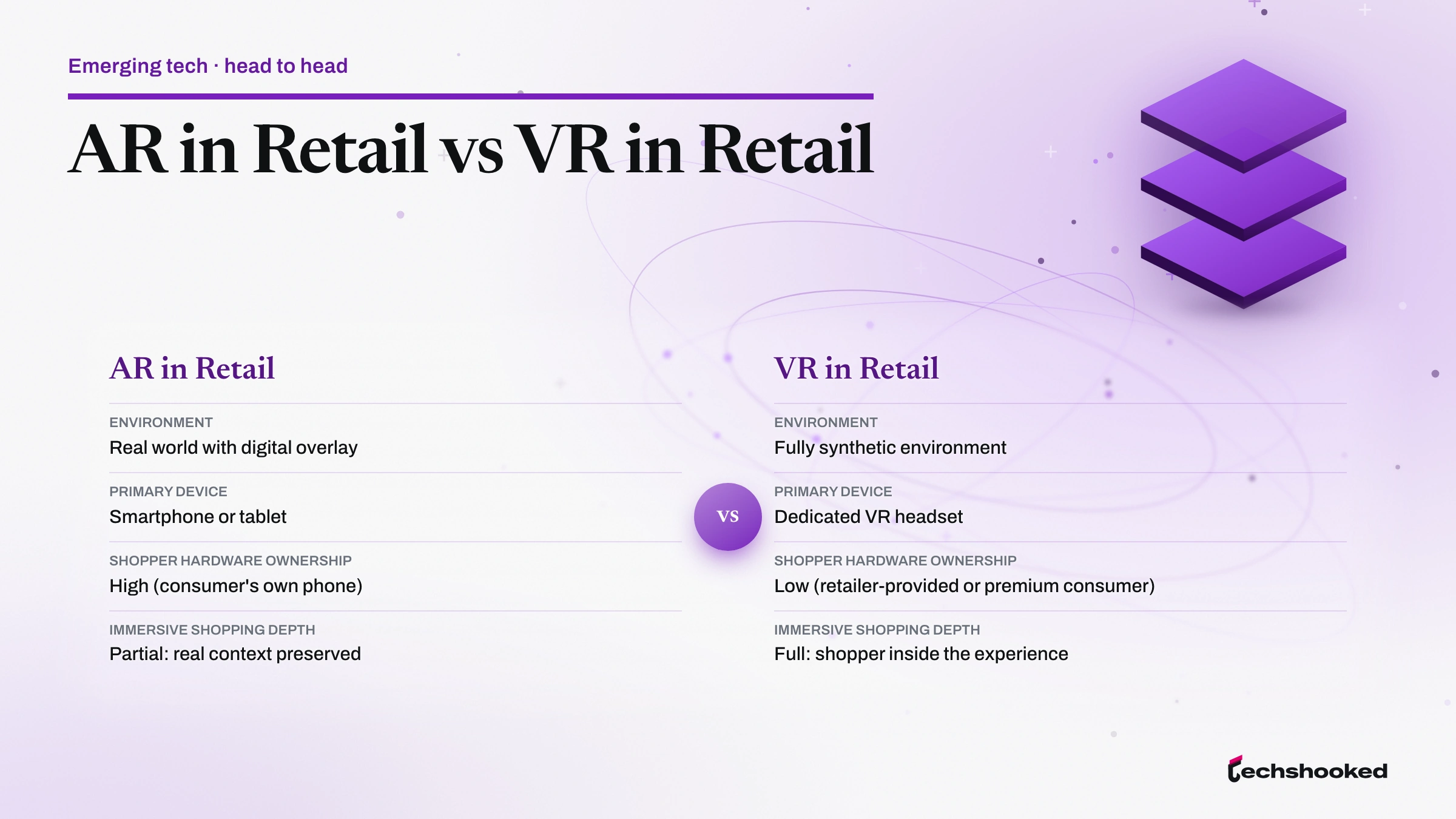
| Dimension | AR in Retail | VR in Retail |
|---|---|---|
| Environment | Real world with digital overlay | Fully synthetic environment |
| Primary device | Smartphone or tablet | Dedicated VR headset |
| Shopper hardware ownership | High (consumer's own phone) | Low (retailer-provided or premium consumer) |
| Immersive shopping depth | Partial: real context preserved | Full: shopper inside the experience |
| Catalog scale | Scales with 3D asset library | Curated environments, not full catalogs |
| Primary retail fit | Product visualization, virtual try-on | Virtual showrooms, brand experiences |
AR in Retail: Platform Capabilities and Use Cases
Two platform SDKs dominate retail AR development: Apple ARKit for iOS and Google ARCore for qualified Android devices. ARKit, documented at developer.apple.com/augmented-reality/arkit/, provides plane detection, scene understanding, and motion tracking that let retailers anchor 3D furniture or apparel models to surfaces in a shopper's home. ARCore, detailed at developers.google.com/ar/devices, covers qualified Android devices and adds capabilities such as the Geospatial API, which maps AR anchors to real-world coordinates documented at developers.google.com/ar/develop/geospatial. Apple's RoomPlan framework, available at developer.apple.com/augmented-reality/roomplan/, uses the LiDAR scanner on supported iPhone and iPad models to generate a parametric room layout, giving furniture retailers room-accurate product visualization rather than floor-plane guesswork.
- Product visualization
- Shoppers place a scaled 3D model of a product into their environment through their camera feed. Furniture, appliances, and home décor benefit most because fit and proportion are the primary purchase blockers. ARKit and ARCore both provide surface-detection APIs that anchor models to floors, walls, and tables without the shopper needing to measure anything manually.
- Virtual try-on
- Face-mesh and body-tracking APIs let shoppers preview eyewear, makeup, jewelry, and footwear on a live camera feed. Apple's ARKit face-tracking mesh runs on the TrueDepth camera found on Face ID-enabled iPhone models. ARCore provides face mesh detection for Android-side virtual try-on implementations.
- WebAR
- Browser-based AR removes the app-install requirement entirely. Retailers embed WebAR experiences in product pages using frameworks built on the WebXR Device API, letting shoppers tap a button on a product detail page to launch an AR view inside Safari or Chrome. Fidelity is lower than native ARKit or ARCore implementations, but conversion lift from removing the install barrier often outweighs the quality trade-off.
- RoomPlan room scanning
- Apple's RoomPlan API generates a structured floor-plan model from a LiDAR scanner pass. Furniture retailers integrate this into room-planning tools where shoppers scan a room, then populate it with items from a catalog. The LiDAR scanner on supported devices measures depth at centimeter accuracy, enabling collision-aware placement of multiple items in the same session.
VR in Retail: Where Full Immersion Adds Value
Virtual reality in retail earns its keep in scenarios where completely replacing the real world produces an outcome no smartphone camera overlay can match. The most defensible retail VR use cases share a common trait: the value comes from the environment itself, delivering a customer experience that product images and flat configurators cannot replicate.
- Virtual showrooms: Automotive and luxury goods brands build navigable virtual showrooms where shoppers configure color, trim, and material options in a spatially accurate environment. A car configurator inside a virtual showroom communicates interior proportions and material quality in ways a flat product image cannot.
- Brand storytelling experiences: Immersive brand films that place shoppers inside a narrative scene, such as the origin story of a product or the manufacturing facility where it was made, use full immersion to build emotional purchase context. The experience requires headset access but can run at retail locations rather than relying on consumer hardware.
- Staff training simulations: Retail operators deploy VR training for visual merchandising, customer interaction scenarios, and safety procedures. Employees rehearse physical store layouts and service scripts in simulation before working a live environment, reducing ramp time.
- Pop-up and event retail: Temporary retail activations at events or flagship stores can deploy headsets as a controlled experience. Because the retailer owns the hardware, the variable-quality consumer device problem disappears and fidelity can be tuned precisely.
Deployment Comparison: Reach, Hardware, and Cost
The most consequential difference between AR in retail and VR in retail deployments is hardware reach: AR runs on the smartphones shoppers already carry, while VR demands a headset the retailer must provide or the consumer must own. That asymmetry drives every budget and scope conversation a retail technology team will have. ARCore's supported device list covers a broad range of Android hardware as documented at developers.google.com/ar/develop/fundamentals, and ARKit covers the iOS device base documented at developer.apple.com/augmented-reality/. WebAR extends reach further by removing the native app requirement, at the cost of some rendering capability. For a detailed look at how AR and VR development trade-offs play out at the platform level, the AR vs VR development trade-offs breakdown covers SDK architecture side by side.
| Dimension | Native AR (ARKit / ARCore) | WebAR | VR (Headset) |
|---|---|---|---|
| Consumer hardware required | Qualifying smartphone | Any modern smartphone browser | Dedicated VR headset |
| Retailer hardware cost | None | None | High (fleet or kiosks) |
| 3D asset format | USDZ (iOS), glTF/GLB (Android) | glTF/GLB via WebXR | Engine-specific (Unity, Unreal) |
| Catalog scale potential | Full catalog with 3D asset library | Full catalog, lower visual fidelity | Curated selection only |
| App install required | Yes (native) / No (WebAR) | No | Yes (VR app or platform store) |
| Typical use case fit | Product visualization, virtual try-on | Quick-view AR on product pages | Virtual showroom, staff training |
3D asset production is the shared cost driver for both formats. A single photorealistic 3D asset for a furniture SKU can require significant production investment when modeled from scratch, though automated photogrammetry pipelines using multi-angle photography are reducing per-unit costs across the industry. Retailers planning large-scale augmented reality in retail programs must budget for both initial asset creation and ongoing catalog maintenance as products change seasonally.
Implementation Challenges and How to Address Them
The most common barriers to shipping augmented reality in retail are 3D asset production cost, device fragmentation, and catalog-integration complexity. Each is addressable with a deliberate sequencing strategy rather than a full-catalog launch.
- Limit the initial 3D asset set to high-margin or high-return-rate SKUs. A full furniture catalog may contain thousands of products, but a retailer's top 50 items by return rate represent the highest ROI on 3D asset investment. Photogrammetry pipelines can batch-process hero products from standard product photography, reducing initial production cost before committing to automated SKU-level pipelines.
- Test on ARKit first, then expand to ARCore. Apple's ARKit device base applies consistent hardware capabilities across a narrower device range, making it easier to validate surface-detection accuracy and rendering quality before addressing the broader Android device fragmentation that ARCore's supported device list represents. ARCore's fundamentals documentation at developers.google.com/ar/develop/fundamentals details the qualifying device criteria and capability tiers.
- Assess WebAR as the entry point for catalog breadth. Where 3D asset fidelity is less critical than coverage, WebAR on product detail pages lets retailers deploy AR for a wider SKU range at lower per-unit cost. The trade-off in rendering quality is measurable, so retailers should A/B test WebAR against native AR on matched SKUs before choosing a primary path.
- Build catalog integration before building the front-end experience. The biggest deployment delays in augmented reality in retail projects come from mapping 3D asset identifiers to product catalog records after the experience is already built. Treating catalog integration as a prerequisite rather than a post-launch task avoids the common outcome where an AR viewer loads but the product library is weeks behind.
- Plan for LiDAR-enhanced features as a progressive enhancement. Room-scale features powered by the LiDAR scanner and RoomPlan are available only on supported Apple hardware. Designing AR product visualization so that it degrades gracefully on non-LiDAR devices, falling back to horizontal-plane detection, keeps the experience functional across a wider device range while still surfacing the enhanced experience to shoppers who have compatible hardware.
Choosing Between AR and VR for Your Retail Strategy
Most retail brands should begin with augmented reality in retail before committing to VR, because the smartphone delivery model scales without per-customer hardware overhead. The decision framework below maps use case to format based on the variables that drive actual deployment outcomes: audience reach, content shelf life, and the nature of the purchase decision the experience is intended to support.
- Start with AR if the primary goal is product visualization at scale. AR in retail reaches any shopper with a qualifying smartphone. No hardware distribution, no location dependency, no ticket price. Virtual try-on for apparel and accessories, and spatial placement for furniture and appliances, both belong here. Immersive shopping at scale requires meeting shoppers where they are, and where they are is their phone.
- Choose VR if the experience requires environment control. Virtual showrooms for automotive, luxury, or custom furniture configurations benefit from a headset environment because the rendered space communicates scale, material finish, and spatial relationship in ways a camera overlay of a real room cannot. Staff training simulations also belong in VR because the controlled environment is the point.
- Run AR and VR in parallel for flagship plus e-commerce strategies. A flagship store can host a VR configuration station while the same brand's e-commerce site runs AR product visualization and virtual try-on. The VR station handles high-consideration purchases where a retailer representative guides the session; the AR experience handles the long tail of shoppers who will never visit a physical location.
- Prioritize WebAR when app adoption is the bottleneck. If analytics show shoppers abandoning before reaching AR features in a native app, a WebAR pilot on the highest-traffic product pages removes the install barrier. Measure add-to-cart rate before and after WebAR availability on matched SKUs to validate conversion impact before committing to a full native rollout.
- Evaluate virtual reality in retail only after confirming a recurring use case. A one-time brand activation does not justify headset fleet investment. Virtual reality in retail generates sustainable return when tied to training programs or permanent showroom formats where headsets are in use across multiple sessions per day rather than sitting idle between marketing campaigns.
The AR and VR applications across industries breakdown shows how the same platform decisions play out in healthcare, education, and industrial training. For retailers whose strategy extends to workforce readiness, the implementing VR training in enterprises guide covers headset fleet management, platform selection, and the LMS integration steps that mirror what retail operators face in staff simulation programs.
References
- Apple Developer: ARKit
- Apple Developer: RoomPlan
- Apple Developer: Augmented Reality overview
- Google Developers: ARCore overview
- Google Developers: ARCore Fundamentals
- Google Developers: ARCore Geospatial API
Further reading
Frequently Asked Questions
What is the difference between AR and VR in retail?
AR overlays digital content onto your real-world environment through a smartphone camera, while VR replaces that environment entirely inside a headset. For most retail use cases, AR runs on devices shoppers already own, making it the lower-friction choice for product visualization; VR suits high-investment brand experiences such as virtual showrooms or staff training simulations.
What implementation challenges do retailers face when deploying AR?
The primary barriers are device fragmentation, content-production cost, and integration with existing product catalogs. ARKit (Apple) and ARCore (Google) address device consistency on iOS and qualified Android hardware respectively, but retailers must still maintain 3D asset libraries for every SKU they want to surface. Starting with a limited product category pilot limits initial cost and surfaces catalog-management bottlenecks early.
Does AR in retail require customers to download a dedicated app?
Not always. Browser-based WebAR lets shoppers launch AR product views directly from a product page without installing anything, lowering the barrier to entry significantly. Native app AR using ARKit or ARCore delivers higher fidelity and access to features like LiDAR-based room scanning, but it requires the download step that many shoppers skip.