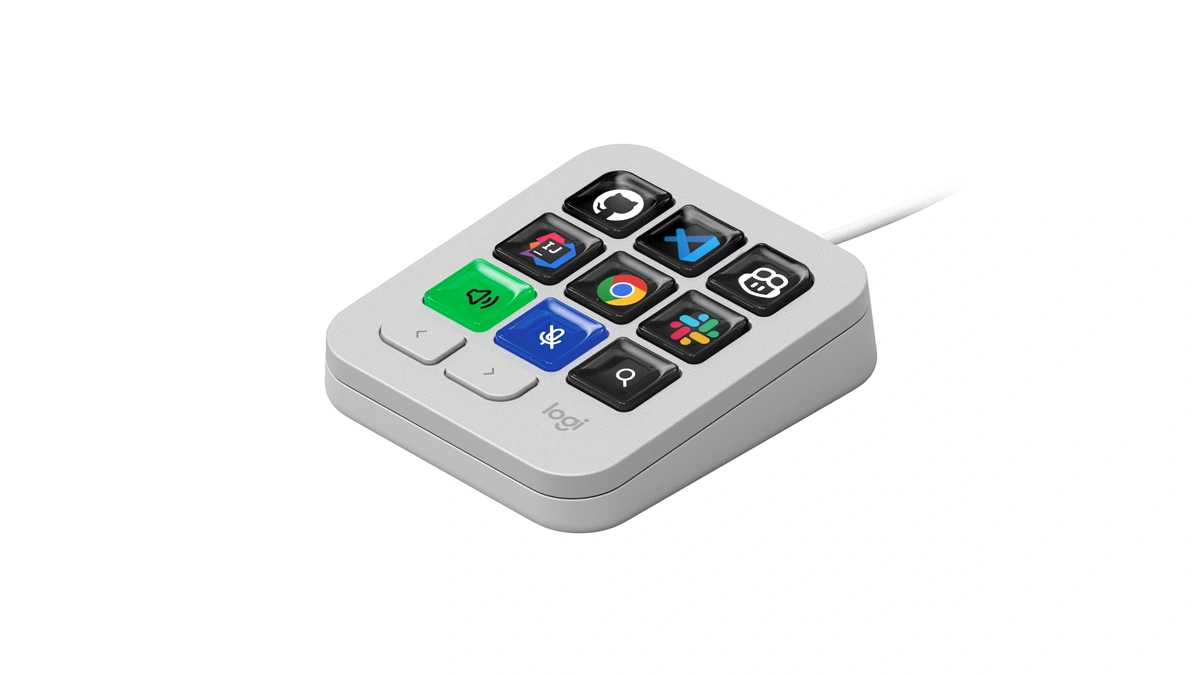
Logitech has built a dedicated hardware control panel for AI coding tools: the MX Keypad, a $99.99 keypad for developers. It lets developers trigger prompts, refactor code, and fire off agent commands across GitHub Copilot, Claude Code, VS Code, and IntelliJ IDEA without reaching for a mouse or memorizing another shortcut.
The device ships September 8 in graphite and pale gray for $99.99 USD / €99.99, and any of its keys can be assigned to control one app or several at once. Logitech built it around feedback from the GitHub and Logitech MX Collective developer communities. "MX Keypad puts a physical control center at your fingertips, allowing you to orchestrate your AI workflows faster and more intuitively," said Anatoliy Polyanker, Logitech's vice president and general manager.
In practice, you assign one key to launch a saved prompt macro in Claude Code, another to trigger a refactor in VS Code, and a third to hand a task off to GitHub Copilot, all without switching windows. Switch to Figma or Slack instead, and the keypad detects the change and swaps in a different set of controls automatically, following whichever app has focus.
The keypad's marquee integration is with GitHub: every unit includes three free months of GitHub Copilot Pro+, redeemable through Logitech's Options+ app, and it ships with native support for VS Code and the GitHub Copilot app. "Great developer tools get out of your way," said Martin Woodward, GitHub's vice president of developer relations. "MX Keypad makes working with GitHub Copilot feel like a natural part of the workflow, so developers can spend less time navigating tools and more time building."
The pitch beyond the built-in integrations is openness. Logitech's Logi Actions SDK lets developers write their own plugins, and the company says the community has already published add-ons for Claude Code and OpenAI Codex to the Logi Marketplace, giving those tools real-time agent status and CLI control from the physical keys. Logitech says the SDK and marketplace reach more than 100 million compatible Logitech devices already in use, though how many of those owners will actually adopt a $99.99 accessory built specifically for AI coding workflows is a separate question the launch does not answer.
The keypad follows a familiar shape in peripheral hardware: dedicated macro decks like Elgato's Stream Deck have offered programmable buttons to streamers and creators for years, and Logitech is betting that the same physical-shortcut approach translates to an audience juggling AI agents instead of overlays and scenes. MX Keypad's shell also carries Logitech's now-standard sustainability claims, with certified post-consumer recycled plastic making up 64% of the graphite model and 49% of the pale gray version, packaged in paper sourced from FSC-certified forests. What's not yet clear is whether a physical keypad actually beats a well-configured set of software shortcuts for most developers, or whether it mainly appeals to the subset already buying into Logitech's MX ecosystem.