An audio interface is a recording device that converts microphone, instrument and line signals into digital audio for a computer and turns playback back into sound for headphones and speakers. For a streamer or a home musician it is the box between an XLR microphone and the PC, and it settles three things a USB headset never has to: how much clean gain the microphone gets, how fast you hear yourself, and how game audio, music and voice reach one broadcast. The spec sheet answers all three, once you know which lines to read.
What Is an Audio Interface?
An audio interface is the hardware that connects microphones, instruments and speakers to a computer. Its preamps raise a weak mic signal, its converters turn that signal into digital audio over USB-C or Thunderbolt, and its outputs send playback to headphones and studio monitors. You need one when a microphone has an XLR plug or an instrument has to be recorded.
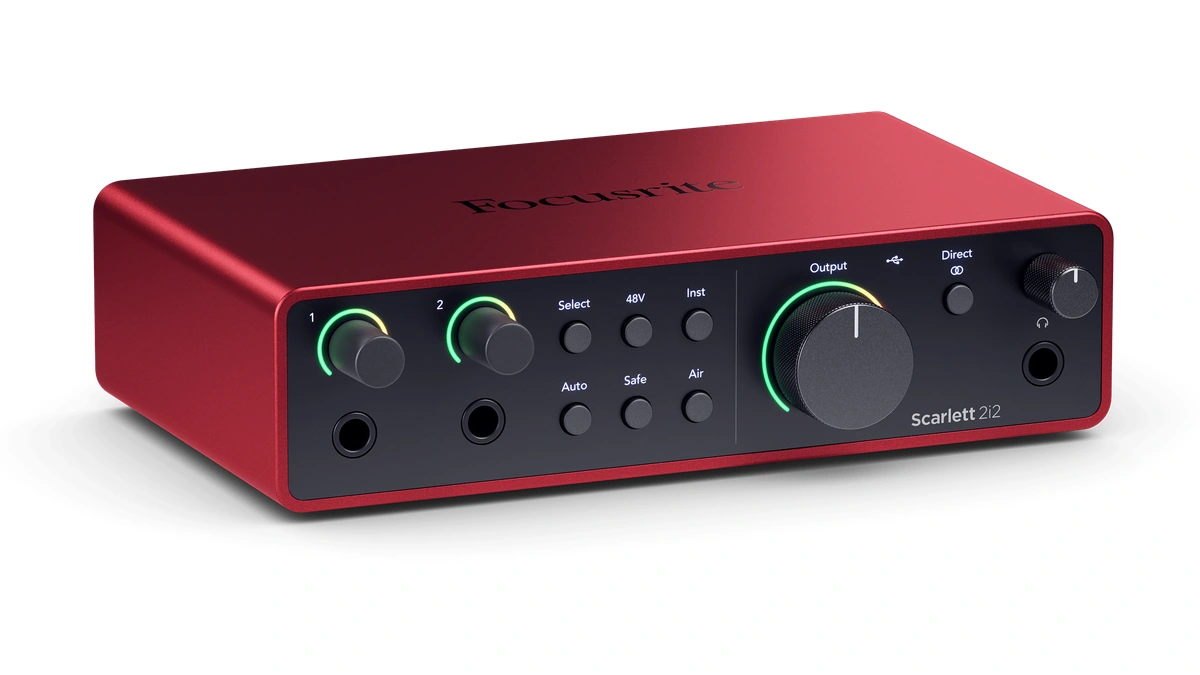
An audio interface handles four jobs, and even a two-input desktop model carries all of them. Focusrite's Scarlett 2i2 spec sheet makes a fair template: two mic preamps with phantom power, two instrument inputs, two balanced line outputs, one headphone output, and a USB-C connection that also powers the unit.
- Preamps. A microphone puts out a tiny voltage. The preamp raises it to a level the converter can work with, and the gain knob sets how far.
- Converters. The analog-to-digital stage samples the signal at a chosen sample rate and bit depth. The digital-to-analog stage does the reverse for playback.
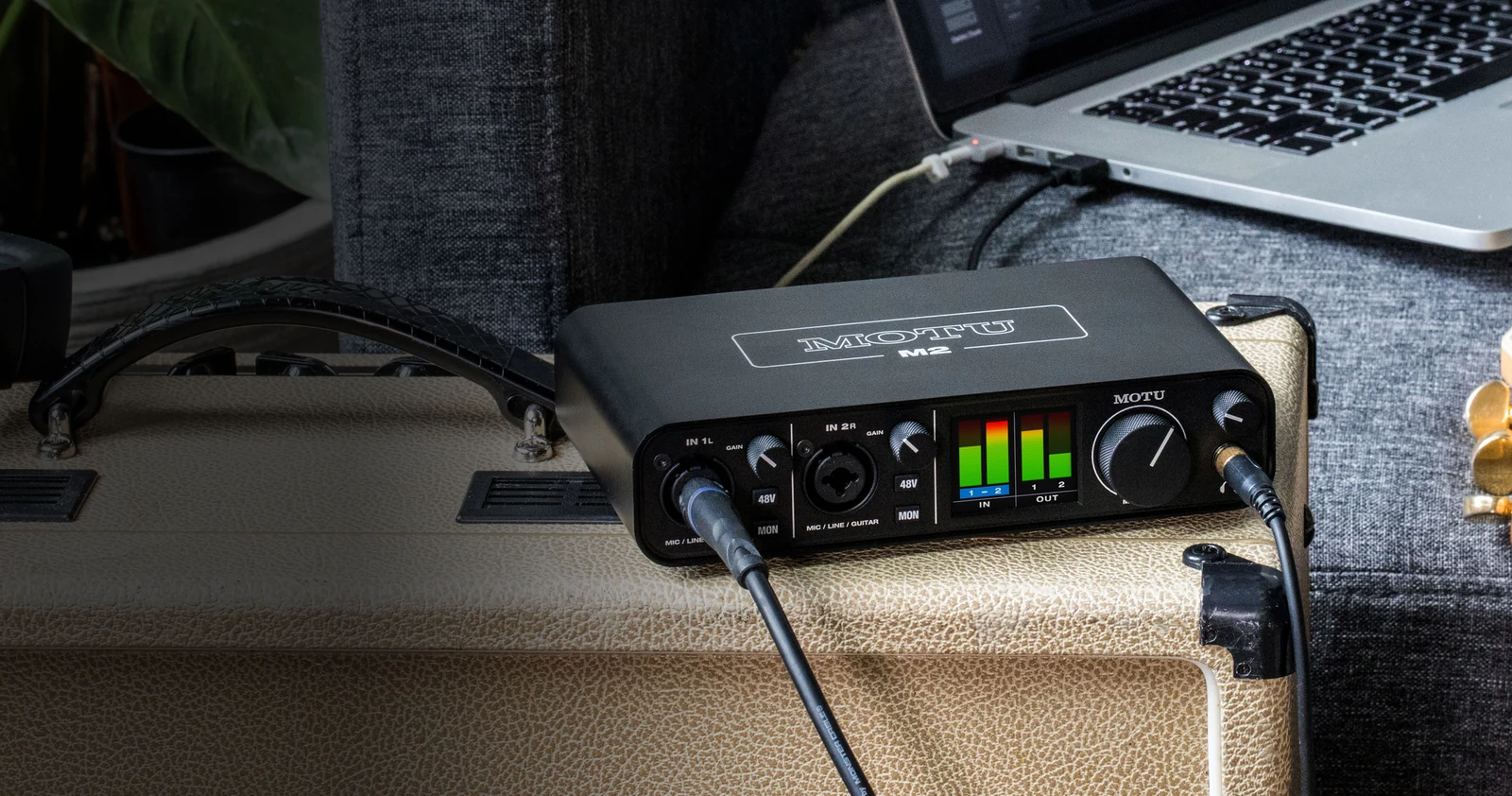
- Phantom power. A 48-volt supply sent up the XLR cable to run a condenser microphone. MOTU gives each input on its M2 independent 48V phantom power, so one channel can feed a condenser while the other stays off.
- Monitoring. A headphone amplifier and speaker outputs, usually with a direct monitoring path that lets you hear the input before it reaches the computer.
The front-panel sockets do a lot of the work. MOTU says each combo input on the M2 accepts either a microphone or a guitar, and Focusrite describes the Scarlett 2i2's Hi-Z input as behaving like the input on a guitar amp. That flexibility is why one small box can serve a singer-songwriter and a streamer with the same two sockets. The microphone is usually picked first, and the streaming microphone roundup covers that half of the decision.
Audio Interface, DAW, Mixer or USB Microphone
An audio interface is one of five pieces of recording gear that are easy to mix up, and each one does a different job:
| Gear | What it is | Vendor example |
|---|---|---|
| Audio interface | Hardware with preamps, converters and outputs that sits between the sources and the computer | Focusrite Scarlett 2i2, MOTU M2 |
| DAW (digital audio workstation) | Software on the computer that records, edits and mixes the tracks | MOTU says its bundled Performer Lite lets you record, edit, mix, process and master music tracks |
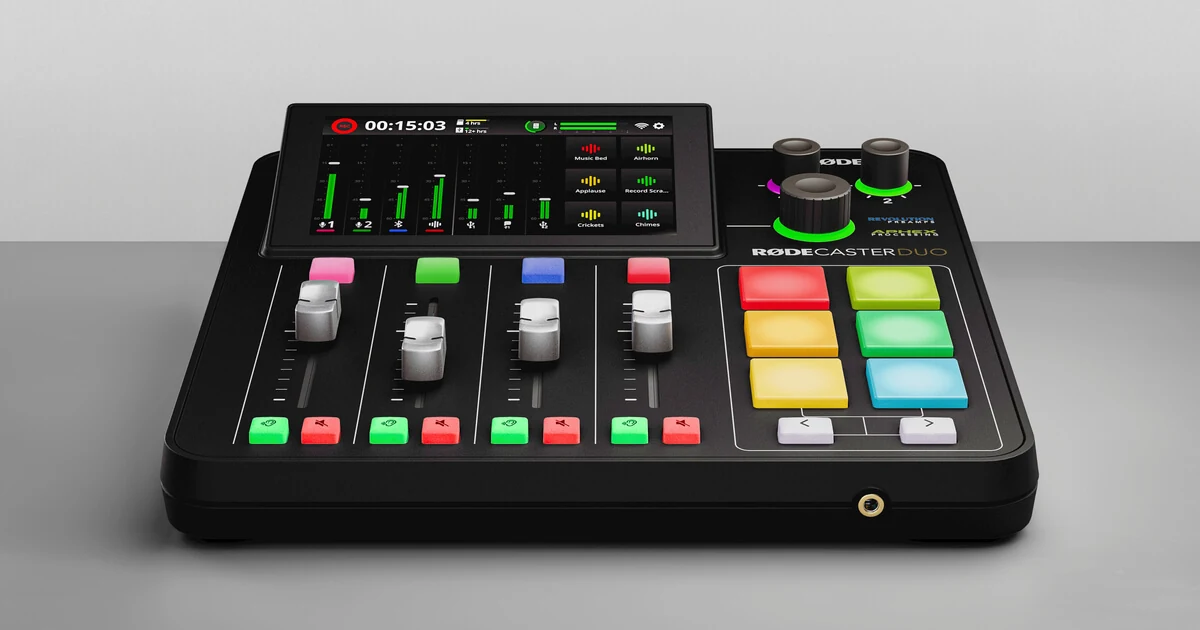
| Mixer or production console | Hardware with faders and onboard processing, sometimes with a USB interface built in | Rode RodeCaster Duo: APHEX processing, recording to a microSD card, dual USB-C interfaces |
| XLR-to-USB adapter | A small device that connects one XLR microphone to USB and supplies gain and phantom power | Shure MVX2U Gen 2 |
| USB microphone | A microphone that outputs USB audio and plugs straight into the computer | Rode NT-USB+: USB-C with built-in analog-to-digital conversion |
The interface and the DAW work as a pair: the hardware delivers clean digital audio, and the software records and arranges it. That is why both of these USB audio interfaces ship with recording software. Focusrite bundles Pro Tools Intro+, Ableton Live Lite and Cubase LE with the Scarlett 2i2, and MOTU includes Performer Lite and Live Lite with the M2.
Whether an audio interface is worth buying comes down to what you plug in. A voice-only stream on a USB microphone can skip one. An XLR microphone, a guitar recorded direct, a pair of studio monitors or a second person on mic all point to an interface. The makers whose spec pages this article draws on, Focusrite, MOTU, RME, Universal Audio, Rode and Shure, cover the range from a one-channel adapter to an expandable studio box.
Inputs, Outputs and Connections
The sockets on an audio interface decide what you can plug in at the same time, so the connector list on a spec page is worth reading line by line:
| Connection | What it is for | Vendor example |
|---|---|---|
| XLR combo input | Microphones; the combo input also takes a 1/4-inch plug for line or instrument sources | MOTU M2: two mic/line/Hi-Z guitar inputs, each with its own preamp gain and 48V phantom power |
| Hi-Z input | A guitar or bass plugged in directly, without an amp | Focusrite Scarlett 2i2: two instrument inputs |
| Line inputs | Synths, drum machines, grooveboxes and mixers | Focusrite Scarlett 4i4: two line inputs on top of its two mic preamps |
| Balanced line outputs | Studio monitors | MOTU M2: two balanced 1/4-inch TRS outputs plus two mirrored RCA outputs |
| Headphone outputs | Monitoring; a second jack serves a guest or a bandmate | Rode RodeCaster Duo and RME Babyface Pro FS: two headphone outputs each |
| MIDI in and out | Keyboards and hardware synths on 5-pin DIN cables | MOTU M2 and Focusrite Scarlett 4i4; the Babyface Pro FS through a breakout cable |
| Optical port (ADAT or S/PDIF) | Digital expansion with an external preamp or converter | RME Babyface Pro FS; Universal Audio Apollo Twin X optical input |
| Computer connection | Audio data and, on bus-powered models, power | Scarlett 2i2 and M2 on bus-powered USB-C; Apollo Twin X on Thunderbolt |
Vendors sum the sockets up as a simultaneous I/O count, and the count can include more than the physical jacks. Focusrite rates the Scarlett 2i2 at 4 x 2 and the Scarlett 4i4 at 6 x 6, and says both figures include the loopback inputs. Universal Audio describes the Apollo Twin X as a 10 x 6 Thunderbolt 3 interface with two Unison mic preamps, a Hi-Z instrument input and an optical input for ADAT or S/PDIF. RME says the Babyface Pro FS optical port runs as ADAT with SMUX or as SPDIF at up to 192 kHz.
A simple way to size the purchase: count the sources you record at the same moment, add one input for growth, and match the headphone outputs to the number of people who need to hear the mix. A solo streamer needs one good mic input, which a one-channel adapter or a small USB audio interface covers. A singer who plays guitar needs two inputs, one of them a Hi-Z input. A drummer or a band will usually outgrow a desktop box, which is where digital expansion through the optical port comes in.
Gain Range and Microphone Matching
Gain range is the audio interface spec that most often decides whether a setup works on day one. Shure's own numbers show why: the company says the MVX2U Gen 2 offers +60 dB of gain, which it calls enough for an SM7B, plus +48V phantom power for any condenser microphone. For interfaces that fall short, Shure sells the SM7dB, which builds in a preamp with a selectable +18 dB or +28 dB boost and runs it from the interface's phantom power.
Each vendor below publishes a gain figure for its microphone inputs. Treat the number as a ceiling. A dynamic microphone that wants 60 dB would use most of a 69 dB range, with 9 dB left over.
| Device | What it is | Mic gain (vendor figure) |
|---|---|---|
| Focusrite Scarlett 2i2 | Two-input desktop interface | 69 dB gain range |
| Focusrite Vocaster One | One-mic podcast and streaming interface | 70 dB gain range |
| Shure MVX2U Gen 2 | XLR-to-USB-C adapter | +60 dB |
| Rode RodeCaster Duo | Two-input production console | 76 dB |
| RME Babyface Pro FS | Portable 24-channel USB interface | 76 dB, in 1 dB steps |
Noise figures need a closer read. Focusrite lists the Scarlett 2i2 at -127 dBu equivalent input noise (EIN), A-weighted. MOTU quotes a measured -129 dBu EIN for the M2. Rode lists -131.5 dBV for the RodeCaster Duo, which uses a different reference: 0 dBV sits about 2.2 dB above 0 dBu, so the Rode figure works out to roughly -129.3 dBu. Lower is quieter. Use a gap of a dB or two as a tiebreaker only, once the gain range is settled.
Latency, Buffer Size and Drivers
Latency is the audio interface problem you hear rather than see. Microsoft's Windows low latency audio documentation defines round-trip latency as the delay from the moment a microphone captures a sound, through processing in an app, to the moment it plays from the speakers, roughly capture latency plus render latency. For a singer monitoring through a plugin, or a streamer hearing a filtered voice back through OBS Studio, that delay becomes an echo in the headphones.
The biggest lever is buffer size. The driver hands audio to the software in blocks of samples, and every block adds its own length in time. The math is samples divided by sample rate:
| Buffer size | Delay per buffer at 48 kHz | Delay per buffer at 96 kHz |
|---|---|---|
| 32 samples | 0.67 ms | 0.33 ms |
| 64 samples | 1.33 ms | 0.67 ms |
| 128 samples | 2.67 ms | 1.33 ms |
| 256 samples | 5.33 ms | 2.67 ms |
| 512 samples | 10.67 ms | 5.33 ms |
Those are one-way figures for a single buffer, and the converters add their own share. RME specifies 5 samples of converter delay on the input side and 7 on the output side for the Babyface Pro FS. MOTU quotes 2.5 ms round-trip latency for the M2 at 96 kHz with a 32-sample buffer. A vendor round-trip number only means something at the buffer and sample rate it was measured with, so compare two interfaces at matching settings. Smaller buffers ask more of the CPU; if audio crackles while a game and the stream encoder are both running, raising the buffer size one step is the usual fix.
Drivers set the floor. Starting with Windows 10 release 1703, Windows ships a USB Audio 2.0 class driver, and Microsoft says a partner driver from the manufacturer or Windows Update overrides it when one exists. A class-compliant USB Audio 2.0 interface can therefore use that driver without a separate install. Many music apps on Windows talk to an ASIO driver instead, which Microsoft describes as a third-party model that passes audio straight from the application to the driver in exclusive mode.
Vendors handle this differently. MOTU lists a Windows driver and an optional Mac driver for the M2. Rode offers a dedicated ASIO driver download for the RodeCaster Duo. RME lists a class-compliant mode for the Babyface Pro FS alongside its own TotalMix FX mixer.
Direct monitoring sidesteps the delay for the performer. On the M2, the MON button sends the live input to headphones or speakers without a trip through software. Shure calls the 3.5 mm headphone jack on the MVX2U Gen 2 zero-latency, with a Monitor Mix setting that blends input and playback. The trade-off: what you hear is the dry input, without plugins or OBS filters.
Spec Sheet Lines That Matter Less
Several audio interface specs look decisive on the box and rarely separate two models in use.
- 192 kHz support. Focusrite lists sample rates from 44.1 kHz to 192 kHz for the Scarlett 2i2, and MOTU lists the same span for the M2. Shure records the MVX2U Gen 2 at 24-bit/48 kHz and still sells it to podcasters and streamers. For speech and game streams, starting at 48 kHz, the rate Shure's adapter records at, is a reasonable choice.
- Headline dynamic range. Focusrite quotes 120 dB for the Scarlett 2i2's line outputs, and MOTU quotes 120 dB for the M2 main outputs. When two interfaces quote the same output figure, the number stops being a reason to pick either one.
- Bundled software. Focusrite ships Pro Tools Intro+, Ableton Live Lite and Cubase LE with the Scarlett 2i2, and MOTU bundles Performer Lite and Live Lite with the M2. Handy for a first project, but a bundle is not a reason to choose hardware.
- Tone modes. Focusrite's Air modes and the voice presets on the Vocaster One change the sound on the way in. They are useful shortcuts, not specs to compare.
The lines that deserve attention are the counts: inputs, outputs, headphone jacks and loopback channels. They decide whether a setup fits, and they are the hardest thing to change after purchase.
Loopback and Routing for Streaming
Loopback is the audio interface feature streamers lean on most. It returns the computer's own playback, such as game sound, music or a Discord call, to the computer as an extra input, so a single app can capture voice and system audio together. Vendors implement it in different ways:
- Focusrite lists loopback for the Scarlett 2i2 and counts the loopback inputs in its 4 x 2 simultaneous I/O figure.
- Focusrite gives the Vocaster One two sets of stereo loopback for intros, outros and calls, managed in the Vocaster Hub app.
- MOTU says the M2 driver provides loopback channels so computer output can be mixed with live mic and guitar inputs in the host software.
- Rode gives the RodeCaster Duo two USB-C interfaces for connecting two computers or mobile devices, which Rode pitches for dual-computer setups.
One first-stream problem worth checking for is a voice that comes out of one side only. On a two-input audio interface, a single microphone can arrive as the left half of a stereo pair. The OBS Studio audio mixer guide says that when only the first meter of a stereo source lights up, viewers hear that source only in their left channel, and it points to the Downmix to Mono option in the advanced audio settings as the fix.
Mac users have one more routing tool. Apple's Audio MIDI Setup can combine several devices into a single aggregate device, for example an interface plus a USB microphone, and Apple says each device should run at the same sample rate for the aggregate to work correctly. Picking the broadcast app is its own decision, set out in how to choose between OBS, Streamlabs and XSplit.
Matching an Audio Interface to the Job
An audio interface purchase gets simpler once you count what has to be plugged in at the same time. The models named here are examples drawn from vendor spec pages, not ranked picks.
| Setup | What to prioritize | Examples |
|---|---|---|
| Solo streamer or podcaster, one XLR mic | Gain for a dynamic microphone, loopback, a mute control | Focusrite Vocaster One, Shure MVX2U Gen 2 |
| Voice plus guitar or keys | Two combo inputs, a Hi-Z input for guitar, direct monitoring, low round-trip latency | Focusrite Scarlett 2i2, MOTU M2 |
| Two-person show or two-PC stream | Two mic channels, physical faders, two USB connections | Rode RodeCaster Duo |
| Growing home studio | Digital expansion, a capable routing mixer | RME Babyface Pro FS, Universal Audio Apollo Twin X |
On price, Focusrite's US store lists the Vocaster One at $169.99 and the Scarlett 2i2 at $239.99. The last two examples in the table add channels, expansion or processing. RME says the Babyface Pro FS reaches 12 analog inputs and 12 outputs through its optical ADAT port when paired with an external converter. Universal Audio builds the Apollo Twin X around Unison preamp emulation and DUO or QUAD Core DSP for running UAD plugins in real time. A solo streamer pays for none of that and loses nothing by skipping it.
Stream quality also depends on what happens after the audio leaves the interface; the stream optimization breakdown of internet requirements and quality settings picks up from there.
Mistakes That Cost Audio Interface Buyers
The costly audio interface mistakes are mismatches, and each one can be checked before buying:
- A quiet dynamic microphone on a low-gain input. Check the gain figure against the microphone. Shure's own answers are the +60 dB on the MVX2U Gen 2 and the built-in boost on the SM7dB.
- Phantom power left on for a ribbon microphone. Shure notes that phantom power is on by default on the MVX2U Gen 2 and says to switch it off in its app before plugging in a vintage ribbon mic.
- Thunderbolt on a PC that lacks it. Universal Audio says the Apollo Twin X works with macOS and Windows over Thunderbolt 3 or 4, and points PC owners without Thunderbolt to its USB model.
- Expecting a phone to power the interface. MOTU lists iOS support for the M2 only with an adapter kit and a powered USB hub, while Shure designed the MVX2U Gen 2 to run from phones and tablets.
- Paying for inputs that stay empty. A four-person podcast needs four mic channels; a solo stream needs one good one, a working buffer size and loopback.
Further reading
Frequently Asked Questions
Is it worth buying an audio interface?
Yes, if you use an XLR microphone, record a guitar or keyboard directly, or want studio monitors on balanced outputs. A USB microphone such as Rode's NT-USB+ converts the sound to digital inside the microphone and plugs straight into a computer, phone or tablet, so a voice-only setup can skip one. For a single XLR mic, an adapter such as Shure's MVX2U Gen 2 supplies gain and phantom power over USB-C; a full interface adds instrument inputs, speaker outputs and, on many models, loopback for computer audio.
What is the difference between a DAW and an audio interface?
An audio interface is hardware and a DAW is software. The interface turns microphone and instrument signals into digital audio and plays the mix back out; the digital audio workstation records, edits and mixes those tracks on the computer. They work as a pair, which is why Focusrite bundles Pro Tools Intro+, Ableton Live Lite and Cubase LE with the Scarlett 2i2 and MOTU ships Performer Lite with the M2.
How much latency is too much?
Any delay you can hear while monitoring yourself is too much, and the fix is direct monitoring or a smaller buffer. At 48 kHz, a 128-sample buffer adds about 2.7 ms per pass and a 512-sample buffer about 10.7 ms. Round-trip latency stacks capture, processing and playback, so the total is always higher than a single buffer. Singing or playing guitar through plugins is where the delay shows first.
Why can I still hear latency with direct monitoring on?
You are probably hearing the software return on top of the direct signal. If OBS audio monitoring or a recording app's input monitoring is also active, a delayed copy plays under the dry one and sounds like a slap echo or a hollow double. Turn off one of the two paths: keep direct monitoring for your voice and switch on software monitoring only when you need to check an effect.
Will an audio interface work with an iPad or phone?
Some will, but power can be the obstacle. MOTU lists iOS support for the M2 only with an adapter kit and a powered USB hub. Shure says the MVX2U Gen 2 works with Android phones, iPhones and iPads, and Rode gives the RodeCaster Duo an MFi-certified USB port for iOS devices.
How much should you spend on an audio interface?
Spend for the number of microphones you run and the gain they need, not for headline specs. Focusrite's US store lists the one-mic Vocaster One at $169.99 and the two-input Scarlett 2i2 at $239.99. Pricier examples such as the RME Babyface Pro FS and the Universal Audio Apollo Twin X add channels, digital expansion or onboard DSP, which pay off in a growing studio more than on a solo stream.