An API documentation tool is a platform that captures, renders, and publishes the contract between a software service and its consumers, turning machine-readable API definitions into browsable reference material, interactive consoles, and version-controlled developer guides.
For teams building public APIs or internal microservices, the documentation toolchain is not a secondary concern. Poor API reference documentation costs developer hours at integration time, increases support load, and signals low confidence in the API contract itself. The W3C's API Design Principles frame documentation as a first-class dimension of developer experience (DX), on equal footing with schema correctness and backward compatibility. Choosing the right toolchain depends on how your team authors specs, hosts docs, and handles versioning.
What an API Documentation Tool Actually Does

An API documentation tool performs three distinct functions, and understanding each one helps teams avoid buying a testing harness when they need a publishing pipeline. First, it must support authoring and validation of the API contract, typically an OpenAPI Specification (OAS) YAML or JSON file. Second, it must render that contract into browsable API reference documentation with enough navigability for an external developer to find an endpoint, read its parameters, and understand its response shape. Third, it must handle publishing and versioning so that multiple API versions coexist without documentation conflicts.
The boundary with adjacent tools matters here. Postman's collection runner is primarily an API testing client. MuleSoft and similar platforms are integration middleware. Both can produce documentation as a byproduct, but documentation is not their primary job. See microservices communication for context on how the API contract fits within service-to-service communication design. For a dedicated look at API testing clients, the comparison in API Testing Tools Compared covers that angle.
- Authoring and validation
- Writing the API contract in OAS YAML or JSON, checking it against schema rules before any rendering happens.
- Reference rendering
- Converting the validated spec into structured, browsable API reference documentation with an interactive API console for live request testing.
- Publishing and versioning
- Deploying rendered docs to a stable URL, managing version-controlled API docs across major releases, and integrating with CI/CD pipelines to regenerate on every spec change.
Swagger and the OpenAPI Specification Ecosystem
Swagger is the original API documentation tool that gave the industry a shared vocabulary for machine-readable endpoint definitions, and its toolset remains the most direct path from a spec file to published reference docs. The Swagger project donated its specification to the Linux Foundation's OpenAPI Initiative, which maintains OAS as a vendor-neutral standard. Any OAS-compliant file, regardless of which editor produced it, can be rendered by Swagger UI.
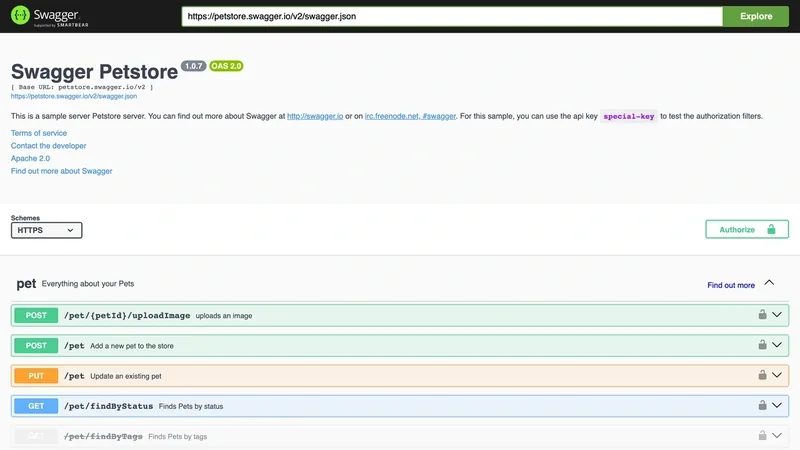
The core Swagger tools divide responsibilities cleanly. Swagger Editor provides browser-based YAML and JSON authoring with a live linter that flags schema errors as you type. Swagger UI consumes any OAS 3.x file and renders it as structured API reference documentation with a built-in interactive API console, letting developers fire real requests against a live server without leaving the browser. Swagger Codegen generates client and server stubs from the same OAS file, reinforcing the spec as the single source of truth.
OAS maps HTTP methods (GET, POST, PUT, DELETE, PATCH) to endpoint definitions using the HTTP semantics defined in IETF RFC 9110 (HTTP Semantics). The OAS file itself is serialized as either YAML or canonical JSON; consistent byte-level serialization matters for version diffing, as covered in IETF RFC 8785 (JSON Canonicalization).
Stoplight Studio and Redoc extend the OAS ecosystem without replacing Swagger. Stoplight adds a visual editor and mock server. Redoc offers a three-panel layout for read-only reference portals. Because all three consume OAS files natively, switching renderers does not require rewriting the spec.
Spec-First Workflow: Authoring to Publishing
The spec-first workflow treats the OAS file as the primary artifact, not a retrospective description of a working API. The pipeline runs in five stages:
- Write endpoint definitions in OAS 3.x YAML, specifying paths, parameters, request bodies, and response schemas before implementation begins.
- Validate the file with Swagger Editor's linter to surface schema violations, missing required fields, and inconsistent response types.
- Render the validated spec for an internal developer preview and review cycle.
- Publish the rendered HTML output to a CDN or internal developer portal.
- Wire a CI/CD hook to regenerate documentation on every version bump, so the API contract and its published docs never drift apart. The CI/CD Pipeline Comparison covers the tooling options for that automation layer.
This discipline separates spec-first teams from teams that write prose documentation after the API ships. The OAS file is the contract; the documentation is a rendering of it. For guidance on maintaining that contract across versions, see RESTful API Documentation Best Practices.
Postman: API Documentation Platform or Testing Harness?
Postman is an API documentation platform that auto-generates reference docs from the collections developers already maintain for testing. That dual identity is a genuine advantage for teams whose workflow is collection-centric, and a genuine liability for teams whose source of truth is an OAS file.
Postman's documentation features are tightly coupled to its collection model. Auto-generated API reference documentation pulls endpoint descriptions, parameter definitions, and example responses directly from collection items. Code sample generation covers more than 15 programming languages per endpoint. The Run in Postman button embeds a try-it console into any external page, letting consumers fork the collection and run requests in their own Postman environment without a separate portal. The official Postman API Documentation guide details the publishing workflow in full.
The structural trade-off is the collection model versus the OAS schema hierarchy. When a team's API is defined by an OAS file, Postman can import it, but the documentation output reflects the collection structure, not the spec's path-and-component hierarchy. Teams that iterate on the OAS file without updating the collection end up with documentation that diverges from the actual API contract. Strict sync discipline is required to avoid that drift.
Developer experience runs in both directions here. The friction cost of adopting Postman for documentation is low when the team already uses it for development. The friction cost of keeping documentation accurate rises as spec and collection diverge. The trade-offs, in priority order:
- Teams already using Postman get documentation as a near-zero-overhead byproduct of their existing collection work.
- Public documentation on Postman-hosted URLs works on the free tier, but custom domains and advanced access controls require a paid plan.
- Collection-centric docs are easier to navigate when the collection mirrors the API's logical groupings, harder when collections are organized by testing scenario rather than API surface.
- OAS import populates a Postman collection, but ongoing spec changes must be re-imported or manually synced to stay accurate.
GitBook: Documentation-as-Code for Developer Guides
GitBook is an API docs toolchain built around Git-backed content, treating Markdown files and branch-based versioning as the natural medium for developer guides, SDK walkthroughs, and conceptual overviews that surround API reference material. Its architecture mirrors how engineering teams already manage code: content lives in a GitHub or GitLab repository, changes go through pull requests, and published versions correspond to Git branches.
The documentation-as-code model has a concrete operational benefit. Engineers comfortable with Markdown and Git branching do not need to learn a separate CMS or rich-text editor. Version-controlled API docs across multiple active API versions are a branch checkout away. The GitBook Git Sync feature handles the repository connection, so the publishing pipeline is a standard Git push. For teams already treating their developer guides as documentation-as-code, extending that discipline to API reference material requires no new tooling philosophy.
GitBook's limitation relative to Swagger is the absence of native OAS parsing. The Swagger renderer ingests an OAS YAML file and generates structured endpoint tables with a live try-it console automatically. GitBook requires either a Stoplight sync integration or manually authored OpenAPI blocks to produce equivalent reference material. Teams that need the full spec-first rendering pipeline will find GitBook's out-of-the-box OAS support less direct. What GitBook does well, a developer portal with rich tutorial content around an API, the Swagger toolchain does not attempt.
GitBook's strengths for developer experience include:
- Unlimited public documentation on the free tier, with no hosting infrastructure to manage.
- Branch-based publishing, so documentation for API version 2 and version 3 can coexist at separate URLs without manual page management.
- Custom domain support on paid plans, keeping documentation on the same domain as the product.
- Native Markdown authoring with a WYSIWYG mode for non-technical contributors working on the same portal.
- Built-in search across all content, including multi-version spaces.
Head-to-Head Comparison: Swagger vs. Postman vs. GitBook
The following comparison table covers the attributes that determine fit for any API docs toolchain decision: spec-first workflow teams, collection-centric teams, and narrative developer portal teams. Code-generated documentation from an OAS file is the defining differentiator between Swagger and the other two platforms.
| Attribute | Swagger (Swagger UI + Editor) | Postman | GitBook |
|---|---|---|---|
| Primary input format | OAS 3.x YAML or JSON | Postman Collection (OAS import supported) | Markdown files in Git repository |
| Live interactive console | Built-in try-it console in Swagger UI | Run in Postman button, embedded | Plugin-dependent (Stoplight sync or manual block) |
| Spec-first support | Native: spec drives all output | Import only: collection is primary | Manual: no native OAS rendering |
| Hosting model | Self-hosted or SwaggerHub SaaS | Postman-hosted public URL | Git-synced custom domain |
| Versioning mechanism | OAS file versioning via CI/CD hook | Workspace version history | Git branches per API version |
| Free tier | Open-source renderer; no usage limits | Free tier with public URL, limited features | Unlimited public docs |
The comparison reveals a decision axis based on workflow fit. Teams with an OAS file and a CI/CD pipeline get the most from Swagger's code-generated documentation pipeline. Teams already living in Postman get documentation with near-zero additional tooling. Teams building narrative developer portals get the most from GitBook's Git-backed authoring model.
Choosing the Right API Documentation Tool for Your Team
An API documentation tool selection is a workflow decision before it is a feature decision. The right platform fits the team's existing authoring habits and the documentation purpose, whether that is machine-generated API reference documentation, a collection-centric auto-doc, or a rich developer guide. API lifecycle management complicates the choice further: as APIs mature, teams often combine platforms rather than commit to a single one.
Work through these decision points in order:
- Do you have an OAS file or plan to write one? If yes, Swagger UI is the lowest-friction path to rendered reference docs from that spec. The spec-first workflow keeps documentation and implementation in sync without manual effort. If no OAS file exists, GitBook's Markdown authoring lets you start documenting without a spec.
- Is your team already using Postman for API development? If yes, Postman's documentation feature generates publishable API reference doc from the collections you already maintain. The incremental cost is low.
- Do you need a public developer portal with tutorials, integration guides, and SDK walkthroughs around the API reference? GitBook handles this better than Swagger UI or Postman's hosted docs.
- Do you need an interactive console with zero hosting infrastructure? Postman-hosted public documentation includes the Run in Postman button, letting consumers fork the collection and run live requests without a separate portal. Swagger's self-hosted deployment requires a server or CDN, but SwaggerHub eliminates that constraint.
- Do you need code-generated documentation that auto-regenerates on every API version bump via CI/CD? Swagger in a pipeline delivers that. Connect the OAS file to the build system, and documentation becomes a pipeline artifact rather than a manual task. See CI/CD Pipeline Comparison for implementation options.
As APIs mature through API lifecycle management stages, the toolchain typically evolves. A common pattern: spec-generated reference docs from Swagger, integration guides and tutorials in GitBook, and an API gateway layer handling routing and authentication. The underlying OAS file remains portable across all three renderers covered here, so switching does not require a spec rewrite. For the gateway layer, see API Gateway Comparison. For the integration platform layer that sits above documentation, see Top API Integration Platforms for Developers. For the microservices context where API agreements govern service-to-service communication, the microservices communication hub covers gRPC, REST, and message queue design alongside API spec contract design.
Additional API Documentation Platforms Worth Evaluating
Three OAS-compatible renderers serve as API documentation platform alternatives to Swagger, Postman, and GitBook. Each addresses a specific gap in rendering style, authoring workflow, or hosting model, and each reads the OpenAPI Specification natively.
- Redoc: Open-source renderer with a three-panel layout (navigation, reference docs, code samples). Consumes OAS 3.x natively. No built-in interactive console by default, making it the right choice when a read-only reference portal is the goal and interactivity would add noise rather than value.
- Stoplight Studio: Visual OAS editor with integrated linting, a mock server for pre-implementation testing, and hosted documentation. Bridges Swagger Editor's authoring capability and SwaggerHub's publishing without requiring teams to manage their own hosting infrastructure.
- Scalar: Open-source renderer with a modern interface, OAS 3.1 support, and an integrated try-it console that matches Swagger's interactivity. A practical option for teams seeking a spec-first output with a more contemporary visual design.
All three are OAS-portable: they consume the same YAML file that drives the Swagger renderer. The OAS spec is the durable asset; the rendering layer is interchangeable.
Further reading
- Microservices Communication: gRPC vs REST vs Message Queues
- API Testing Tools Compared: Postman vs Insomnia vs Thunder Client
- RESTful API Documentation Best Practices
- API Gateway Comparison: AWS vs Kong vs Zuul
- Top API Integration Platforms for Developers
See also NIST Risk Management for APIs.