A Git workflow strategy is a branching convention that governs how developers create, merge, and release code across a shared repository. Three models dominate practitioner discussion: Gitflow, GitHub Flow, and GitLab Flow. Each makes different bets about release cadence, the cost of a merge conflict, and how much branching ceremony a team can sustain. The right pick depends on team size, deployment frequency, and how strictly a release must be stabilized before it ships to users.
What Is a Git Workflow Strategy
A Git workflow strategy formalizes the branching rules that a version control repository follows: which branch holds shippable code, which branch receives ongoing integration, how feature work is isolated, and how releases are cut. Git itself is unopinionated about this. The Pro Git book notes that Git's distributed model supports "a vast range of workflow possibilities," and teams can mix paradigms freely. A consistent branching strategy reduces coordination cost, keeps the default branch deployable, and gives reviewers a predictable place to look. Disciplined version control around these branches is what separates teams that ship daily from teams that fight merge conflicts every release.
- Gitflow: structured model with parallel develop and main branches plus dedicated release and hotfix branches; built for scheduled versioned releases.
- GitHub Flow: single long-lived main branch with short feature branches merged through pull request review; built for continuous deployment.
- GitLab Flow: GitHub Flow extended with environment branches such as pre-production and production, used as promotion gates between merge and release.
Gitflow: Structured Releases With Long-Lived Branches
The Gitflow Git workflow, popularized by Vincent Driessen in 2010, organizes a repository around five branch roles. It assumes a versioned release model where stabilization happens on its own track and emergency fixes need a separate fast path. The branching strategy adds ceremony in exchange for clear ownership of each phase of the release process.
- main
- Holds only released, production-tagged code. Every commit corresponds to a shipped version.
- develop
- The integration branch where completed feature work accumulates between releases. This is the canonical long-running branch alongside main.
- feature branch
- Short-lived branch cut from develop for a single unit of work, merged back into develop on completion.
- release branch
- Cut from develop when a release is ready to stabilize. Bug fixes, documentation updates, and version bumps land here while develop accepts new feature branch work for the next cycle.
- hotfix branch
- Cut directly from main when a production defect needs an emergency patch. Merged back into both main and develop to keep histories aligned.
The strength of Gitflow is isolation. A release branch lets a team harden a release candidate without blocking feature work, and a hotfix branch routes around the develop queue when production breaks. The Pro Git branching workflows chapter observes that "having multiple long-running branches isn't necessary, but it's often helpful, especially when you're dealing with very large or complex projects."
The cost is divergence. A long-running branch that lives for weeks accumulates drift against main, and the longer it lives the more expensive each merge becomes. Teams running continuous integration (continuous integration (CI)), the practice Martin Fowler defines as merging "into a codebase together with their colleagues changes at least daily," tend to find Gitflow's release cadence at odds with how often they actually push. The branching overhead also slows CI cycles, since pipelines must run across multiple integration targets.
GitHub Flow: Lightweight Branching for Continuous Deployment

The GitHub Flow Git workflow strips the model down to a single default branch and short-lived topic branches. GitHub Docs describes it as "a lightweight, branch-based workflow" suited to teams that deploy continuously and want code review without release-branch ceremony. There is no develop branch, no release branch, and no scheduled cut. Main is always deployable, and every change reaches main through a pull request (PR).
- Create a feature branch off the default branch, named for the work it contains.
- Commit small logical changes to that branch as the work progresses.
- Open a pull request against main when the change is ready for review.
- Discuss the diff with reviewers, run CI checks, and iterate on requested changes.
- Deploy the branch to a test or staging environment to verify behavior before merge.
- Merge the PR into main, which triggers the production deployment pipeline.
GitHub Flow fits teams that ship multiple times a day and treat the PR as the unit of integration and review. The absence of a release branch removes a class of merge conflict that Gitflow tends to produce, and the short feature branch lifespan keeps drift small. Its weak point is the missing emergency path: without a hotfix branch convention, a production defect competes with whatever else is in the review queue.
GitLab Flow: Environment Branches and CI/CD Integration

The GitLab Flow Git workflow extends GitHub Flow with environment branches that act as promotion gates between merge and live deployment. The branching strategy keeps main as the integration point but adds downstream branches such as pre-production and production that track what is actually deployed to each environment. Merge requests promote code forward through these gates rather than landing in a single shippable branch.
- Open a feature branch off main and develop the change in isolation.
- Merge the feature branch into main once review and CI checks pass.
- Promote main to pre-production by merging into the pre-production environment branch, triggering deployment to the staging cluster.
- Run integration and acceptance checks against pre-production over the agreed soak period.
- Promote pre-production into the production the deployment line, which deploys to live users and tags the release.
The model adds traceability without the full Gitflow stack. Each the env branch carries a Git history that maps exactly to what users see, which simplifies rollback and audit. Teams already running GitLab CI tend to adopt it because the pipeline naturally hooks into branch promotion events. For teams comparing the underlying automation choices, our CI/CD pipeline comparison covers GitHub Actions, GitLab CI, and Jenkins side by side.
Side-by-Side Comparison
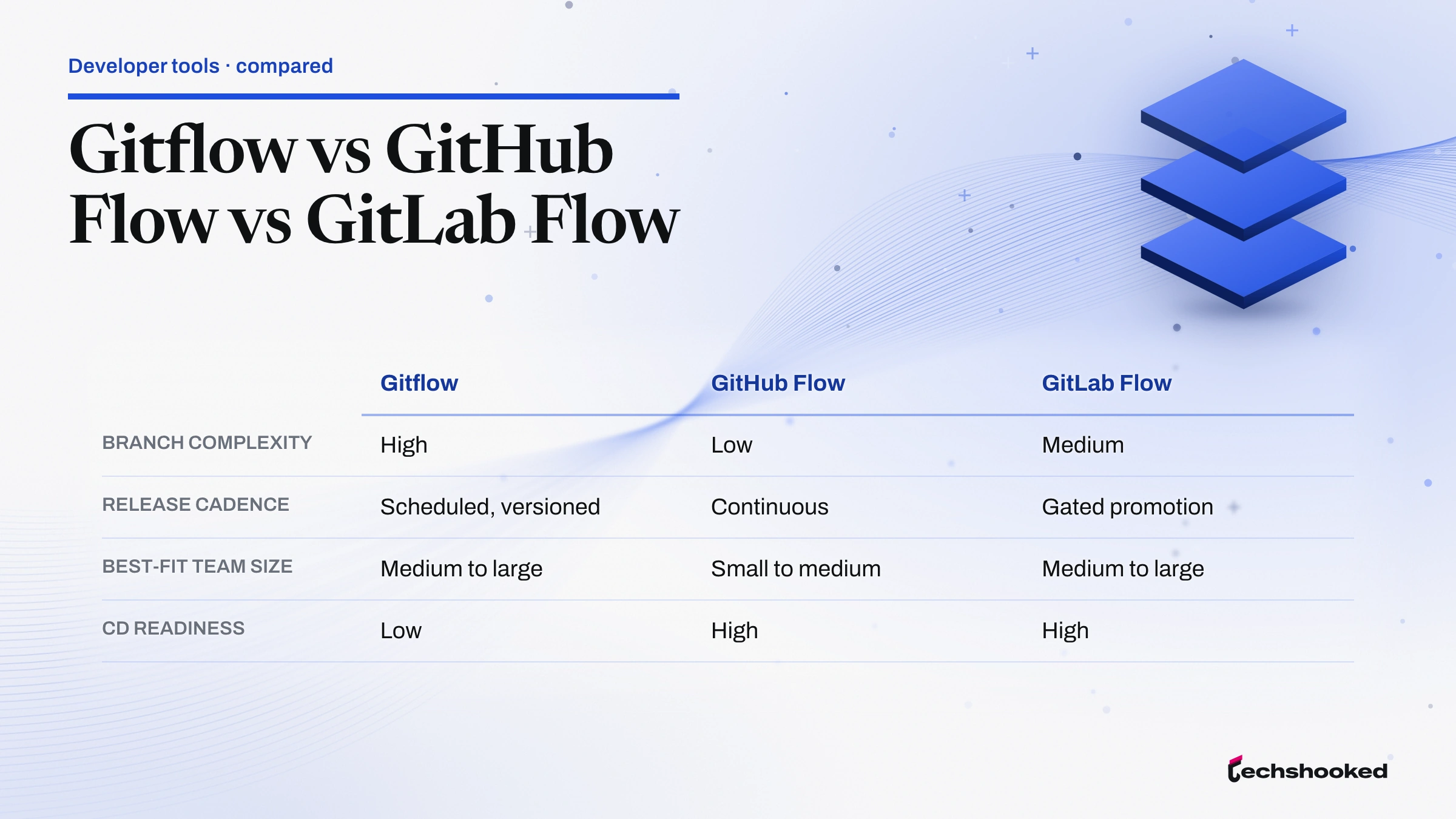
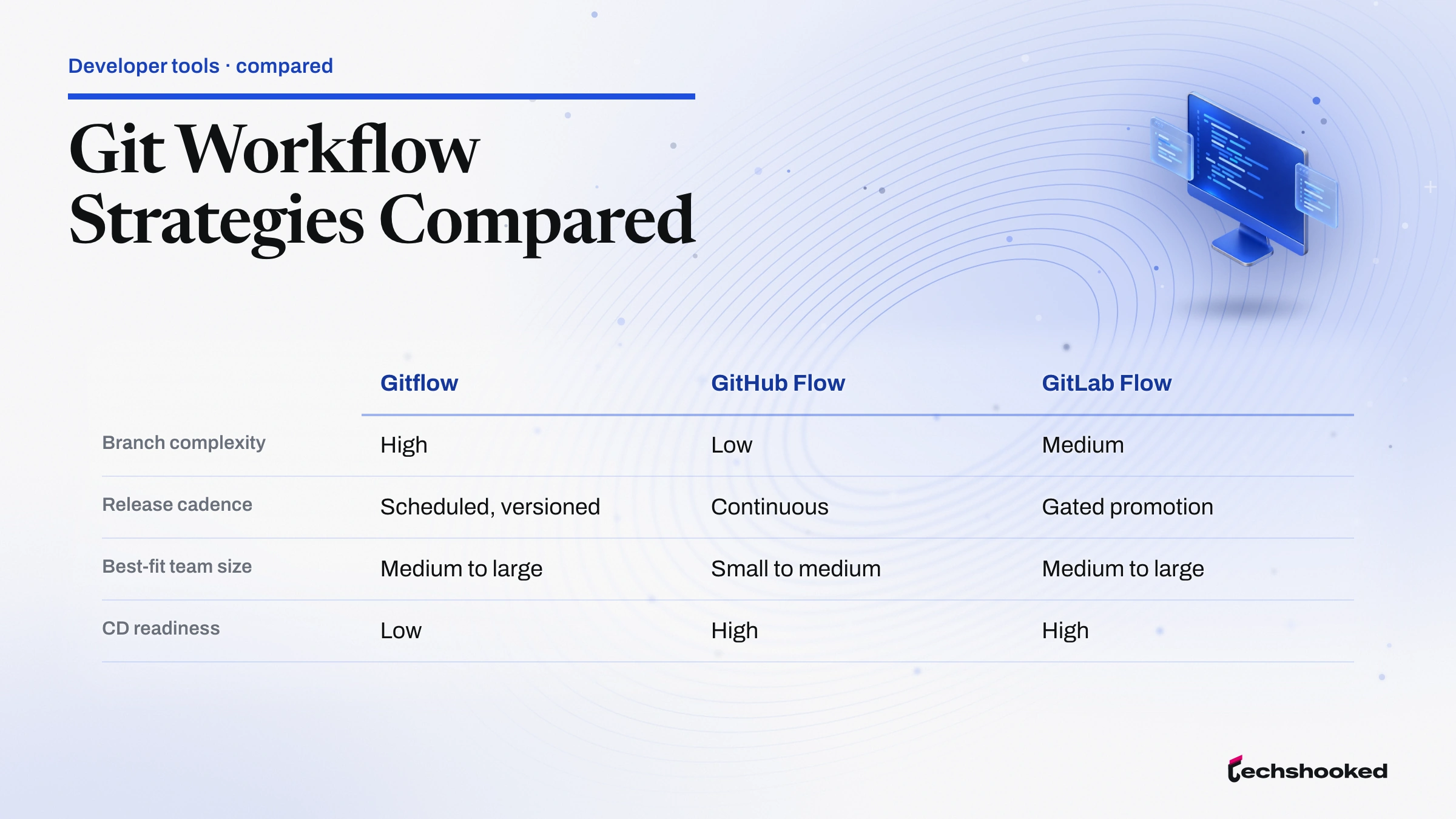
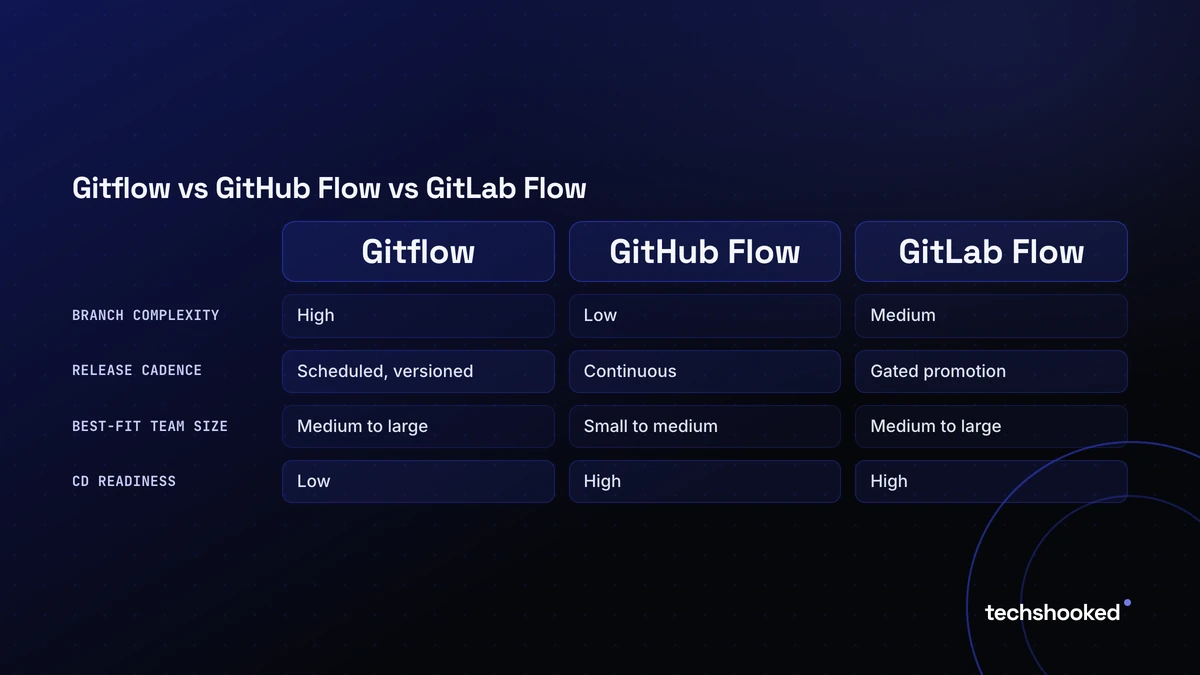
The three workflows differ along five practical axes: branch complexity, release cadence, team-size fit, readiness for continuous deployment, and exposure to merge conflict at integration. The gitworkflows reference notes that "a merge can carry over the changes from 1, 10, or 1000 commits with equal ease," which is why merge-based models scale well across contributor count regardless of the branching strategy chosen.
| Workflow | Branch complexity | Release cadence | Best-fit team size | CD readiness | Merge conflict risk |
|---|---|---|---|---|---|
| Gitflow | High | Scheduled, versioned | Medium to large | Low | High (long-lived branches drift) |
| GitHub Flow | Low | Continuous | Small to medium | High | Low (short the working branch lifespan) |
| GitLab Flow | Medium | Gated promotion | Medium to large | High | Medium (env branches add merge surface) |
How to Choose the Right this workflow for Your Team
No source ranks one branching strategy as universally best. The choice maps to release cadence, regulatory posture, and how much investment a team has made in test automation and feature flags. The selection lens below pairs common team profiles with the workflow that fits their constraints.
- Startup shipping daily to production: GitHub Flow. A single default branch with PR review keeps overhead minimal and matches a deploy-on-merge pipeline.
- Regulated product with versioned releases: Gitflow. The release branch and the hotfix line isolate stabilization and emergency patches in a way auditors can trace.
- Team on GitLab with staged environments: GitLab Flow. the deployment linees give explicit promotion gates without the full Gitflow stack, and they integrate cleanly with merge request pipelines.
- Large open-source project with hundreds of contributors: a merge-based Gitflow variant or fork workflow. The Pro Git distributed workflows chapter notes Git can scale to "hundreds of developers" through dozens of branches simultaneously.
- Mature team with strong test coverage and feature flags: trunk-based development. The model collapses branching entirely by committing to main behind flags, which removes long-running branch drift but requires the test discipline to enforce safe defaults.
Trunk-based development sits at the opposite end of the spectrum from Gitflow. It eliminates the release branch and treats every commit as a candidate for production, gated by feature flags rather than branch isolation. Fowler's CI principle of daily integration sets the floor for any of these models: the longer code sits unmerged, the more expensive the eventual merge becomes. For teams evaluating adjacent automation choices, our guide on webhook versus polling integration patterns covers a related decision about event delivery.
Further reading
Frequently Asked Questions
What is the main advantage of Gitflow?
Answer directly: Gitflow's dedicated release branch isolates release stabilization from ongoing feature development, letting teams patch a release candidate without blocking feature work on the develop branch. Its hotfix branch also allows emergency production patches to bypass the normal develop cycle entirely.
How does GitHub Flow differ from Gitflow?
Answer directly: GitHub Flow uses a single long-lived main branch where short-lived the topic branches merge via pull request with no dedicated release or develop branch overhead. Gitflow adds develop, release, and the hotfix linees that impose a structured release gate, making it more complex but better suited to scheduled versioned releases.
Why might a team choose GitLab Flow?
Answer directly: GitLab Flow adds the env branches (pre-production, production) as explicit promotion gates between code merge and live deployment. Giving teams traceability across staged environments without the full branch ceremony of Gitflow. It is particularly well suited to teams already running GitLab CI/CD pipelines.
What are the challenges of using Gitflow in large projects?
Answer directly: long-lived develop and the release linees accumulate divergence, making merge operations expensive and increasing the frequency of merge conflicts at integration time. Teams with many contributors and fast release cadences often find the branching overhead creates more friction than the structure resolves.
Is GitHub Flow suitable for small teams?
Answer directly: yes, GitHub Flow's single main branch with pull-request review reduces overhead for small teams shipping continuously. Its lightweight model means new contributors can get productive quickly. Its main gap is the absence of a built-in hotfix pathway, so teams must agree on an emergency-patch convention before adopting it.