CGNAT is a network address translation method that lets an internet provider share one public IPv4 address among many subscribers at the same time. The shared address works because the provider translates traffic at its own edge, so a home connection never owns the address it appears to use. The cost shows up as failed port forwarding, unreliable self-hosting and puzzling game lobbies, and the right fix depends on first confirming that CGNAT is the cause.
What CGNAT is
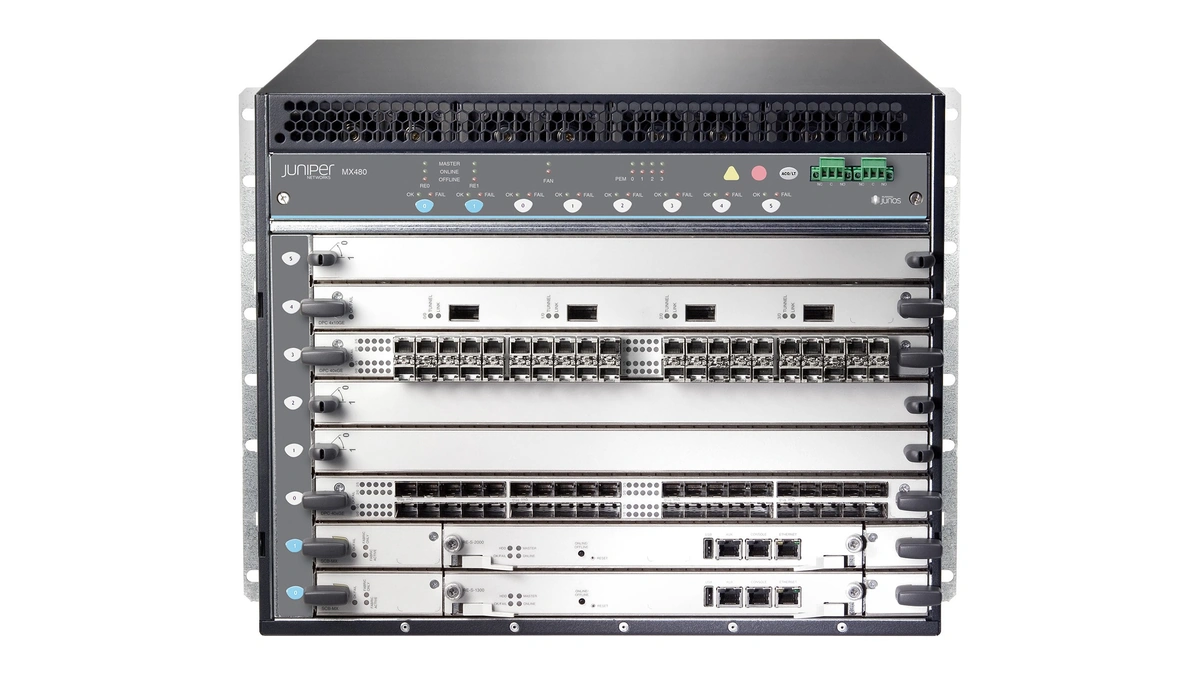
CGNAT, short for carrier-grade NAT and often written CGN, is defined by the IETF in RFC 6888 as a NAT-based logical function used to share the same IPv4 address among several subscribers. RFC 7289 adds that the technique is also known as Large-Scale NAT. The "carrier-grade" label describes where the device sits, not how well it performs: RFC 6888 calls it a topological qualifier, meaning the NAT lives in the ISP's network and translates the traffic of potentially many subscribers.
Two details matter for troubleshooting. Subscribers have limited or no control over a CGN, whereas they typically control the NAT on their own premises. And the CGN in RFC 6888 is IPv4-only. It stretches a scarce supply by reuse; it creates no new addresses.
Why ISPs use it: running out of IPv4 addresses
CGNAT exists because IPv4 exhaustion left providers with fewer public IPv4 addresses than they have customers. RFC 7289 names IPv4 exhaustion, meaning depletion of the address pool, as a major driver compelling some operators to implement CGN. The RIPE NCC announced that it has run out of IPv4 addresses, and noted both an IPv4 transfer market and greater use of CGNAT in its region.
Address space flows from IANA to five regional registries: RIPE NCC, APNIC, ARIN, LACNIC and AFRINIC. The governance story behind who allocates internet addresses explains why a late-arriving provider cannot simply ask for more, and the comparison of how IPv4 and IPv6 addressing differ shows why the supply is finite. A provider short of addresses has three broad options, summarized in RIPE Labs guidance on getting IP addresses:
- Buy or lease space on the IPv4 transfer market.
- Deploy CGNAT, which RIPE Labs lists as a way to grow a customer base without acquiring more IPv4 addresses.
- Move subscribers to IPv6. RFC 6264 says CGN devices with integrated transition mechanisms can reduce operational changes during migration or coexistence.
Cisco's documentation frames the trade the same way: CGNAT is a method ISPs use to extend IPv4 by sharing one public IP. Because the translation maps IPv4 to IPv4, engineers also call it NAT44.
CGNAT versus the NAT in your router
CGNAT applies the same idea as your home router, port address translation (PAT, also called NAPT), at provider scale. Your router hands RFC 1918 private addresses to devices on the LAN through DHCP and maps them all onto one WAN address. With CGNAT, the WAN address your router receives is itself not a public IPv4 address, so a second translation happens upstream.
| Aspect | Router NAT | CGNAT |
|---|---|---|
| Operated by | You | The ISP |
| Location | Between your LAN and the WAN | Inside the provider network, upstream of your router |
| Typical WAN address | A public IPv4 address | Shared address space or a private address |
| Port forwarding | Configured on your router | Only possible if the ISP offers PCP or a port mapping |
| Users per public address | One household | Many subscribers |
Any setup with two translations in a row is double NAT. A second router behind your main one causes it too, so a private WAN address alone does not prove the ISP is responsible. Mapping protocols such as UPnP and NAT-PMP ask the translating device to open a port, and they act on your own router only. PCP can reach further: RFC 6888 requires a carrier-grade NAT to offer subscribers a protocol for controlling their NAT mappings and says that protocol should be PCP, but few consumer providers expose it, so ask your ISP before counting on it. Router firmware including OpenWrt, pfSense and UniFi shows the WAN address on its status page, which is the starting point for the checks below.
The 100.64.0.0/10 range
The 100.64.0.0/10 block is the IPv4 range that RFC 6598 allocated as Shared Address Space to accommodate the needs of CGN devices. The RFC says the block is distinct from RFC 1918 private space because it is intended for service provider networks. In CIDR notation, /10 fixes the first ten bits, so the block spans 100.64.0.0 through 100.127.255.255, about 4.2 million addresses. The IANA IPv4 Special-Purpose Address Registry lists it as Shared Address Space that is not globally reachable. A separate block lets a provider number its CGN-facing links without colliding with the RFC 1918 ranges customers already use at home.
| Block | Span | Intended use |
|---|---|---|
| 10.0.0.0/8 | 10.0.0.0 to 10.255.255.255 | Private use inside a network (RFC 1918) |
| 172.16.0.0/12 | 172.16.0.0 to 172.31.255.255 | Private use inside a network (RFC 1918) |
| 192.168.0.0/16 | 192.168.0.0 to 192.168.255.255 | Private use inside a network (RFC 1918) |
| 100.64.0.0/10 | 100.64.0.0 to 100.127.255.255 | Shared address space for CGN in provider networks (RFC 6598) |
How to tell if you are behind CGNAT
A WAN address inside 100.64.0.0/10 is the strongest sign of CGNAT. Every other result is a clue to weigh, and the order below moves from the strongest evidence to the weakest.
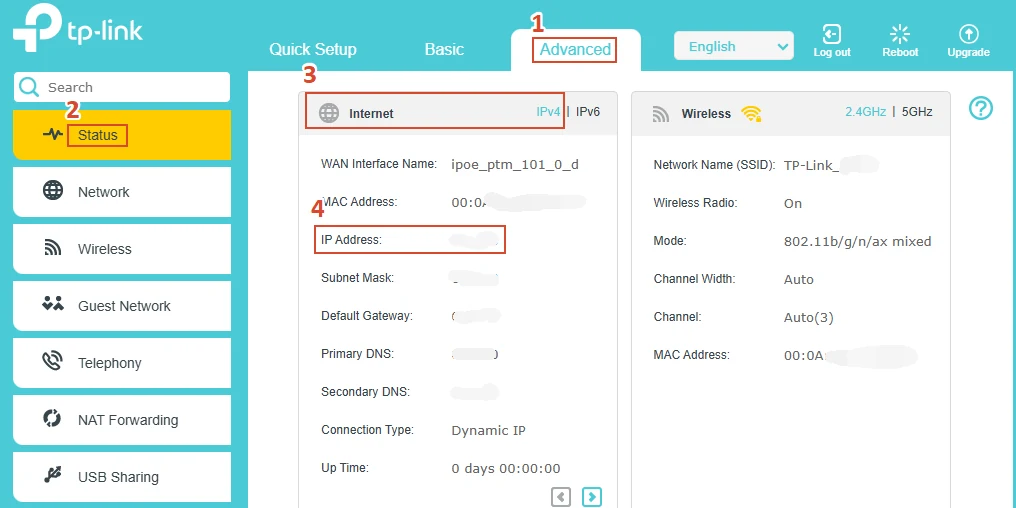
- Open your router's admin page and note the WAN address, sometimes labeled Internet IP.
- Look up your public IP from a device on the network using any "what is my IP" service.
- If the WAN address sits in 100.64.0.0/10 (100.64.x.x through 100.127.x.x), your provider is almost certainly running CGNAT.
- If the WAN address is a private address (10.x, 172.16.x to 172.31.x or 192.168.x), another NAT sits upstream. It may be CGNAT or a second router, which is double NAT.
- If the WAN address is public but differs from the address the internet sees, treat it as suggestive and ask the ISP.
- Run a trace as supporting evidence:
tracerton Windows,tracerouteon macOS and Linux,mtrfor a continuous view, orTest-NetConnection -TraceRoutein PowerShell. An early hop in 100.64.0.0/10 supports the diagnosis.
A trace never settles the question. Many devices drop ICMP or return no reply, and TTL expiry messages only reveal the hops that choose to answer. A public WAN address that matches your public IP rules CGNAT out. Networks that are short of addresses, such as mobile, satellite and fixed-wireless services, may place subscribers behind CGNAT, so check your own WAN address instead of assuming either way.
What CGNAT breaks
CGNAT breaks anything that needs inbound connections. Your connection has no public IPv4 address of its own, and the provider's translator holds no mapping for traffic you did not start. Outbound browsing works as usual, which is why the problem hides until you try to host something. Services named below may be affected, depending on the application and the provider.
- Self-hosting
- Port forwarding for HTTPS, SSH or RDP usually cannot work, which affects Plex, Home Assistant, Nextcloud, Synology remote access and a hosted Minecraft server.
- Real-time and peer-to-peer traffic
- WebRTC and SIP-based VoIP depend on NAT traversal through STUN, TURN and ICE, and NAT traversal gets harder when a second translator sits in the path. BitTorrent peers may be unable to reach you directly.
- Games and consoles
- Xbox, PlayStation and Nintendo Switch titles may report a restrictive NAT type or fail to host lobbies.
- VPN servers
- Running an IPsec, OpenVPN or WireGuard server at home needs inbound reachability. Connecting out to a VPN service works as before.
- Shared reputation and logging
- Many subscribers share one address, so a blocklist entry or abuse report can hit innocent neighbors. RFC 6888 notes that a provider handling abuse may need to identify a subscriber from the shared address, port and timestamp, which means logging every mapping it creates.
How to get around CGNAT
You cannot switch CGNAT off yourself, because the translation runs in the provider's network. The direct fix is asking your ISP for a public IPv4 address, often sold as a static public IP. Not every provider offers a static public IP, and support teams differ on whether they grant it. If they decline, you need a route that does not rely on inbound connections.
| Symptom | Likely cause | Fix |
|---|---|---|
| Port forwarding rule never works | WAN address is shared or private | Ask the ISP for a public address, or use a tunnel |
| Remote access to a home server fails | No inbound path to your router | Mesh VPN such as Tailscale |
| Web service must be public | No public IPv4 address to point at | Cloudflare Tunnel or ngrok |
| Game server or VPN must accept connections | Raw ports are unreachable | WireGuard tunnel to a VPS (an SSH reverse tunnel carries TCP only) |
| Dynamic DNS name points nowhere useful | Name resolves to the shared address | DuckDNS or No-IP only helps with a real public address |
A reverse tunnel is the most flexible option. Your home machine opens an outbound connection, using WireGuard or ssh -R, to a server that does have a public IPv4 address. Visitors reach that server, and traffic returns through the tunnel your side started. The usual stack is renting a VPS to act as a public relay, with nginx or Caddy terminating HTTPS and forwarding requests down the tunnel. The tunnel client can run in Docker next to the service it exposes.
Whichever path you pick, name resolution still matters: clients need a hostname that points at the relay, so the explainer on how DNS turns names into addresses is worth a read before you configure records. Dynamic DNS services like DuckDNS and No-IP track a changing address but do not create reachability behind CGNAT. Tailscale, Cloudflare Tunnel and ngrok take a hosted approach to the same outbound-connection idea.
IPv6 and the long-term way out
CGNAT is a stopgap for IPv4, and IPv6 is the way out. A dual-stack connection gives every device a public IPv6 address, usually via SLAAC, so inbound connections need only a firewall rule. When a hostname has an AAAA record, clients try IPv6 first, and Happy Eyeballs lets them fall back to IPv4 quickly. Providers pick from several transition designs:
- Dual-stack: IPv4 and IPv6 side by side, with CGNAT still serving the IPv4 half.
- DS-Lite (RFC 6333): IPv4 carried over an IPv6-only access network, with the translation done at the provider.
- NAT64 with DNS64, or 464XLAT: IPv6-only clients reach IPv4 services.
- MAP-T and MAP-E: IPv4 addresses shared by port range without per-flow state at the provider.
- 6rd: IPv6 delivered over an existing IPv4 network.
Which design you get is the provider's decision. Reading how far networks have actually moved to IPv6 and what blocks the rest helps set expectations, and a connection with working IPv6 lets you host services that IPv4 CGNAT never could.
CGNAT is not a firewall
CGNAT exists to conserve addresses. Dropping unsolicited inbound traffic is a side effect of the translation table, not a security policy, which makes it a weak substitute for securing devices that sit behind a home router. Keep these habits in place:
- Run stateful inspection on your own router and keep default-deny rules for inbound traffic.
- Remember that IPv6 and tunneled services are reachable from outside, and scanners such as Nmap and search engines like Shodan will find anything exposed.
- Restrict each tunneled service with an ACL or a Zero Trust access policy so only approved identities connect.
Further reading
Frequently Asked Questions
What is the difference between NAT and DNS?
NAT rewrites IP addresses and port numbers as packets cross a router, while DNS translates human-readable names into IP addresses. They solve different problems and run at different layers. Your device asks DNS where a site lives, then NAT rewrites the address on the packets that travel there.
What does 100.64.0.0/10 mean?
It is the shared address space that RFC 6598 reserves for carrier-grade NAT, covering 100.64.0.0 through 100.127.255.255 inside service provider networks. If your router's WAN address falls in this block, your provider is almost certainly using CGNAT. These addresses are not routable on the public internet.
Can you turn CGNAT off yourself?
No, because the translation runs in the provider's network and subscribers have limited or no control over it, as RFC 6888 describes. The only direct route is asking your ISP to move you to a public IPv4 address. Some providers handle that request, others do not, so ask support before you plan around it.
Can I bypass CGNAT without changing providers?
Yes, in most cases, by avoiding the need for an inbound connection. IPv6, a reverse tunnel to a rented server, or a mesh VPN each let outside devices reach your service without a public IPv4 address on your connection. The right choice depends on whether your clients can use IPv6.
Is CGNAT a security feature?
No, CGNAT exists to conserve IPv4 addresses, not to protect you. Blocking unsolicited inbound traffic is a side effect of how the translation table works, not a designed policy. Keep your own firewall and device updates in place, and treat any exposed service as reachable once you tunnel it out.