An uptime SLA is a written commitment that sets how much of each month a hosting service must stay reachable, and what the provider owes you when it falls short. The headline percentage gets the attention, yet the fine print decides what counts as downtime, who measures it and how much money comes back. Two hosts can both advertise 99.9% and leave a customer in very different positions after the same outage.
What 99.9% Uptime Means in Minutes
A 99.9% uptime SLA means the host commits to keeping the service available for at least 99.9% of each month. That allows about 43 minutes of counted downtime in a 30-day month, or 8 hours 45 minutes a year per the AWS availability table, before you can claim a credit, and only downtime the agreement counts adds up.
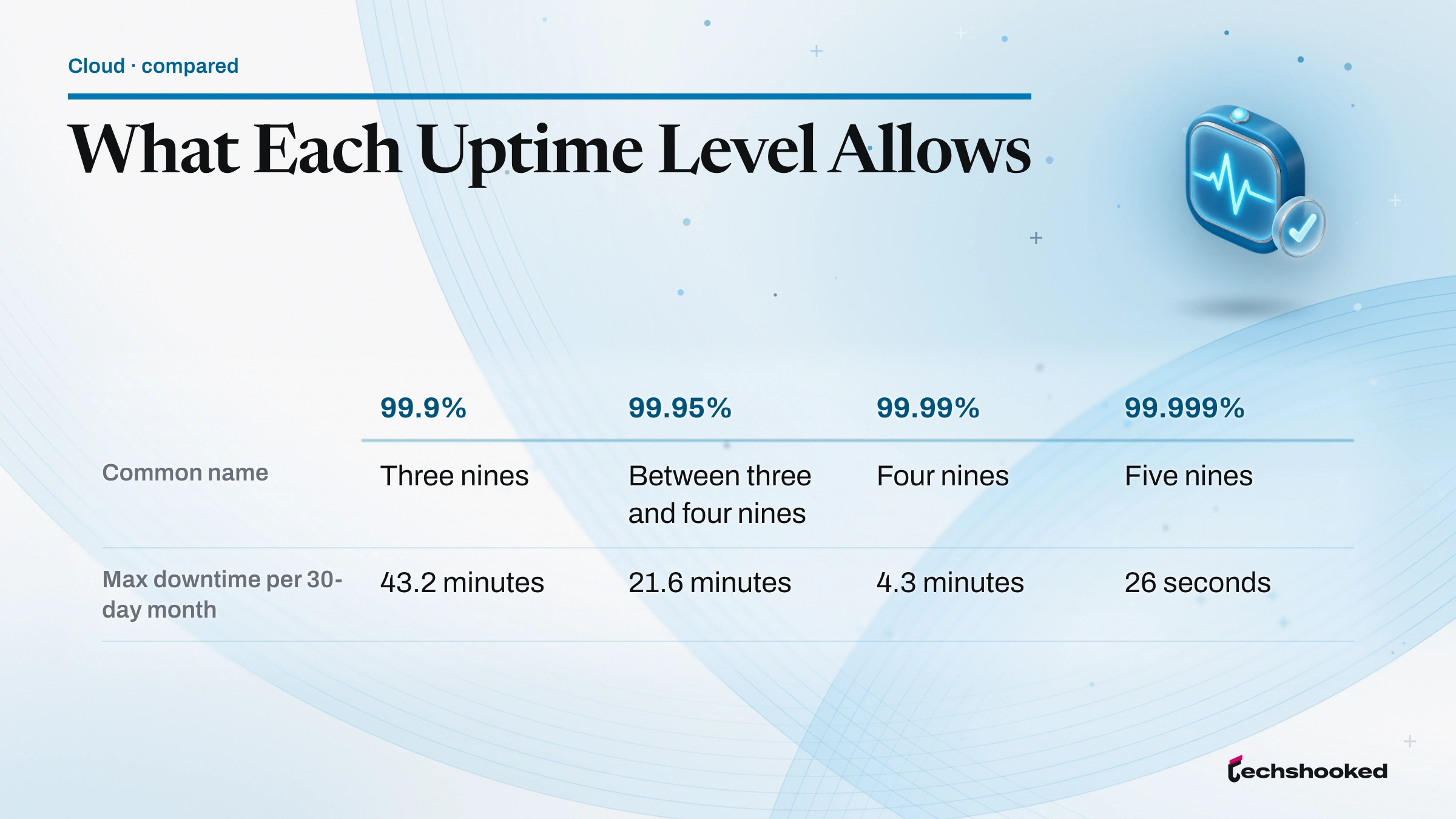
An uptime SLA percentage is easiest to judge once it is turned into time. Google Cloud publishes the conversion for a 30-day month in its infrastructure reliability guide, and the AWS Well-Architected Framework gives the yearly equivalent on its availability page:
| Availability | Common name | Max downtime, 30-day month (Google Cloud) | Max downtime per year (AWS) |
|---|---|---|---|
| 99.9% | Three nines | 43.2 minutes | 8 hours 45 minutes |
| 99.95% | Between three and four nines | 21.6 minutes | 4 hours 22 minutes |
| 99.99% | Four nines | 4.3 minutes | 52 minutes |
| 99.999% | Five nines | 26 seconds | 5 minutes |
Each extra nine cuts the allowed outage by a factor of ten. That is why the jump from a 99.9% uptime guarantee to 99.99% matters far more than the small change in the number suggests: about three quarters of an hour of permitted downtime per month shrinks to a few minutes. AWS lists online commerce and point of sale as example workloads for its 99.95% tier, and internal tools such as project tracking for 99.9%.
The table shows a ceiling, not a forecast. Microsoft makes the point in its guide to reading SLAs: a 99.9% SLA neither guarantees constant availability nor means you should expect only about 8.7 hours of downtime a year, because the agreement's own definition of downtime decides what gets counted.
How to Calculate Uptime and Allowed Downtime
An uptime SLA percentage turns into minutes with one formula. The DigitalOcean Droplet SLA spells it out: the monthly uptime percentage is the total minutes in the month minus the minutes of unavailability, divided by the total minutes in the month. The AWS Well-Architected Framework uses the same idea, defining availability as available-for-use time divided by total time. Three steps get you from the contract to a number:
- Count the minutes in the period. A 30-day month has 43,200 minutes, a 31-day month 44,640 and a 365-day year 525,600.
- Multiply by the share the SLA leaves open. At 99.9%, that share is 0.1%, so a 30-day month allows 43.2 minutes, a 31-day month about 44.6 and a year about 525.6 minutes, or 8 hours 45 minutes. At 99.99%, divide each figure by ten.
- Compare counted downtime with the allowance. Take the outage minutes you recorded, subtract anything the agreement excludes, such as a maintenance window, and check the result against the committed percentage. Microsoft's guide to reading SLAs sets out the same order before a credit claim.
Before a site has a track record, the AWS availability page offers an estimate: divide the mean time between failures (MTBF) by MTBF plus the mean time to recover (MTTR). Its example, a failure every 150 days with one hour to recover, works out to about 99.97%. In that formula, halving the recovery time lifts the result exactly as much as doubling the time between failures, so spotting and fixing an outage quickly counts as much as avoiding one.
How Hosts Measure Downtime
An uptime SLA is only as useful as its measurement rules. Microsoft separates two methods: time-based measurement checks whether a service was up during each interval, while request-based measurement divides successful responses by valid requests. The same outage can produce different scores under each. AWS adds that request-based figures are often taken over one-minute or five-minute periods and then averaged into a monthly uptime percentage.
Hosting contracts settle three further questions, and each one shifts the odds:
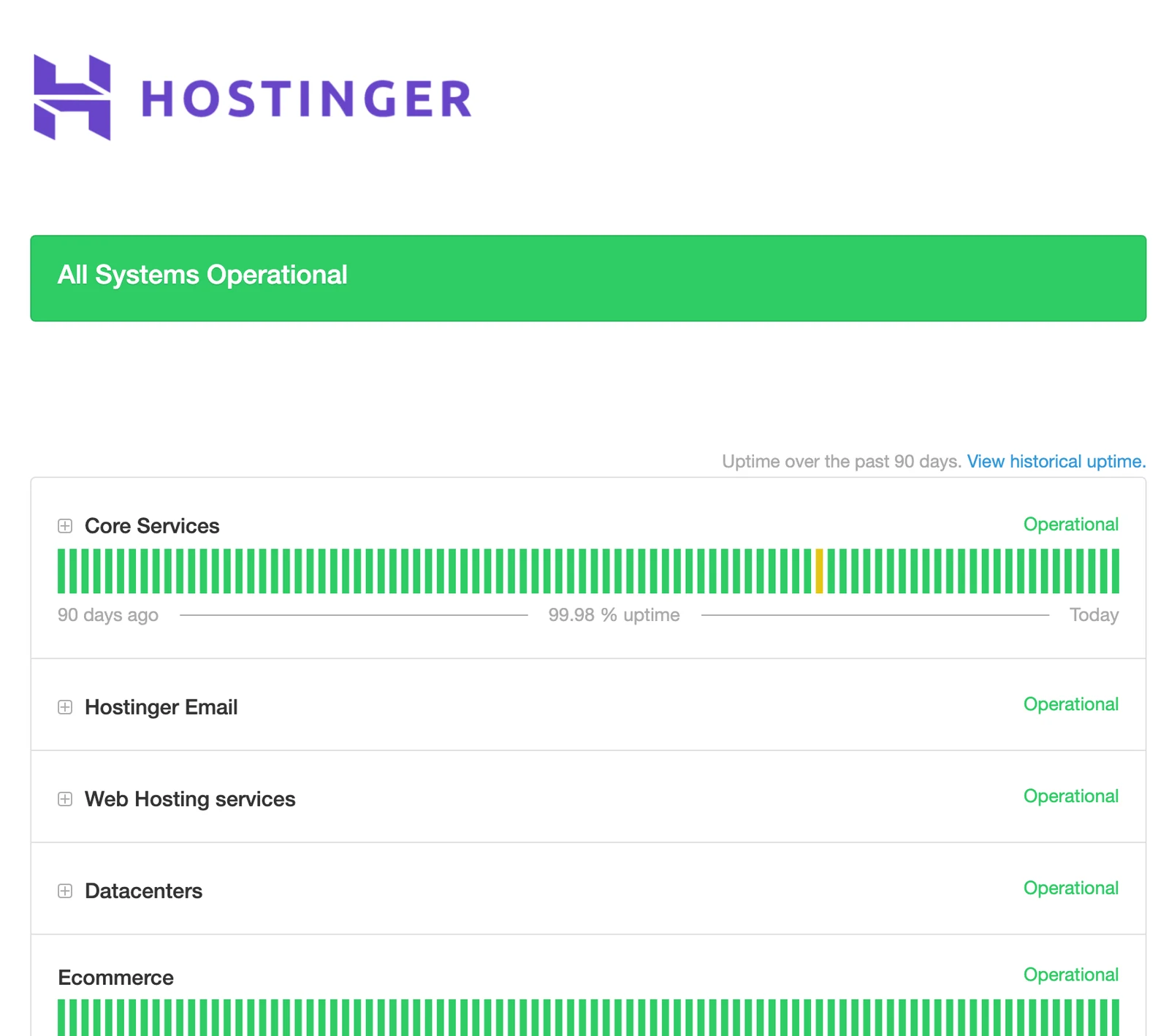
- Who measures: the Kinsta SLA calculates downtime from Kinsta's own monitoring, and the Hostinger Hosting Agreement says a missed month is "solely determined by us".
- Over what window: Kinsta measures each monthly billing period, and Hostinger measures available time per month.
- Per site or per account: Kinsta counts total downtime once, however many live sites fail together, while the DigitalOcean Droplet SLA applies its monthly uptime percentage to each Droplet on its own.
Microsoft flags two effects of these choices. When availability is pooled across instances, healthy ones can offset failed ones, and because uptime is usually measured over a billing period, an outage lasting several minutes can still meet the SLA for the month.
Both hosting agreements rely on the provider's own figures, which is the strongest reason to keep your own uptime monitoring. A provider's logs settle the credit; your logs show what visitors saw.
What Uptime SLAs Leave Out
Each uptime SLA here carves out events that do not count against the percentage. Read side by side, the three agreements share a familiar set of exclusions:
- Scheduled maintenance: Kinsta excludes work done in a daily window from 2 am to 5 am in the local time of each data center, plus emergency maintenance at any hour.
- Force majeure: Kinsta's force majeure clause covers natural disasters, power failures and outages caused by external service providers.
- Overload: Kinsta does not count downtime from traffic, requests or processes that exceed what the site, the plan or the service can handle.
- Your own code: Hostinger excludes interruptions from custom scripting, coding and third-party applications, and DigitalOcean excludes issues from customer application code or configuration.
- Attacks and network paths: Hostinger excludes DDoS attacks, IP blacklists, problems at the customer's ISP and on routes between the customer and the server.
- Partial outages: Hostinger does not count FTP or email failures that leave the website itself looking normal, nor browser caching or DNS issues.
The DNS carve-out deserves attention, because a broken record or a slow resolver looks exactly like a dead server to a visitor. The DNS explainer walks through the lookup chain that runs before a request ever reaches the host. Microsoft's broader advice applies here: if a failure does not meet the agreement's definition of downtime, the agreement does not cover it.
What an Uptime SLA Pays When It Fails
The remedy in an uptime SLA is a service credit, not a refund, in all three agreements below, which matches Microsoft's description of compensation that usually takes the form of credits. The size varies widely:
| Provider and plan type | Uptime guarantee | Remedy | Claim window |
|---|---|---|---|
| Hostinger hosting | 99.9% per month | 5% of that month's hosting fee, for future purchases only | 30 days |
| Kinsta managed WordPress | 99.9%, or higher in an order form | Tiered credit from 5% once downtime passes 43 minutes | 30 days, via chat |
| DigitalOcean CPU Droplets | 99.99% per Droplet | 100% of the affected Droplet's charges as credit | Two billing cycles |
Kinsta's schedule shows how a tiered service credit works. Under its 99.9% uptime guarantee, 43 to 59 minutes of downtime earns 5% of the monthly subscription value. The credit rises in hourly steps, reaching 20% for 180 to 239 minutes of downtime. It is then scaled by the share of live sites that were affected, capped at one month's value, and carries no cash value, per the Kinsta service level agreement. Where an order form sets a 99.99% guarantee, the same steps start once downtime passes 4 minutes, and Kinsta may cut the guarantee back to 99.9% after a plan downgrade.
Even the most generous remedy is sized to the hosting bill, not to lost sales. A store that loses a busy afternoon gets back a slice of a monthly fee, and Microsoft's guide states plainly that credits do not cover lost revenue, customer attrition or reputational damage. That gap is why Microsoft calls SLAs engineering signals rather than strict availability guarantees: they describe the provider's financial exposure, and they say little about yours.
How to Claim an Uptime SLA Credit
An uptime SLA credit rarely arrives on its own. Microsoft notes that providers do not usually apply credits automatically or file claims for you: the customer has to detect the breach, document it and submit the claim before a deadline. The three hosting agreements above work the same way, and a claim goes more smoothly in this order:
- Record the outage while it happens. Note start and end times with the time zone, the error codes or timeouts you saw, and any status page update or support reply that acknowledges the problem.
- Check that it counts. Apply the agreement's formula, remove excluded time, and confirm the month fell below the guarantee, as in the calculation above.
- Use the channel the contract names. Kinsta requires a written request through the chat system in its platform. The Droplet SLA asks for an email with the account address, the affected Droplet details and the outage dates and times. Hostinger's agreement says only that you may contact it and request the credit.
- Beat the deadline. Hostinger accepts claims for up to 30 days after the interruption, Kinsta within 30 days of the downtime, and DigitalOcean within two billing cycles. Kinsta states that missing its window forfeits the credit.
- Watch where the credit lands. DigitalOcean applies verified credits within one billing cycle, toward future Droplet charges only, and unused Kinsta credits expire when the hosting plan ends.
Why a Site Rarely Matches Its Host's Uptime SLA
A site depends on more than the server behind its uptime SLA, and every hard dependency lowers the total. Google Cloud's reliability guide works through the math for a stack where every tier is built for 99.9%:
- Two tiers (frontend and application) land at about 99.8%, or roughly 86 minutes of possible downtime in a 30-day month.
- Three tiers add a middle layer and fall to about 99.7%, or roughly 130 minutes.
- Four tiers add a data layer and fall to about 99.6%, or roughly 173 minutes.
AWS states the same rule: a system designed for 99.99% that has a hard dependency on two other independent systems, each designed for 99.99%, can theoretically achieve about 99.97%. A WordPress store can chain DNS, a CDN, the web server, a database and a payment gateway, and by the same multiplication each added hard dependency pulls the total below that of its least reliable part. A CDN is one more layer in that chain, and the overview of how a CDN improves web performance covers what it adds.
Redundancy pushes the other way. AWS calculates that two independent components at 99.9% each give a theoretical 99.9999%, but Google caps what you can expect at the target of the deployment location: 99.9% in a single zone, 99.99% across multiple zones in a region and 99.999% across multiple regions. Microsoft adds a warning about any composite SLA built by multiplying percentages: it gives at best an approximate maximum, because services rarely fail independently and each agreement has its own exclusions.
That leads site owners to a service-level objective of their own. Microsoft defines an SLO as the internal reliability target you set for your workload, and recommends using provider SLAs to inform it rather than adopting their percentage. A composite SLA estimate is a starting point for that service-level objective, not a substitute for it.
How to Check a Host's Uptime SLA Before You Sign
Checking an uptime SLA is a short job with the agreement open, and the order matters:
- Find the contract, not the banner. Hostinger's technology page cites 99.99% uptime on its public status page, while its Hosting Agreement guarantees 99.9%. The agreement is the number you can claim against.
- Read the definitions first. Check what counts as downtime, which services are covered and whether the monthly uptime percentage applies per site, per server or per account. Microsoft points out that a pricier tier sometimes improves the downtime definition rather than the percentage, and that SLAs can also cover performance, recovery time or data durability, so confirm which commitment a figure belongs to.
- List the exclusions. Note the scheduled maintenance window against your busiest hours, and whether overload, DDoS and DNS problems are excluded.
- Price the remedy. Work out what a three-hour outage would return under the credit table, and compare it with what three hours offline would cost the business.
- Set up independent uptime monitoring. Google Cloud Monitoring uptime checks send requests from several locations, require at least three checkers and only fail when more than one location gets no response, which filters out single-path network blips.
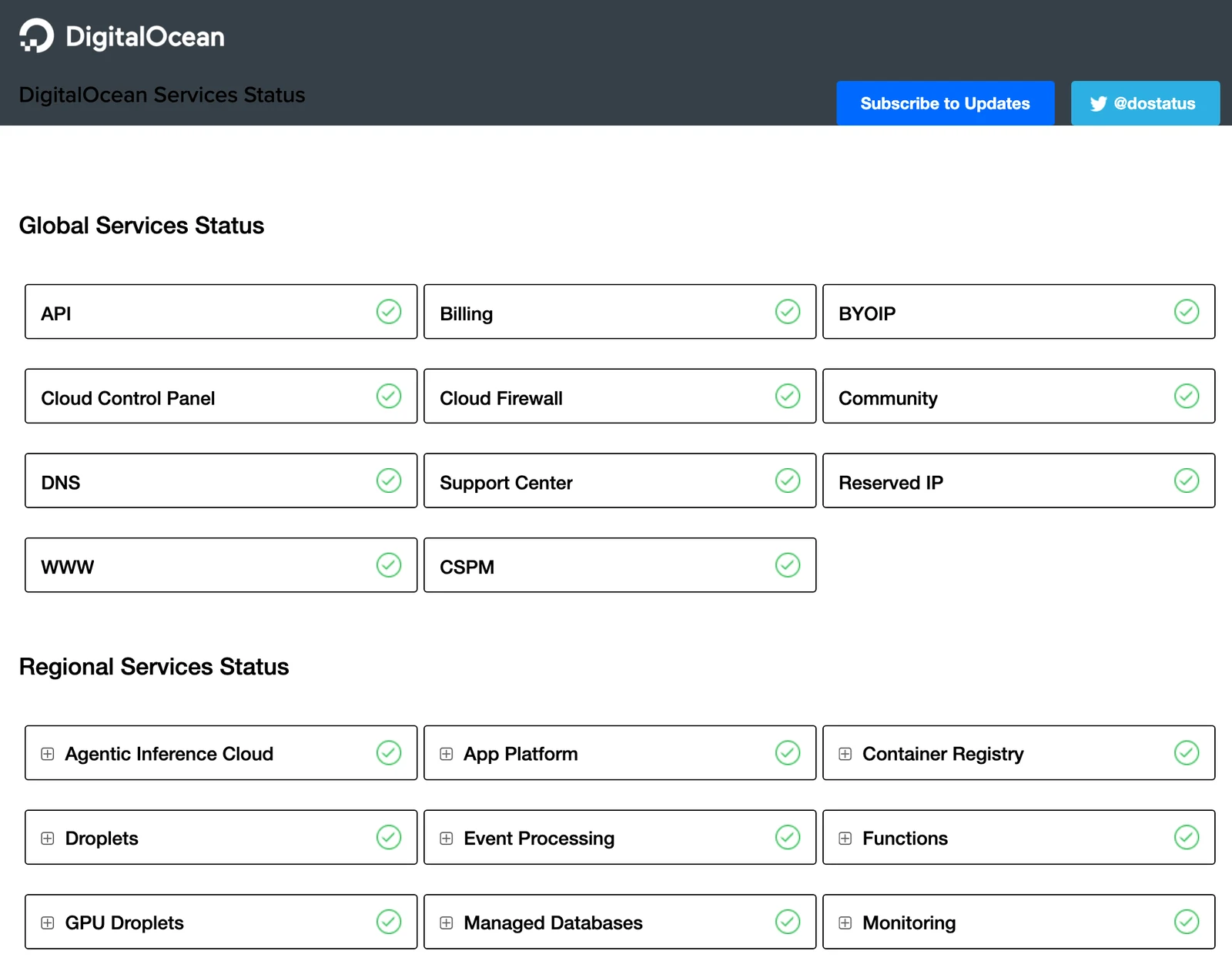
- Read the status page history. A public status page with dated incidents shows how often maintenance and outages happen and how quickly they are explained.
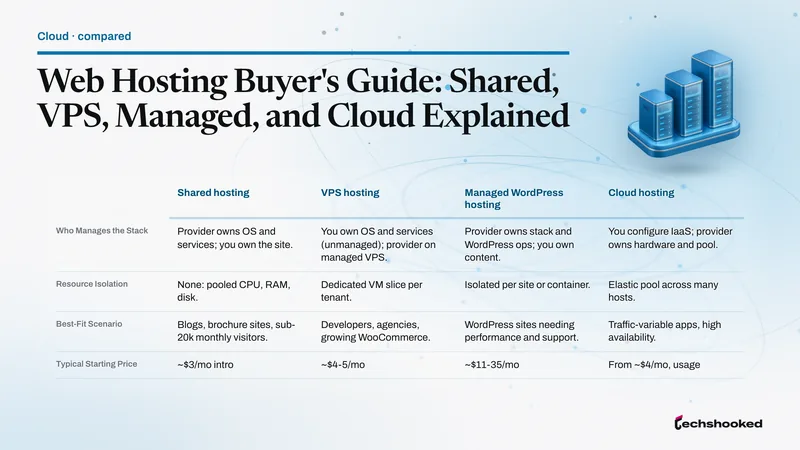
As a rule of thumb, treat a 99.9% uptime guarantee with clear exclusions as the baseline for a brochure site or a blog, and let price, support and speed decide the rest; the web hosting buyer's guide walks through those trade-offs by hosting type. The Hostinger review covers what a budget plan includes beyond its uptime guarantee, and if a current host's terms or track record fall short, the rundown of Bluehost alternatives lists other hosts worth weighing. For a store or a booking site, weigh multiple zones, a 99.99% tier and your own monitoring above any single headline percentage.
Further reading
Frequently Asked Questions
What does a 99.9% uptime SLA mean?
It means the host commits to keeping the service available for at least 99.9% of each month. That allows about 43 minutes of counted downtime in a 30-day month, or 8 hours 45 minutes a year. That is the breach threshold, not a forecast: scheduled maintenance and problems caused by your own code sit outside the calculation at both Hostinger and Kinsta, so a site can be offline for longer without the host missing its SLA.
What does a 99.95% availability SLA mean per year?
A 99.95% SLA allows up to 4 hours 22 minutes of downtime a year, by the AWS Well-Architected Framework table. Google Cloud converts it to about 21.6 minutes in a 30-day month. AWS lists online commerce and point of sale as example workloads for that tier. As with any SLA, events the agreement excludes do not count toward the total.
Is a 99.99% uptime SLA good?
It is a strict target: 99.99% allows about 4.3 minutes of downtime in a 30-day month, against about 43 at 99.9%. Google Cloud ties its 99.99% availability target to deployments across multiple zones, and a 99.99% guarantee in a Kinsta order form starts paying credits once downtime passes 4 minutes. Whether it is worth the extra cost is a business call, so compare the price difference with what an hour offline costs you.
Can a host guarantee 100% uptime?
None of the agreements reviewed here promises it: Hostinger and Kinsta guarantee 99.9% by default and DigitalOcean 99.99% per Droplet. Microsoft notes that an SLA does not guarantee a service always remains available, and AWS says designing for higher availability typically raises costs, partly because it requires automated recovery from all manner of failures. Plan for some downtime and work on keeping each outage short.
Will I get a refund if my host misses its uptime guarantee?
Usually not; uptime SLAs pay service credits toward future bills, and only if you file a claim in time. Hostinger offers 5% of that month's hosting fee for future purchases, claimed within 30 days. DigitalOcean credits apply only to future Droplet charges and are non-refundable, and Kinsta credits carry no cash value and expire when the hosting plan ends.
Does scheduled maintenance count as downtime?
Not under the hosting SLAs reviewed here; Hostinger, Kinsta and DigitalOcean all exclude scheduled maintenance. Kinsta also publishes a daily maintenance window from 2 am to 5 am in each data center's local time. AWS advises against excluding planned maintenance from your own availability figures, because users still want the site during those hours.