WordPress hosting for agencies is a managed platform category that bundles multi-site client management, per-site staging environments, and white-label billing controls into a single agency account. This roundup sorts the five providers that dominate that category by team shape: dashboard-led agencies, developer-heavy studios, cost-flexible freelance portfolios, white-label billing specialists, and Automattic-ecosystem boutiques.
Our Top Picks at a Glance
Our verdict on WordPress hosting for agencies depends less on raw traffic tiers than on how your team works. Established agencies scaling client sub-accounts land on Kinsta; developer-led teams pushing code daily fit WP Engine; freelancers with mixed-size client sites get the most flexibility from Cloudways; billing-consolidation shops belong on Flywheel; Automattic-stack boutiques benefit most from WordPress.com for Agencies.
- Kinsta Agency plan: best for established agencies and white-label scale. MyKinsta sub-accounts, application-level isolation on Google Cloud Platform C2 machines, one-click staging push per site. The WP 5 tier starts at $115/month ($96/month annual) for 5 installs, scaling to Agency 20 at $340/month for 20 installs, per the Kinsta pricing page.
- WP Engine Growth plan: best for development-heavy agency teams. WP Engine Hub, Git push-to-deploy with GitHub and Bitbucket integration, Transferable Sites for client handoff. Growth starts at $109/month for 10 sites and 100,000 monthly visits, per the WP Engine plans page.
- Cloudways: best for cost-flexible freelance portfolios. Resource-based billing across DigitalOcean, Vultr High Frequency, AWS EC2, and Google Cloud Platform. The entry DigitalOcean Micro server starts at $11/month with 2GB RAM, 50GB storage, and 2TB bandwidth, per the Cloudways pricing page.
- Flywheel Growth Suite: best for white-label client billing. Flywheel Agency at $242/month covers up to 30 sites, 400,000 monthly visits, and 50GB storage, with billing transfer, Organizations, Collaborators, and Blueprints, per the Flywheel pricing page.
- WordPress.com for Agencies: best for Automattic-ecosystem freelancers. No membership fee to join; bulk discounts of up to 70% applied automatically across WordPress.com, Pressable, Jetpack, and Woo, plus a revenue-share component, per the WordPress.com for Agencies program page.
| Provider | Best for | Starting price | Sites included | Staging | White-label | Standout feature |
|---|---|---|---|---|---|---|
| Kinsta | White-label scale | $115/mo (WP 5) | 5 | One-click, per site | MyKinsta sub-accounts | LXC container isolation on GCP C2 |
| WP Engine | Dev-led teams | $109/mo (Growth) | 10 | One-click, per site | Hub sub-accounts | Git push-to-deploy in the Hub |
| Cloudways | Freelance flexibility | $11/mo (DigitalOcean Micro, 2GB) | Unlimited apps per server | Clone-and-promote | Teams, no brand removal | Multi-cloud server choice |
| Flywheel | White-label billing | $242/mo (Agency) | 30 | One-click, per site | Full white-label | Client billing portal |
| WordPress.com | Automattic stack | No membership fee | Per-plan bulk | Site editor draft | Not white-label | Jetpack Security bundled |
How We Evaluate Agency WordPress Hosting
We evaluate WordPress hosting for agencies on five criteria that matter most when a client site failure becomes your business problem, not just a support ticket. Our methodology is criteria-based comparative research plus direct vendor-documentation verification against the WordPress.org hosting team's published requirements. We do not claim hands-on operational time with each host; instead, we anchor every capability claim to a primary source and check pricing against the vendor's own plans page.
- Performance: PHP worker limits, whether the host applies application-level isolation per site or pools resources, and each vendor's own published server response time (TTFB) and Core Web Vitals claims, read from documentation rather than measured by us. We ran no PageSpeed Insights benchmarks for this piece.
- Multi-site management: how many sites are included per plan, whether each site gets its own staging environment, and the workflow for deploying updates across multiple client sites simultaneously.
- Developer tooling: SSH access, SFTP, WP-CLI availability, Git push-to-deploy support, and compatibility with local development environments such as DevKinsta or Local by Flywheel.
- White-label and client access: whether the dashboard can be branded or access-restricted per client, and whether the client billing portal passes charges through the agency or routes them directly to the host.
- Support and security: whether support staff are WordPress specialists with a documented uptime SLA guarantee, whether the platform publishes a compliance/security certification, and whether automatic WordPress updates and Sucuri malware scanning or Patchstack vulnerability intelligence are included.
Kinsta: Best for Established Agencies and White-Label Workflows

Kinsta runs every WordPress site on Google Cloud Platform C2 machines inside LXC containers, giving each client site application-level isolation regardless of activity on other sites in the account. That isolation is why Kinsta stands out among providers of WordPress hosting for agencies with heavy portfolios: a runaway plugin or traffic spike on one client cannot exhaust the PHP worker limits allocated to another. The MyKinsta dashboard supports client-level sub-accounts with per-site permissions, and the Kinsta white-label dashboard lets agencies present MyKinsta to clients under a custom domain.
Strengths cluster around performance and workflow: Kinsta Edge Caching sits in front of every site, Cloudflare CDN integration is bundled, and DevKinsta provides a matching local development environment. Free managed WordPress migrations are included on every plan, and the Kinsta APM tool surfaces slow queries in the same dashboard. The trade-off is price. The WP 5 tier starts at $115/month ($96/month annual) for 5 installs, and the Agency 20 tier starts at $340/month ($284/month annual) for 20 installs, scaling to Agency 60 at $675/month, per the Kinsta pricing page. Storage on the WP 5 tier caps at 30GB, which is tight for image-heavy portfolios.
- Per-site LXC isolation prevents cross-tenant contention on shared C2 hardware.
- MyKinsta sub-accounts + white-label domain support client-facing access without exposing the Kinsta brand.
- Honest limitation: entry-tier storage is 30GB, and per-site pricing rises quickly above 20 installs.
WP Engine: Best for Development-Heavy Agency Teams

WP Engine built its agency workflow around the Hub, a centralized dashboard that lets teams manage multiple WordPress installations, assign developer roles, and push code via Git without switching interfaces. Among agency WordPress hosting platforms, WP Engine is the most opinionated on developer-led workflow: the WP Engine Hub dashboard exposes SSH access, WP-CLI, and Git push-to-deploy with GitHub integration and Bitbucket integration on every plan above Startup.
Strengths lean technical. EverCache technology sits in front of every site to protect Core Web Vitals scores under agency-scale traffic, WP Engine Global Edge Security bundles a WAF and DDoS mitigation, and the Genesis Framework and StudioPress themes are included at no extra cost. Transferable Sites let agencies build a site under the agency account and hand off billing to the client. Local by Flywheel and the WP Engine Local development tool round out the toolchain. The honest limitation: pricing scales aggressively. Growth starts at $109/month for 10 sites and 100,000 visits per month, and Scale jumps to $276/month for 30 sites and 400,000 visits, per the WP Engine plans page. Client sub-accounts exist through the Hub but do not remove the WP Engine brand from the client view.
- Git push-to-deploy plus GitHub and Bitbucket integration is the strongest developer workflow in the category.
- Transferable Sites make client handoff a billing switch rather than a migration project.
- Honest limitation: no true white-label; branding remains WP Engine even for client sub-accounts.
Cloudways: Best for Cost-Flexible Freelance Portfolios

Cloudways bills by server resource consumption rather than by site count, which makes it the most cost-efficient option for a freelancer managing several small client sites at different traffic levels on one cloud server. Among agency WordPress hosting choices, Cloudways is the only vendor that lets you host arbitrarily many client applications on a single Cloudways DigitalOcean server, or scale up to a DigitalOcean Droplet, Vultr High Frequency instance, AWS EC2 instance, Google Cloud Platform node, or Linode Akamai server without switching platforms.
Strengths center on flexibility and price. The Cloudways Breeze cache plugin, StackPath CDN, and an optional Cloudflare Enterprise add-on cover performance. Cloudways SafeUpdates handles automatic WordPress updates with visual regression testing, and Cloudways Teams grants role-based access to each application. Pricing starts at $11/month for the DigitalOcean Micro plan with 2GB RAM, 50GB storage, and 2TB bandwidth, per the Cloudways pricing page. WordPress Multisite (WPMU) is supported. The honest limitations: staging is a manual clone rather than a one-click staging push, and Cloudways support covers the server layer but not plugin-level issues; there is no client billing portal or brand removal.
- Resource-based billing across five cloud providers suits mixed-size client portfolios.
- SafeUpdates plus staging cloning give a lightweight change-management workflow.
- Honest limitation: support does not cover WordPress plugin issues, and there is no white-label client portal.
Flywheel: Best for White-Label Client Billing
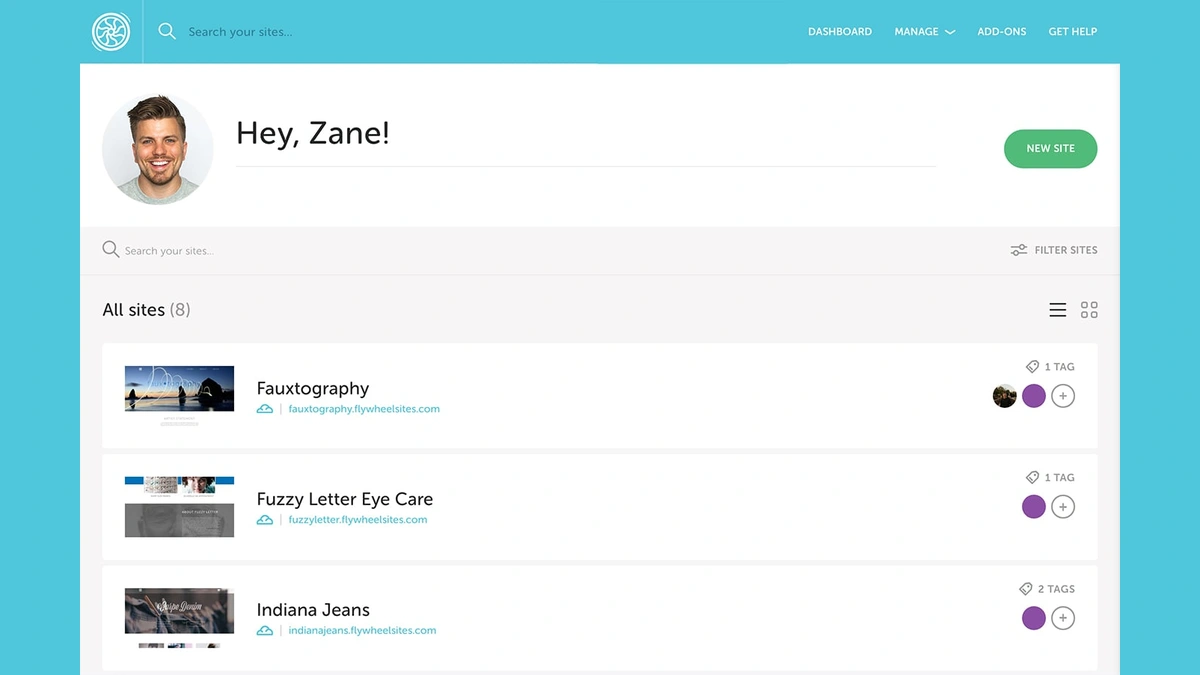
Flywheel, now a WP Engine subsidiary, built its Growth Suite entirely around the operational pain of agencies: consolidated billing, client-facing portals under the agency brand, and bulk site management without the Flywheel name appearing to clients. Inside the agency WordPress hosting category, Flywheel Growth Suite is the only product that offers a fully branded white-label client portal with billing transfer, so clients pay the agency directly and never see Flywheel invoicing.
Strengths are billing-first. The Flywheel white-label client portal handles invoicing, the Flywheel bulk billing feature consolidates monthly charges into a single agency invoice, and Flywheel Blueprint sites let you clone a starter build across new client engagements. Flywheel Managed WordPress covers Flywheel nightly backups, a per-site Flywheel staging environment, and free managed WordPress migration on onboarding. Pricing is transparent: Flywheel Agency runs $242/month for up to 30 sites, 400,000 monthly visits, and 50GB storage, with Organizations for team collaboration and Collaborators for outside contractors, per the Flywheel pricing page. The honest limitations: Git push-to-deploy is less direct than on WP Engine or Kinsta, and Flywheel and its parent WP Engine are separate products that should not be treated as interchangeable.
- Full white-label billing removes the Flywheel brand from the client experience.
- Blueprint sites and Organizations shorten new-client onboarding.
- Honest limitation: Git deployment is via Local by Flywheel sync rather than direct push-to-deploy, and there is no separate development tier below Agency at the multi-site level.
WordPress.com for Agencies: Best for Automattic-Ecosystem Freelancers

WordPress.com for Agencies is an Automattic partner program that gives qualifying freelancers and boutique agencies access to discounted WordPress.com Business plans, Jetpack Security features, and co-marketing support, priced through bulk discounts and revenue share rather than a flat site or visitor tier. The program runs as a partner-reseller model built on the WordPress.com Content Delivery Network and the Automattic product stack.
Strengths sit in bundled security and ecosystem integration. Jetpack Security ships with Akismet anti-spam and Jetpack Boost, Woo (WooCommerce) is first-class, and support routes through Automattic Happiness Engineers who work with the WordPress.org core team. There is no membership fee to join; bulk discounts of up to 70% are automatically applied across WordPress.com, Pressable, Jetpack, and Woo purchases, plus a revenue-share component with terms disclosed only after enrollment, per the WordPress.com for Agencies program page. Honest limitations: the platform is less suitable for high-traffic agency clients that need dedicated PHP worker limits, and developer tooling (SSH, WP-CLI, Git) is narrower than on a managed host such as Kinsta or WP Engine, so a mixed portfolio may still need a second vendor for heavier builds. WordPress VIP is a separate, enterprise-priced product.
- Jetpack Security, Akismet, and Woo included at partner-discounted rates.
- Support routes through Automattic Happiness Engineers rather than a generic ticket queue.
- Honest limitation: not a fit for high-traffic clients or Git-heavy development workflows.
See WordPress.com for Agencies.
How to Choose Agency WordPress Hosting
The right agency hosting plan depends on three variables: how many client sites you need under one multi-site management console (or a single WordPress Multisite network), whether clients need direct dashboard access, and whether your workflow is developer-led or support-led. Add two secondary variables if you serve regulated clients: a GDPR data residency requirement usually forces EU data center availability, and enterprise procurement will ask for a published compliance certification. The best managed WordPress hosting roundup takes the single-site traffic-tier view rather than agency-portfolio operations, covering the same Kinsta, WP Engine, and Cloudways trio alongside Rocket.net and Hostinger on visit-count billing.
- Site count and growth pace: hosts with flat per-site fees (Kinsta Agency plan, WP Engine Growth plan, Flywheel Growth Suite) suit agencies with predictable client rosters; Cloudways' resource-based multi-site management model suits freelancers whose client sites vary widely in size.
- White-label requirement: only Flywheel Growth Suite fully hides the host brand through a white-label client portal; Kinsta and WP Engine support client sub-accounts with restricted access but do not remove vendor branding.
- Developer workflow: Git push-to-deploy is most mature on WP Engine and Kinsta; Cloudways and Flywheel use SSH and SFTP plus companion local-dev apps for the same job.
- Staging depth: confirm whether staging is a full environment copy with one-click staging push (Kinsta, WP Engine, Flywheel) or a manual clone step (Cloudways).
- Support model and white-label reseller agreement: Kinsta and WP Engine staff WordPress specialists with a WordPress-native support SLA; Cloudways support covers the server layer but not plugin-level issues; WordPress.com for Agencies routes support through Automattic Happiness Engineers, and any reseller must review the terms before signing.
Further reading
Frequently Asked Questions
Can I host multiple client WordPress sites under one agency hosting plan?
Yes. Agency-tier plans are built for exactly this workflow. Kinsta Agency plans start from five sites under one account; WP Engine Growth supports two to ten sites with shared visit pools; Cloudways lets you spin up a separate application per client on a shared server with no hard site cap, billed by resource consumption. Flywheel Growth Suite bundles multiple sites with per-client access controls and consolidated billing. The right choice depends on whether you prefer a flat per-site fee or a resource-consumption model.
What does white-label WordPress hosting actually include?
White-label hosting lets your agency present a control panel under its own branding rather than the host logo. Flywheel Growth Suite goes furthest: clients pay your agency directly through a branded billing portal, and the Flywheel name is hidden from the client view. Kinsta allows client-level sub-accounts inside MyKinsta with restricted access. WP Engine Hub supports client sub-accounts but does not suppress its branding. True white-labeling means a custom domain for the dashboard, removed vendor branding, and agency-level invoicing; the strongest implementation is on Flywheel.
Do all agency WordPress hosting plans include staging environments for every site?
Most managed agency plans include at least one staging environment per site, but the mechanics vary. Kinsta and WP Engine include one-click staging on every plan with a push-to-live button. Cloudways provides staging as a cloneable server environment you promote to production manually. Flywheel Growth Suite includes staging-to-live push for all sites in the plan. If your agency deploys code frequently, confirm whether the host provides one-click staging promotion or requires manual file and database synchronization.
How do agency WordPress hosts handle developer access and deployment workflows?
Developer-friendly agency hosts provide SSH, SFTP, WP-CLI, and increasingly Git-based deployment. WP Engine offers full Git push-to-deploy via its Hub and supports GitHub and Bitbucket integrations. Kinsta supports SSH and SFTP on all plans and ships DevKinsta, a local development environment that syncs directly with staging. Cloudways provides SSH and SFTP on all paid tiers. Flywheel uses Local by Flywheel for local-to-staging sync, though Git push-to-deploy is less direct than on WP Engine or Kinsta.