Web hosting is the service that stores your website's files on a remote server and delivers them to visitors on demand, and the type you choose determines your site's speed, uptime, cost, and control ceiling. To choose web hosting, start from what your site has to do, pick the hosting type that fits it, then compare plans on the renewal price, the published resource limits, backups, uptime terms, support, and how easily you can leave.
How to Choose Web Hosting: The Short Answer
Choose web hosting in seven steps: define what the site must do, match that to a hosting type (shared, VPS, managed WordPress, or cloud), set the budget at the renewal price, read the plan's published limits, confirm backups and security, check uptime terms and support, and plan your exit before you sign.
- Define what the site needs. Note what you run (a blog, a store, a custom app), the traffic you expect within a year, and how much server work you will do yourself.
- Match the need to a hosting type. Shared hosting suits small, mostly static sites; VPS hosting suits developers who want root access; managed WordPress hosting suits owners who want the server work done; cloud hosting suits traffic that swings hard.
- Set the budget at the renewal price. Entry plans are sold on an introductory rate that resets at renewal: Hostinger's entry WordPress plan is $2.99 a month on a 48-month term and renews at $10.99, per Hostinger. Budget for the second number.
- Read the published plan limits. Look for PHP workers, storage, bandwidth or visits, and site count, plus what happens past them: throttling, an overage fee, or a forced upgrade.
- Confirm backups and security. Check backup frequency, retention, off-server storage, and restore fees, plus free SSL, a firewall, malware scanning, and two-factor login.
- Check uptime terms, support, and location. Read what the uptime guarantee actually pays, confirm the support channels on your plan, and pick a data center near most of your visitors.
- Plan the exit before you sign. Confirm the refund window, whether the host migrates your site for free, and whether backups come out in a standard format (a SQL dump plus files) you can take to the next host.
The sections below expand each step: the four hosting types, the decision criteria, the questions to ask, real costs, and picks by scenario.
What Web Hosting Actually Does
Web hosting connects three moving pieces: a domain name, DNS resolution through a nameserver, and a web server that returns files over an HTTP response. When a visitor types your URL, their browser asks a nameserver for the IP address on record, opens a connection to the web server at that address, and the server returns the HTML, CSS, JavaScript, and images that assemble your page. Per AWS's overview of web hosting, a hosting provider takes on ongoing server maintenance and security upgrades so you don't have to. In practice that also extends to jobs a browser never sees directly: bandwidth allocation and data center power and cooling.
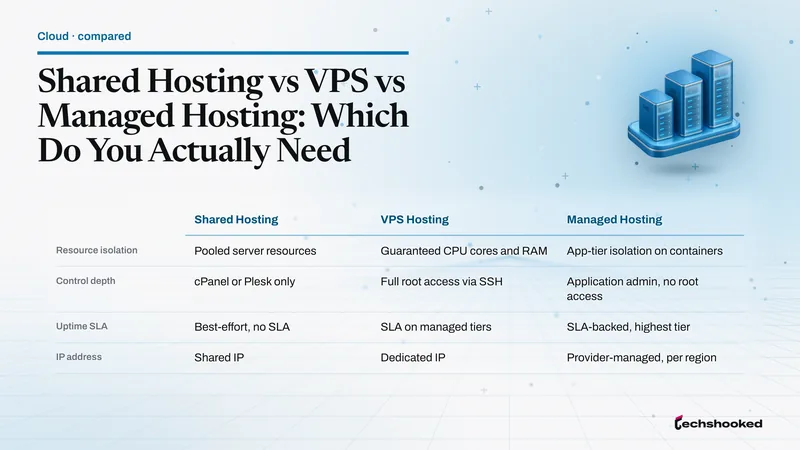
The category everyone calls "web hosting" is actually four distinct products with different resource models and management responsibilities. Shared hosting, VPS hosting, managed WordPress hosting, and cloud hosting sit on the same continuum, but they answer very different questions about who owns the operating system, how many other tenants share your CPU cores, and how quickly the platform can absorb a traffic spike. Choosing the wrong tier is the single most common cause of the two problems every site owner eventually complains about: slow pages and surprise renewal bills.
Shared Hosting: The Entry Point
Shared hosting is the entry-level web hosting tier, where dozens or hundreds of accounts share the same physical server, disk, memory pool, and network interface, typically administered through cPanel or Plesk on top of Apache or LiteSpeed. For a plain WordPress site or a brochure page, it works fine. The friction shows up under two conditions: your traffic climbs past what a cramped resource share can serve, or a neighbor on an oversold server hogs CPU and drags everyone's response times down, the classic noisy neighbor effect. For a fuller side-by-side, see shared vs VPS vs managed hosting compared in depth.
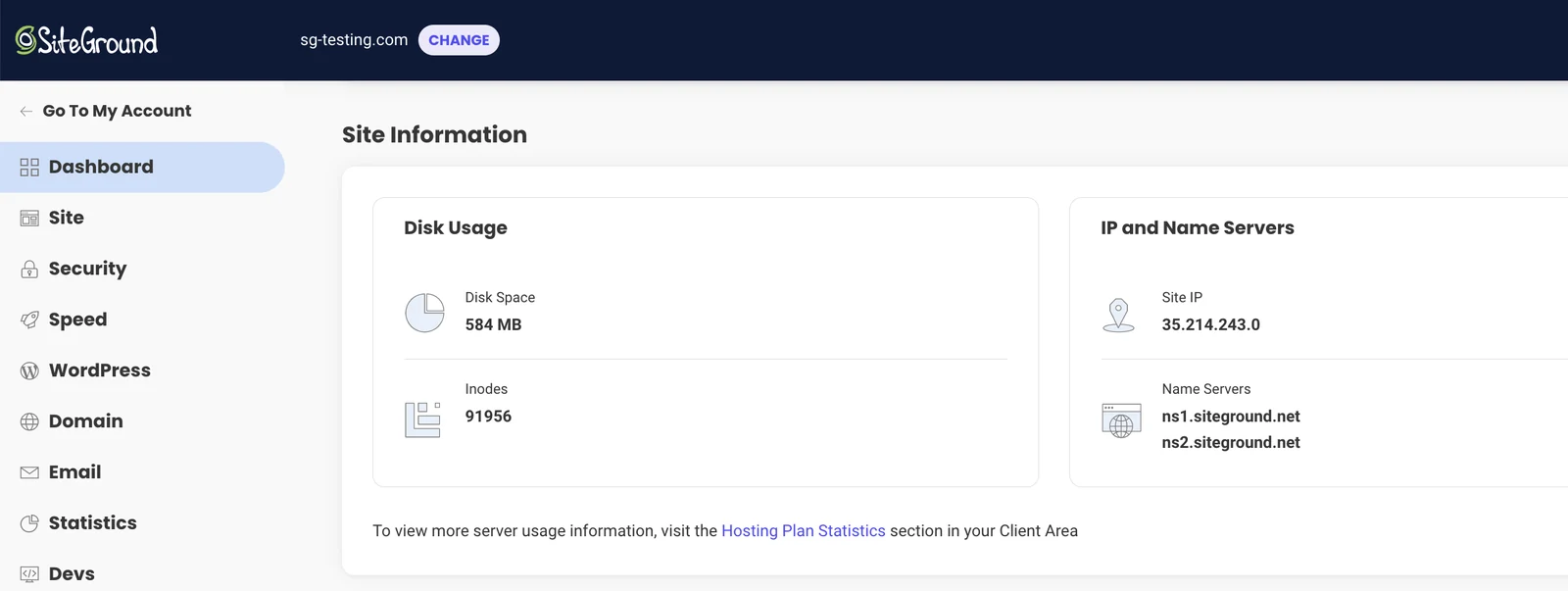
- Resource model: pooled CPU, RAM, and disk I/O across many tenants. Every shared plan publishes a concurrency ceiling, and the entry tier sits at the bottom of its vendor's range: Hostinger, for instance, documents 20 PHP workers on Web Single against 60 on Unlimited, the plan that replaced Web Business on most of its pages, per Hostinger's published plan limits. Tight memory ceilings and CPU throttling during usage spikes come with the territory. Kinsta's PHP workers knowledge base entry explains how a worker cap converts into queued requests.
- Who manages what: the web hosting provider handles everything below your public_html directory, including OS, web server, PHP version, security patches, and MySQL server. You install WordPress and manage your site.
- Failure modes: the noisy neighbor effect, disk I/O contention, and CPU throttling during traffic bursts. Bluehost, Hostinger, SiteGround, A2 Hosting, and DreamHost all publish policies that quarantine or throttle high-load accounts.
- Best fit: personal blogs, portfolios, brochure sites, and early-stage projects under roughly 20,000 to 50,000 monthly visitors on lightly dynamic content.
VPS Hosting: Dedicated Resources on Shared Hardware
VPS hosting, short for virtual private server hosting, is the web hosting configuration where a physical server is partitioned into isolated virtual machines using a hypervisor such as KVM or OpenVZ. Per the AWS VPS definition, each user receives a virtual machine with dedicated resources, ready to deploy and configure independently of other tenants on the same physical hardware. Standard VPS plans also grant root or SSH root access to the operating system, giving you full stack control. That resource isolation is why a virtual private server handles a Reddit spike or a Product Hunt feature where shared hosting would fold.
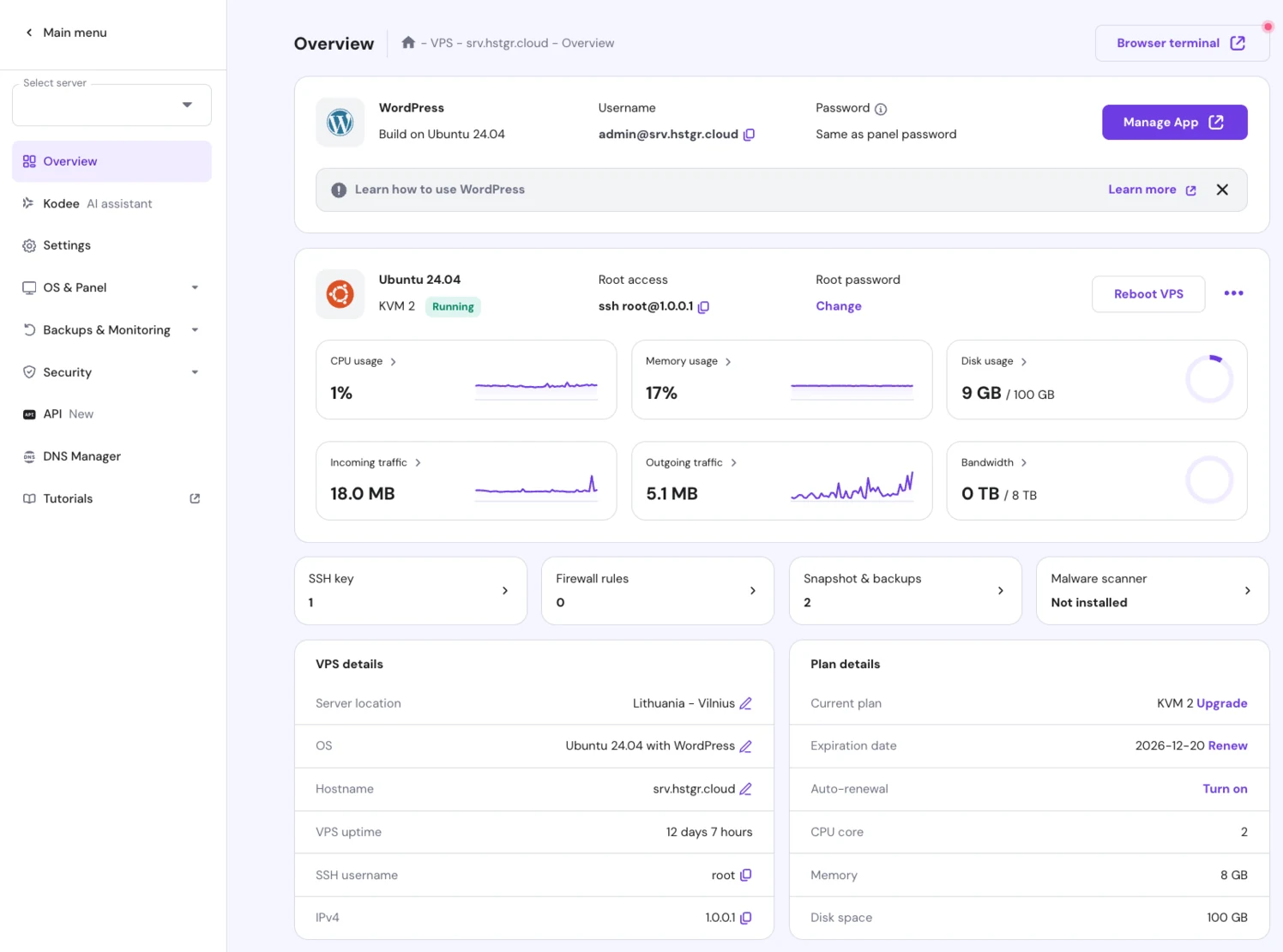
- Resource model: dedicated resources per virtual machine with hardware-enforced resource isolation. Common budget web hosting providers in this tier include DigitalOcean, Vultr, Linode (now part of Akamai), and Hetzner.
- Who manages what: on an unmanaged VPS, you install and update the OS (Ubuntu, CentOS, Debian), the web server (Nginx or Apache), PHP, MySQL, and Docker or any other runtime. A managed VPS shifts patching and monitoring to the provider for an added monthly fee.
- Best fit: developers who want SSH access and full control, agencies running Docker-based deployment pipelines, and growing WooCommerce stores that have outgrown shared plans but do not want to pay managed WordPress prices.
Managed WordPress Hosting: Performance Without the Server Work
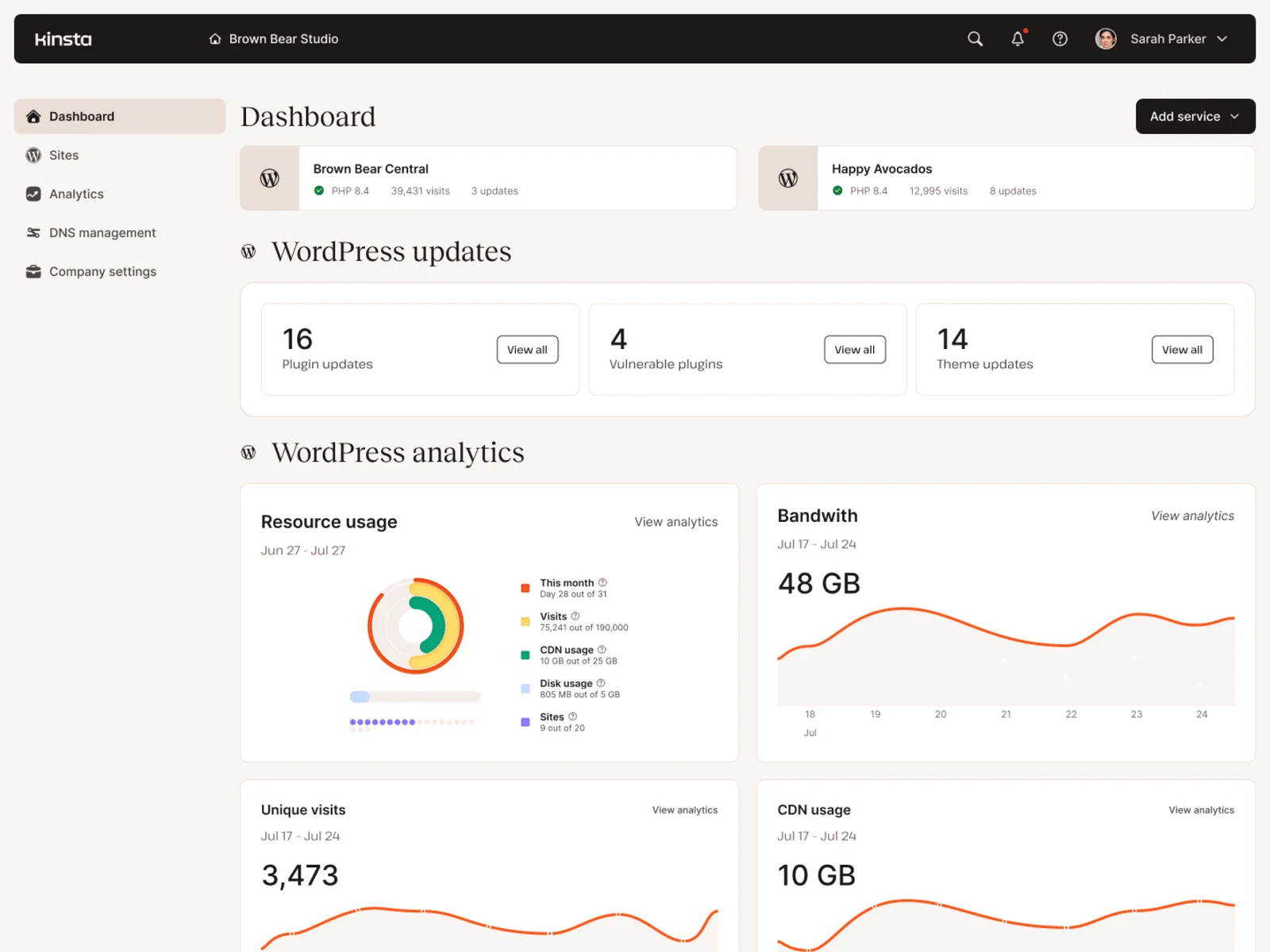
Managed WordPress hosting is a web hosting category built around a single application. Instead of handing you a raw server, the provider preconfigures Nginx, PHP-FPM, MySQL, Redis, and server-level caching specifically for WordPress, ships a staging environment, runs automated backup jobs, and takes responsibility for core and PHP security patches. Kinsta, WP Engine, Cloudways, Flywheel, Rocket.net, and Nexcess are the mainstream picks. Do not confuse this with "managed cloud," which is a broader arrangement where a partner operates general AWS or Azure infrastructure for you.
- What the provider handles
- OS, web server, PHP, MySQL, Redis or Memcached, server-level caching (usually a full-page cache tuned for WordPress), staging environments, automated backup with one-click restore, malware scanner, and CDN integration.
- What you handle
- Site content, plugins, themes, third-party integrations, and application-layer security. Some providers extend into malware remediation and WordPress core updates, but plugin conflicts remain your problem.
- Where it differs from managed cloud
- Managed cloud vendors operate your AWS, Google Cloud, or Azure workloads and handle monitoring, incident response, security, patching, and cost optimization for arbitrary applications. Managed WordPress hosting focuses on one CMS and ships opinionated stack choices tuned for it.
- Adjacent tooling
- SpinupWP and GridPane are control-plane products that automate WordPress deployments on top of your own DigitalOcean, Vultr, or Hetzner virtual private server, sitting between "roll your own" and full managed WordPress hosting. WordPress Multisite and Git deployment workflows are common features across the category.
Cloud Hosting: Elastic Resources, Pay as You Go
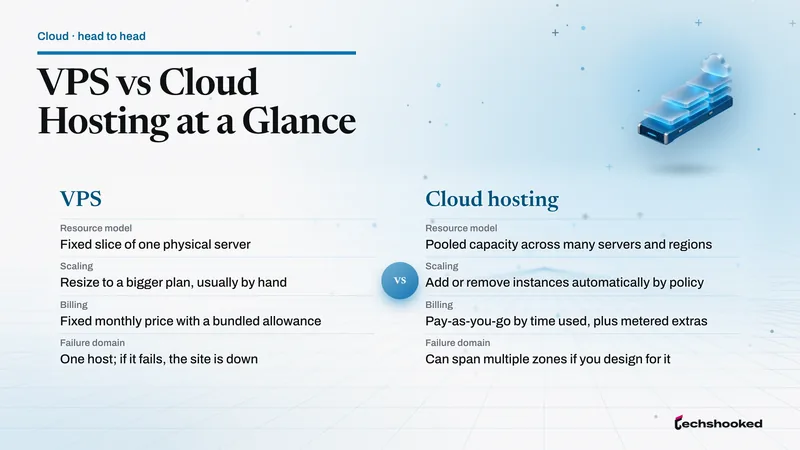
Cloud hosting is the web hosting model where your workload runs on a pool of virtualized resources spanning many physical machines, often across multiple availability zones. Per the AWS cloud hosting definition, you pay a cloud provider to host your application across a network of physical and virtual servers spanning diverse geographic locations. Automatic scaling is the differentiator that follows from that architecture: capacity grows or shrinks as traffic changes, on Google Cloud, Microsoft Azure, and AWS alike, each billing on a consumption basis where you pay only for what you use.

- Resource model: elastic capacity across a pool of servers with pay-as-you-go billing. AWS EC2, Google Cloud Compute Engine, and Azure Virtual Machines are the reference platforms, with AWS CloudFront, Google Cloud CDN, and Cloudflare fronting the compute for delivery.
- How it differs from VPS hosting: a VPS is one virtual machine on one physical server; cloud hosting draws its resource pool from many physical servers, which is why an auto-scaling group can absorb a traffic burst that would exhaust a single VPS. The full trade-off is in VPS vs cloud hosting compared.
- Delivery patterns: containerization with Kubernetes, load balancer routing to multiple availability zones, and hybrid arrangements that mix public cloud, private cloud, and hybrid cloud footprints. Complexity climbs with capability.
All Four Types at a Glance
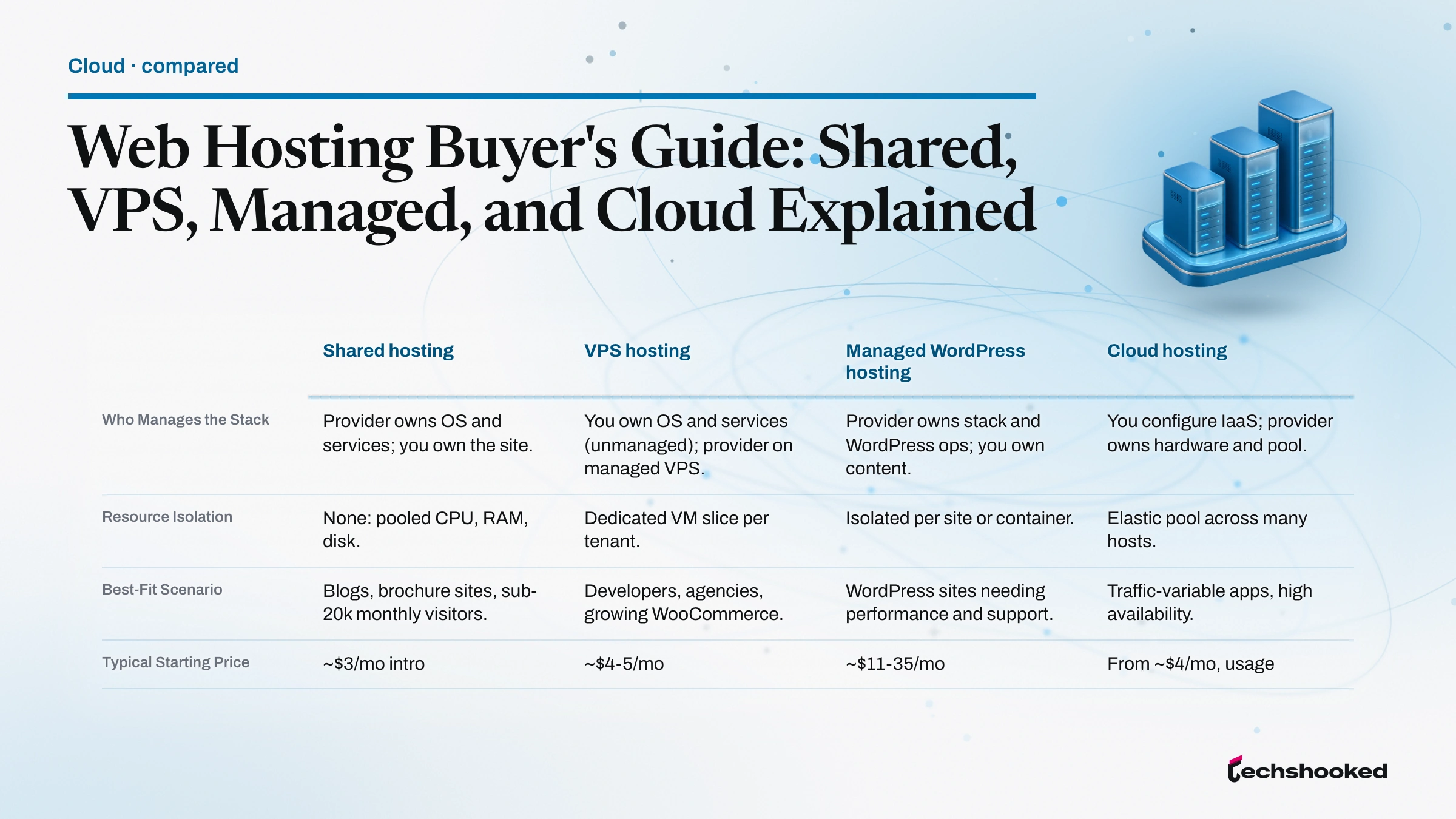
Four web hosting types, four different answers to the question "who runs the server stack, and how much elasticity do you need?" The comparison below summarizes the operational trade-offs between shared hosting, VPS hosting, managed WordPress hosting, and cloud hosting.
| Hosting Type | Who Manages the Stack | Resource Isolation | Best-Fit Scenario | Typical Starting Price |
|---|---|---|---|---|
| Shared hosting | Provider owns OS and services; you own the site. | None: pooled CPU, RAM, disk. | Blogs, brochure sites, sub-20k monthly visitors. | ~$3/mo intro |
| VPS hosting | You own OS and services (unmanaged); provider on managed VPS. | Dedicated VM slice per tenant. | Developers, agencies, growing WooCommerce. | ~$4-5/mo |
| Managed WordPress hosting | Provider owns stack and WordPress ops; you own content. | Isolated per site or container. | WordPress sites needing performance and support. | ~$11-35/mo |
| Cloud hosting | You configure IaaS; provider owns hardware and pool. | Elastic pool across many hosts. | Traffic-variable apps, high availability. | From ~$4/mo, usage-based |
The Decision Criteria That Matter
Choosing web hosting comes down to seven levers, and most people over-index on one or two while ignoring the rest. Budget is a starting point, not the whole answer; a $3/mo introductory plan that renews at $13/mo and cannot handle your holiday traffic burst is not cheap in year two. Work through the criteria below in order.
- Budget with renewal-rate realism. Compare the introductory price and the renewal price side by side, and pick a plan whose renewal you can absorb 12 months from now. Shared plan introductory rates commonly sit 60 to 80 percent below the renewal: Hostinger's $2.99 entry WordPress price renews at $10.99 a month, per Hostinger's WordPress hosting page.
- Technical confidence. An unmanaged VPS with root access is powerful and cheap, but if you cannot patch a Linux kernel or configure Nginx, the savings evaporate into support outages. A managed hosting plan (managed VPS or managed WordPress hosting) is the honest answer for non-Linux-fluent operators.
- Traffic volume and growth curve. Shared plans stay viable up to roughly 20,000 to 50,000 monthly visitors for lightly dynamic content. Beyond that, PHP worker limits and database contention start capping throughput.
- Application requirements. WooCommerce needs PHP worker headroom, the 256 MB WordPress memory limit its own server requirements call for, and Redis or Memcached for object caching. WordPress Multisite adds routing and file-system considerations not every host supports cleanly.
- Control needs. SSH deployment, custom PHP extensions, Docker, cron jobs, Node.js sidecars, and Git deployment pipelines are the exclusive domain of VPS or well-provisioned managed WordPress plans. Shared hosting rarely offers any of them.
- Security posture. Look for two-factor authentication on the control panel, WAF protection, DDoS mitigation, free Let's Encrypt SSL certificate provisioning, and daily backups with off-server storage. WooCommerce brings PCI-DSS scope, which raises the bar further. Uptime SLA language in the terms of service should be specific, not aspirational.
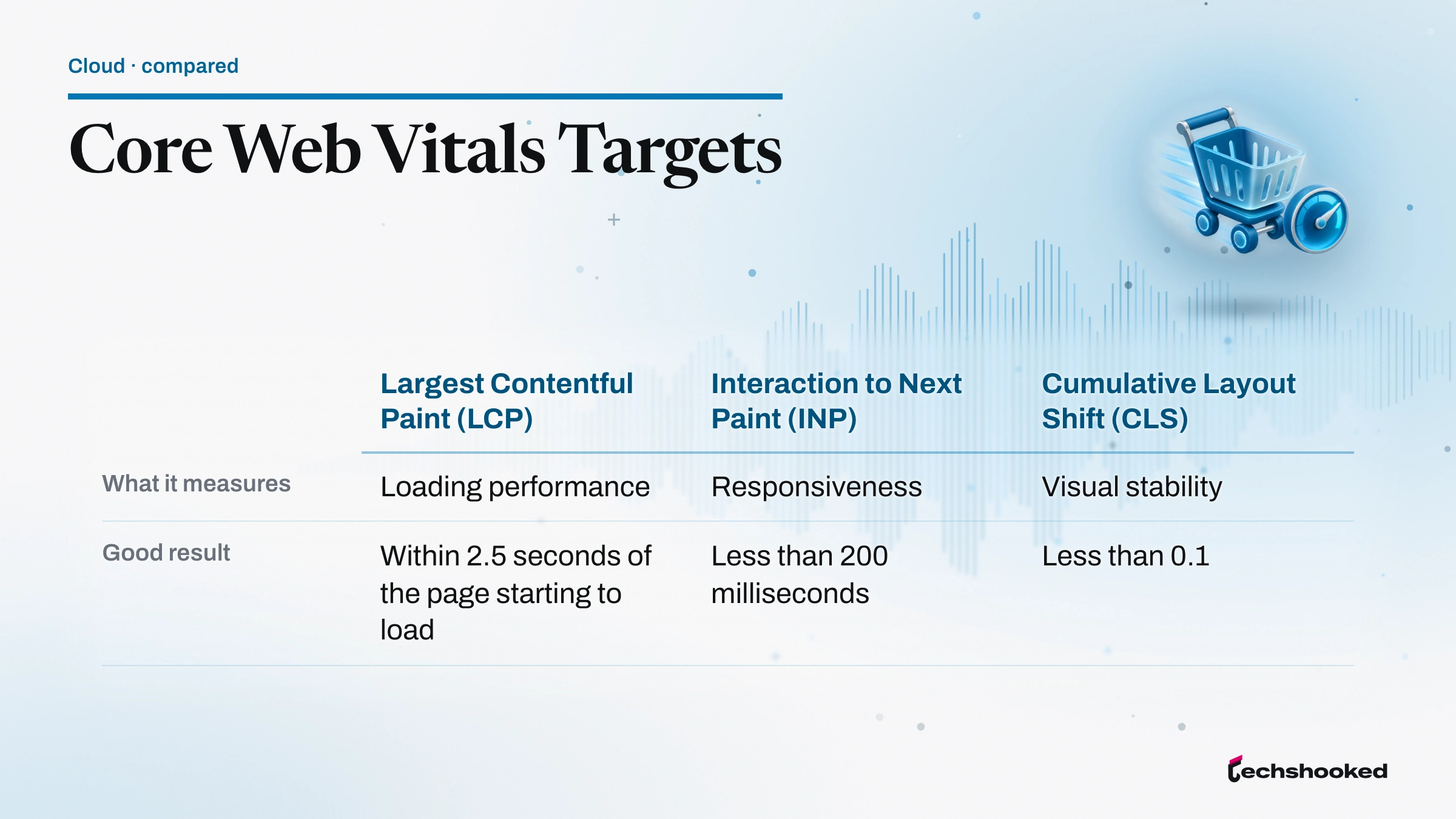
- Team size and workflow. A solo blogger and an agency running 50 client sites live in different worlds. Staging environments, role-based access, and SSH deployment pipelines separate agency-grade platforms from consumer plans. When Time to First Byte (TTFB) or Core Web Vitals (LCP, CLS, INP) degrade, the platform is usually the cause. For the mechanics, see TTFB, PHP workers, and server-level caching explained.
Questions to Ask a Web Host Before You Buy
These questions turn the criteria above into a checklist for any web hosting provider's sales chat or published terms. Each comes with the answer that should make you walk away.
- What does this plan renew at, and on which term? Bluehost, for example, lists the renewal of its Starter plan by term on its renewal price FAQ. Red flag: the renewal shows up only at checkout, or the advertised price needs a term longer than you plan to stay.
- What does "unlimited" actually mean? Ask for the fair-use policy and its hard numbers: PHP workers, entry processes, inodes, storage. Hostinger publishes these per plan in its plan limits table. Red flag: "unlimited" with no published limits anywhere.
- How is traffic counted, and what happens when I pass the limit? Kinsta bills $0.50 per 1,000 visits over a visit-based plan's allowance and keeps the site online, per its overage documentation. WP Engine's visits guide lists $2 per 1,000 extra visits. Red flag: no published overage rate, or throttling at the cap.
- How often are backups taken, how long are they kept, and does a restore cost extra? Hostinger's entry WordPress plan lists free weekly backups, with daily backups starting on the next tier, per Hostinger, while Kinsta keeps automatic daily backups for 14 days, per Kinsta's pricing page. Red flag: paid-only backups or a fee per restore.
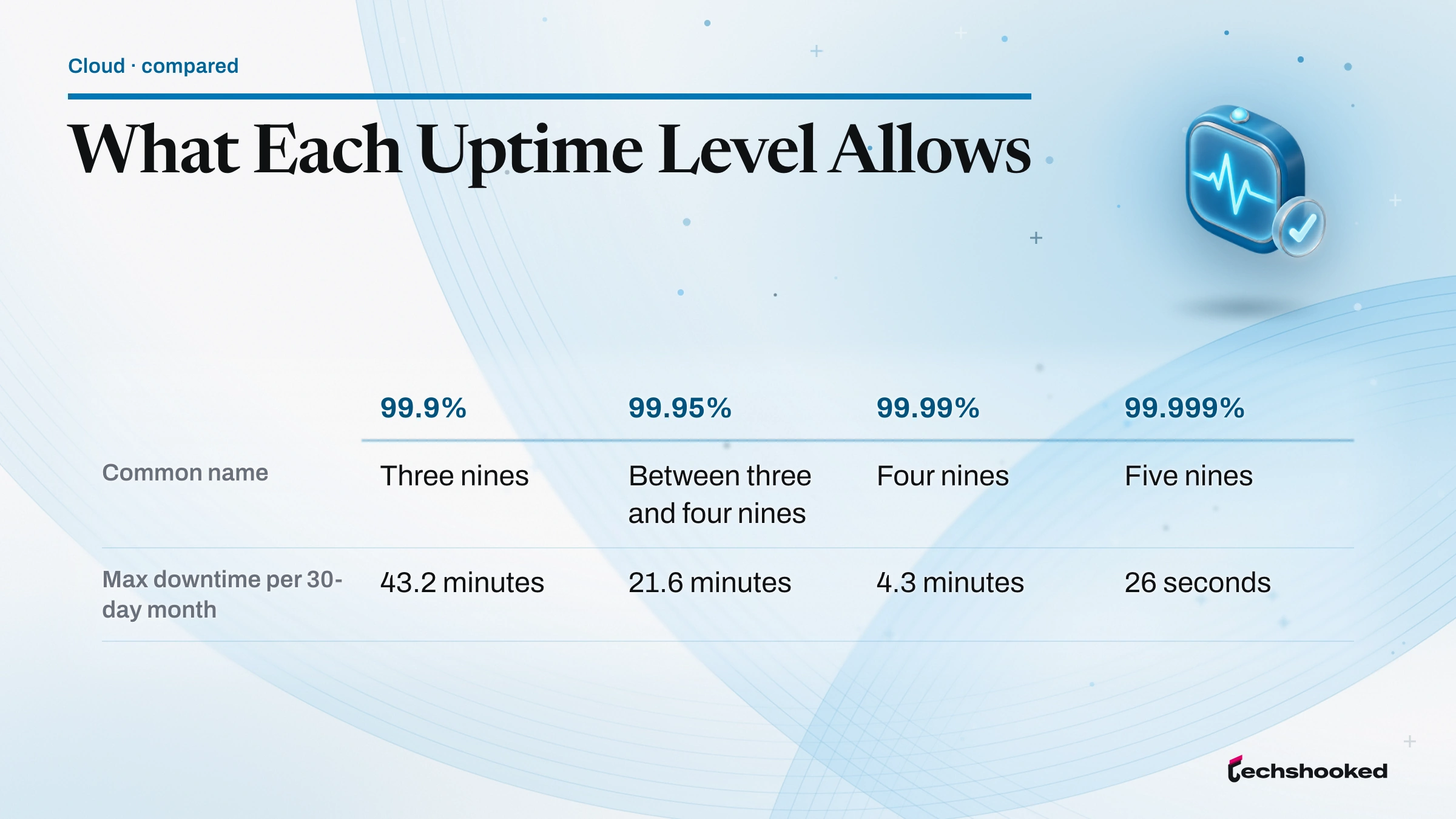
- What does the uptime guarantee pay, and what does it exclude? Kinsta's service level agreement guarantees 99.9% uptime and starts paying credits once downtime passes 43 minutes, beginning at 5% of the monthly fee, per its service level agreement. You must request credits in writing within 30 days, and maintenance windows and traffic beyond the plan's capacity are excluded. Red flag: an uptime percentage with no credit schedule behind it.
- Is a CDN included, or billed as an add-on? Cloudways sells its Cloudflare add-on at $4.99 per domain, per the Cloudways pricing page, while other hosts bundle one. To compare options, see how to choose a CDN for WordPress. Red flag: CDN bandwidth that bills as overage with no published rate.
- Which support channels does my plan include, and when? Chat, tickets, and phone are often split by tier. Red flag: the support promised in sales exists only on a higher plan.
- Is there a refund window and a free migration? Hostinger offers a 30-day money-back guarantee on every plan and a free migration with any plan, per Hostinger's WordPress hosting page; Bluehost also advertises a 30-day money-back guarantee, per Bluehost's WordPress page. Red flag: no refund window, or backups in a proprietary format only.
How We Evaluate Web Hosting
Our web hosting evaluation criteria are public and consistent across every review in this cluster. This guide is criteria-based comparative research against primary sources, not a benchmarking program. We compare each web hosting provider on the axes that actually move a site's outcomes: PHP worker and entry-process limits published in vendor documentation, uptime SLAs stated in the terms of service, renewal pricing transparency, WordPress and WooCommerce compatibility notes from vendor knowledge bases, staging environment availability, and which support channels each plan includes. We anchor definitional claims to primary sources: AWS, Google Cloud, and Microsoft Azure for the platform categories, and the pricing pages of Hostinger, Bluehost, Kinsta, WP Engine, Cloudways, and the other hosts named below for cost figures. We ran no TTFB benchmarks and no support-response trials for this guide, and we quote no figures for either. We do not fabricate testing timelines or invent lab conditions we did not run. When a claim depends on a live benchmark we have not run, we say so.
Costs: What You'll Really Pay
Web hosting pricing splits into two numbers that rarely appear next to each other in the marketing copy: the introductory rate that pulled you in, and the renewal rate that arrives 12 or 36 months later. The cheapest sticker price is not automatically the best value once Time to First Byte and PHP worker headroom are priced in, since a slow entry-tier plan often costs more in lost conversions than the monthly savings are worth. The table below sets the entry price against the typical renewal for each tier, with vendor-specific citations in the paragraphs that follow. For the managed WordPress category specifically, see managed WordPress hosting pricing in full detail.
So how much should web hosting cost? For one small site, plan on about $3 to $16 a month for a shared plan, depending on the intro rate and the renewal term (Bluehost's Starter renews at $9.99 to $15.99 a month by term, per Bluehost), from $4 a month for an entry VPS (DigitalOcean's smallest Droplet, per the VPS paragraph below), and $11 to $35 a month for a managed WordPress plan before add-ons.
| Tier | Entry Range | Typical Renewal | Add-Ons to Watch |
|---|---|---|---|
| Shared hosting | ~$2.99-$3.99/mo intro | ~$10-16/mo, by term | Domain registration, backup storage, malware cleanup |
| VPS hosting | ~$4-5/mo flat | Same as entry | Managed add-on, backups, load balancer |
| Managed WordPress hosting | ~$11-35/mo | Same tier structure | Bandwidth limits, extra sites, CDN overage |
| Cloud hosting | From ~$4/mo, usage-based | Same billing model | Egress bandwidth, snapshot storage, add-on fees |
Shared hosting. Hostinger's WordPress plan starts at $2.99/mo introductory and renews at $10.99/mo, per Hostinger's WordPress hosting page. Bluehost's shared WordPress Starter plan starts at $3.99/mo introductory on a 36-month term, per Bluehost's WordPress page, and renews at $9.99/mo on the same term, per Bluehost's renewal price FAQ. Entry-tier extras (free SSL certificate provisioning via Let's Encrypt, a one-click WordPress install, a starter mailbox) are the norm; common add-on fees include domain registration after year one, backup storage above the free quota, and malware cleanup.
VPS hosting. VPS pricing is flat, no intro-vs-renewal gap. DigitalOcean droplets start at $4/mo for 512 MiB of memory, per DigitalOcean's Droplet pricing page; Vultr lists its Regular and High Performance instance prices on Vultr's pricing page; Linode (Akamai) shared-CPU plans start with the Nanode 1 GB at $5/mo, per Akamai's CPU pricing page; Hetzner Cloud prices in euros and sits in the same entry band, per Hetzner's pricing documentation. Add-on costs: managed add-ons, backups, floating IPs, and load balancers.
Managed WordPress hosting. Cloudways starts at $11/mo per the Cloudways pricing page. Rocket.net starts at $30/mo, or $25/mo billed annually, per Rocket.net's pricing page. Flywheel starts at $25/mo per Flywheel's pricing page. WP Engine starts at $35/mo, or $28/mo billed annually in the first year for new customers, per WP Engine's plans page. Kinsta starts at $35/mo, or $30/mo billed annually, per Kinsta's pricing page. Add-on costs include bandwidth overages, additional-site fees, CDN overage, and premium DNS.
Cloud hosting. Consumption-based pricing from about $4 a month for a small instance, per DigitalOcean, rising with instance size, bandwidth, and storage across Azure, Google Cloud, and AWS alike: you pay only for what you use. The intro-vs-renewal problem disappears, but egress bandwidth, snapshot storage, load-balancer hours, and managed-service add-ons compound at scale.
The renewal-rate shock trap is worst on shared hosting: introductory pricing often sits 60 to 80 percent below the renewal rate, and Bluehost's jump from a $3.99/mo intro to a renewal of $9.99/mo on a 36-month term, $11.99/mo on 12 months, or $15.99/mo billed monthly, per Bluehost's renewal price FAQ, is representative. Ask before committing: what does the renewal cost, and can you absorb that cost 12 months from now? On cloud hosting, the equivalent question is: what does your bill look like once your site actually gets the traffic you are building for?
Our Recommendations by Scenario
The right web hosting pick depends on what you actually run, not which brand has the loudest marketing. The eight scenarios below map common situations to specific recommendations and the deeper techshooked guide that covers each in detail.
- Running a WooCommerce store. Cloudways or Nexcess give you WooCommerce-tuned stacks with Redis object caching, server-level caching for anonymous traffic, and PHP worker headroom appropriate for concurrent checkouts. Start on Cloudways at $11/mo per the Cloudways pricing page via Cloudways. Budget for what the fee excludes: no bundled email or domain registration, a CDN that bills as a paid add-on, and server costs that rise with usage rather than sitting at a flat monthly cap. Full breakdown: best WooCommerce hosting for growing stores.
- Agency managing 10 or more client sites. Cloudways agency accounts or Kinsta's multisite billing consolidate invoicing and give you role-based access and per-site staging environments. Kinsta plans start at $35/mo per Kinsta's pricing page via Kinsta. It shares the highest monthly entry price in this guide with WP Engine, its plans meter visits and bandwidth, and it blocks a curated list of plugins it considers unstable at scale. Deep dive: best WordPress hosting for agencies and freelancers.
- Developer who needs SSH access, root access, Docker, and Git deployment. An unmanaged VPS on DigitalOcean, Vultr, or Hetzner gives you dedicated resources with hardware-enforced resource isolation and full stack control. Start on DigitalOcean droplets from $4/mo per DigitalOcean's Droplet pricing page. Understand what you are buying: the droplet is unmanaged, so OS patching, the web server, and every security update are yours, there is no WordPress support desk, and the $4 tier ships 512 MiB of RAM, too little to run WooCommerce with any headroom. Full comparison: best VPS hosting for developers with root access.
- Budget-first blog or small business. Hostinger's Premium plan covers a WordPress launch checklist at the lowest credible entry price, with server-level caching included. Introductory pricing starts at $2.99/mo and renews at $10.99/mo per Hostinger's WordPress hosting page, available via Hostinger. The trade-offs are real: renewal is roughly 3.7 times the intro rate, the entry tier ships no staging environment, and Hostinger's plan limits table gives the Premium tier 40 PHP workers against 60 on Unlimited. Full read: Hostinger review: what the budget tier actually delivers.
- Frustrated with Bluehost overcrowding. The most common complaint about Bluehost's shared plans is CPU throttling and slow response times during traffic spikes. See Bluehost alternatives worth paying for for the shortlist that avoids the noisy neighbor pattern.
- Frustrated with WP Engine cost or plan limits. WP Engine's visit caps and overage charges are the two most-cited pain points from users considering a move. See WP Engine alternatives worth switching to for the current shortlist of managed hosts that solve the pricing pinch.
- Undecided between Kinsta, WP Engine, and Cloudways. These three are the recurring finalists in any managed hosting plan shortlist. The head-to-head is at Cloudways vs Kinsta vs WP Engine head-to-head, and the broader roundup at best managed WordPress hosting options compared.
- First-timer trying to understand all four types. Before shortlisting vendors, get the four-type comparison at shared vs VPS vs managed hosting compared in depth. Cloud hosting only enters the picture once you have concrete traffic elasticity requirements.
Common Mistakes When Choosing Web Hosting
Most web hosting regrets trace back to six recurring mistakes. All six are avoidable if you slow down long enough to compare renewal rates, plan capacity, and migration paths before signing a 36-month term.
- Choosing on introductory price alone. The Bluehost jump from a $3.99/mo intro to $9.99/mo renewal per Bluehost's renewal price FAQ is the canonical introductory price lock-in trap. Compare renewal rates before committing, and treat any plan whose renewal you cannot absorb as a mistake in year two.
- Staying on shared hosting after outgrowing it. When response times climb past the 0.8-second TTFB that web.dev sets as the "good" threshold, PHP worker limits queue requests during traffic peaks, and support tickets pile up faster than answers arrive, the move to VPS or managed WordPress hosting is overdue. Waiting for a full outage is expensive; a WordPress site migration handled at your own pace is not.
- Buying an unmanaged VPS with no Linux administration skills. An unmanaged VPS is cheap because you own the OS, the web server, the database, and every security patch. Without that experience, the savings evaporate into support outages and a security liability. Take the managed VPS tier, or step up to managed WordPress hosting instead.
- Skipping a migration plan before switching hosts. Server migration costs during a WordPress site migration are dominated by missing MX records, DNS TTL still cached at the old IP, database charset mismatches, and media library URL rewrites. All of these cause avoidable downtime SLA breaches. The full runbook is at migrating a WordPress site without downtime.
- Ignoring PHP worker limits when evaluating plans for WooCommerce. Every shared plan caps concurrent PHP processes, and entry tiers cap them hardest. Once checkout concurrency exceeds the cap, requests queue, time out, and carts are abandoned. Confirm the published PHP worker count, PHP version support, and memory floor before committing.
- Locking into a proprietary control panel or backup format. Custom control panels, proprietary backup format archives, and platform-specific caching plugins all raise vendor lock-in and control panel portability costs. Prefer providers that publish standard backup archives (SQL dump plus files) and support cPanel, LiteSpeed, Nginx, or standard SSH access, so a future move is a weekend, not a project.
Further reading
- Building Scalable Online Stores With Cloud Architecture
- Best Managed WordPress Hosting Compared
- Cloudways vs Kinsta vs WP Engine: Managed Hosting Compared
- Best WordPress Hosting for Agencies and Freelancers
- Best WooCommerce Hosting for Growing Stores
- Best VPS Hosting for Developers
- Hostinger Review: What You Get at the Budget End
- WP Engine Alternatives for WordPress Teams
- Bluehost Alternatives Worth Paying For
- Managed WordPress Hosting Pricing Explained: What You Actually Pay
- Shared vs VPS vs Managed Hosting: Which Do You Actually Need
- How to Migrate a WordPress Site Without Downtime
- Web Hosting Performance: What TTFB, PHP Workers, and Caching Really Mean
Frequently Asked Questions
How much should web hosting cost?
For one small site, a shared plan runs about $3 a month at the intro rate and roughly $10 to $16 at renewal. Hostinger's entry WordPress plan is $2.99 a month and renews at $10.99, per Hostinger, and Bluehost's Starter renews at $9.99 to $15.99 a month depending on the term, per Bluehost. An entry VPS starts at $4 a month at DigitalOcean, per DigitalOcean, and a managed WordPress plan runs about $11 to $35 a month for one site.
What are the four types of web hosting?
Shared hosting, VPS hosting, managed WordPress hosting, and cloud hosting. Shared hosting pools one server across many accounts; a VPS gives you an isolated virtual machine with dedicated resources; managed WordPress hosting runs a stack tuned for WordPress with the server work handled for you; cloud hosting draws on a pool of servers that scales with traffic. Dedicated servers, where you rent a whole machine, sit above all four for sites that need one.
Which web hosting is best for beginners?
For most beginners, shared hosting or an entry managed WordPress plan: the provider runs the server, WordPress installs in a few clicks, and SSL and backups come included. Hostinger's entry WordPress plan, for example, includes free weekly backups and a free domain for the first year, per Hostinger. Skip an unmanaged VPS until you are comfortable patching Linux.
When should you switch from shared hosting to VPS?
Switch when your site sits consistently near the ceiling of the shared plan's published CPU allocation, or when a neighbor's traffic spike is noticeably slowing your pages. Other signals: you need SSH root access for deployment pipelines, require custom software such as Node.js, Redis, or custom PHP extensions, or your WooCommerce checkout is timing out under moderate concurrent load. Most sites on shared hosting can stay there until they reach 20,000 to 50,000 monthly visitors if the content is largely static or lightly dynamic.
Can I run WooCommerce on shared hosting?
A small catalog can launch on shared hosting, but PHP worker limits and memory caps will constrain performance before the first real traffic spike. Simultaneous checkout requests queue once the plan's worker cap is reached. WooCommerce's own server requirements call for a 256 MB WordPress memory limit, which entry shared plans often do not clear. Once orders arrive with any regularity, a managed WooCommerce plan or a VPS with room to raise that limit is the practical starting floor.
What is the difference between managed WordPress hosting and managed cloud?
Managed WordPress hosting covers WordPress-specific operations: core and plugin updates, staging environments, daily backups, CDN integration, and WordPress security hardening. Managed cloud is a broader arrangement where a third party operates public cloud infrastructure, handling uptime monitoring, patching, incident response, and cost optimization, but the application layer remains your responsibility unless explicitly included. Kinsta and WP Engine are managed WordPress hosts; AWS Managed Services and Azure Managed Services are managed cloud providers.