Hostinger is a budget web hosting provider that bundles WordPress one-click install, free SSL, free domain, and CDN access at introductory prices well below managed hosting alternatives. The Premium plan opens at $2.99 per month on a 48-month term and renews at $10.99 per month per Hostinger's WordPress hosting page, a jump every reader should plan for before checkout. This publication runs on Hostinger Business-tier shared hosting, so the observations that follow reflect real hPanel administration rather than a controlled lab test.
Verdict
Hostinger's Premium plan is the right pick for cost-conscious owners running one to three WordPress sites who accept the renewal-price jump in exchange for a low entry cost and a friendly hPanel control panel. The one-click WordPress installer, LiteSpeed Cache, free domain, and free SSL certificate cover the launch checklist without add-on fees. The 30-day money-back guarantee removes commitment risk during evaluation. Our hands-on administration is on the higher Business tier; the Premium-specific limitations below (no staging environment, a tighter PHP worker cap) come from Hostinger's own documentation rather than first-hand testing on that exact plan.
Best for: owners of one to three low-to-mid-traffic WordPress sites who want the cheapest credible entry into WordPress hosting and are willing to renegotiate at renewal.
- Introductory price of $2.99 per month on the Premium plan, well below managed WordPress hosting per Hostinger's WordPress hosting page.
- hPanel control panel with a shallow learning curve compared to legacy cPanel and WHM stacks.
- LiteSpeed Web Server with LiteSpeed Cache pre-configured, plus a free Let's Encrypt SSL certificate.
- One-click WordPress installer and free website migration for the first WordPress site.
- Renewal rate climbs to $10.99 per month, roughly 3.7 times the introductory price.
- PHP workers cap on the Premium tier constrains concurrent traffic; no staging environment on the entry plan.
Check current Hostinger pricing
What Hostinger Is and Who It Is For
Hostinger is a budget web hosting company selling shared hosting, WordPress hosting, cloud hosting, and VPS hosting from a single account dashboard. The core proposition is a low introductory price on a shared hosting plan prewired for WordPress: LiteSpeed Web Server, in-house LSCWP caching, a free domain for the first year, and a free Let's Encrypt SSL certificate. The company also sells Hostinger Email, a Hostinger Website Builder, and a separate Hostinger Horizons app-builder product, though those sit outside the scope of this review.
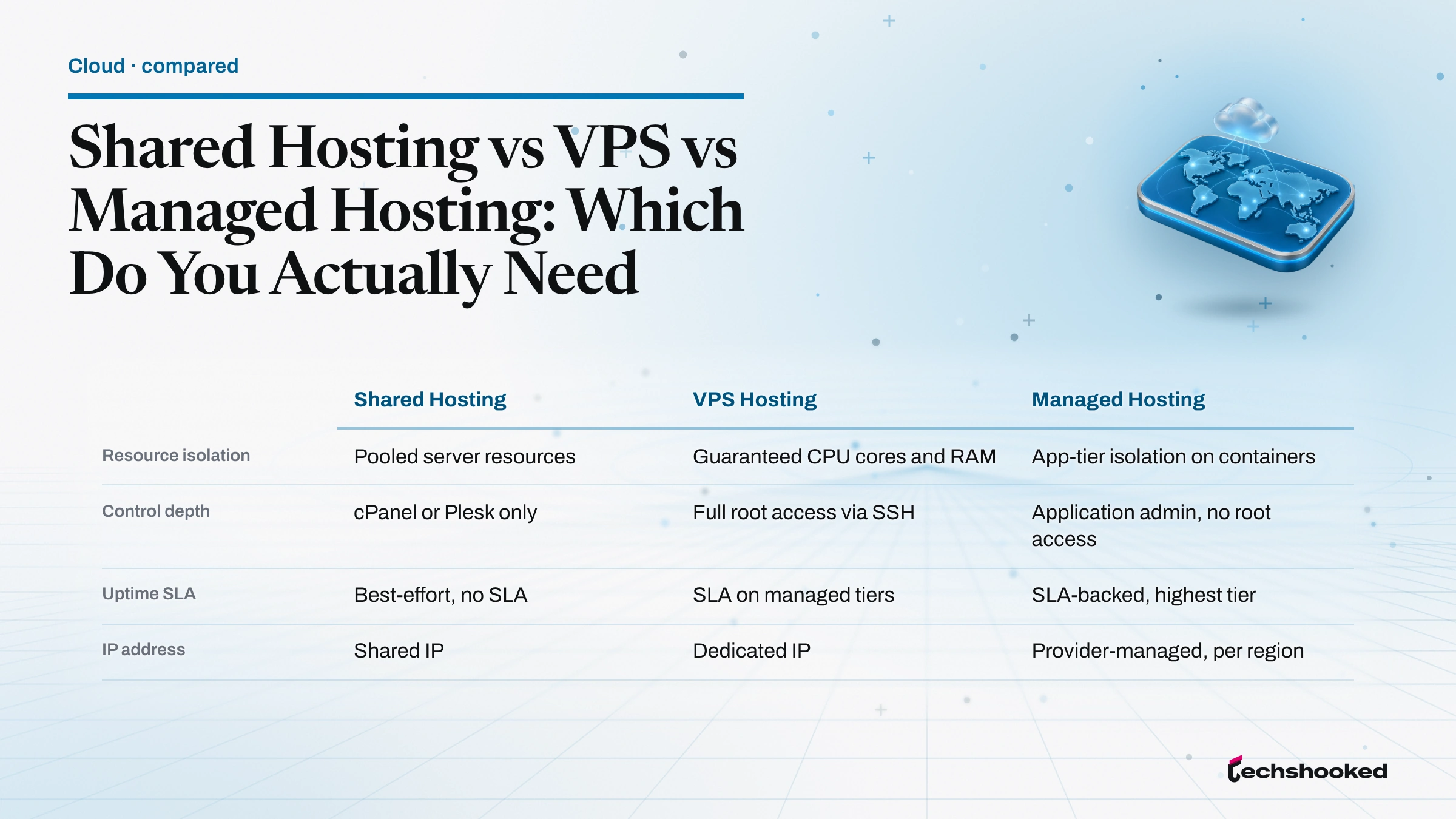
Hostinger fits three profiles well: solo owners launching a first WordPress site, small studios running client sites on separate accounts, and hobbyist developers who want a cheap sandbox with SSH access and Git integration. Sites needing dedicated resources, complex WordPress multisite topology, or bespoke server tuning outgrow the shared tier and belong on a Cloud Startup plan, self-managed VPS hosting, or fully managed WordPress hosting from vendors like Kinsta or WP Engine.
- Personal plan
- Entry-level shared hosting for a single site with basic resources; suits a landing page or micro-blog.
- Premium plan
- Three-site shared hosting with 20 GB SSD storage, LSCWP preinstalled, weekly backups, free domain, and CDN access.
- Business plan
- Higher-tier shared hosting with more SSD storage, raised concurrency caps, daily backups, and an on-demand backup toggle in hPanel.
- Cloud Startup plan
- Cloud-hosted shared environment with dedicated CPU and RAM allotment, higher concurrency ceilings, and priority support.
- VPS hosting
- Root-access virtual servers billed separately; managed WordPress hosting is not offered on this tier.
Premium Plan Pricing and Published Tier Limits
The headline number on any Hostinger comparison is the gap between the introductory price and the renewal rate. The Premium plan on WordPress hosting sits at $2.99 per month for a 48-month term and renews at $10.99 per month per Hostinger's WordPress hosting page. Shorter contract terms carry higher introductory rates, so the 48-month term is the only path to the $2.99 headline. The renewal rate applies at cycle end regardless of contract length.
| Plan | Intro (48-mo) | Renewal | Sites | Storage | PHP workers | Notable extras |
|---|---|---|---|---|---|---|
| Premium (WordPress) | $2.99/mo | $10.99/mo | 3 | 20 GB SSD | 40 | Domain (1 yr), weekly backups, CDN access |
| Business (WordPress) | See vendor pricing | See vendor pricing | 50 | 50 GB | 60 | Daily backups, on-demand backup |
| Cloud Startup | See vendor pricing | See vendor pricing | Highest | NVMe SSD | 100+ | Dedicated CPU and RAM, priority support |
| Premium pricing as of July 2026 per Hostinger's pricing page; PHP worker counts per Hostinger's published plan limits. Promotional rates change seasonally and vary by region; verify current numbers before checkout. | ||||||
The Premium plan bundles the extras that matter for a first WordPress site: domain registration bundled for the first year, a Let's Encrypt SSL certificate provisioned automatically, weekly backups, and content delivery network (CDN) access exposed as a toggle in hPanel. Domain renewal is not included in the promo, so year two carries the standard domain fee separate from the hosting renewal rate. The Business plan raises the concurrency cap and site limit and adds daily backups per Hostinger's plan-limits documentation. The Cloud Startup tier trades shared allocation for a dedicated CPU and RAM budget and is the natural next step for sites that outgrow shared resources.
The renewal rate is not hidden, but it is easy to miss in the checkout flow. The introductory price applies for the term you select and only for the first term. Locking in a 48-month contract delays the renewal cycle to year five rather than year two, which is the single most useful lever a buyer has for holding down the effective monthly cost of shared hosting on Hostinger.
How We Evaluate Web Hosting
This publication reviews Hostinger as the operator of a site running on Hostinger Business-tier shared hosting. Observations reflect real hPanel administration, the WordPress installer, DNS Zone Editor, File Manager, and SSL activation flow. Formal load tests and latency benchmarks were not conducted; readers seeking measured performance data should consult independent Core Web Vitals reports, TTFB measurements, Google's PageSpeed Insights documentation, and GTmetrix runs against a live site.
- Panel usability: how quickly hPanel exposes DNS, SSL, backups, and file access.
- WordPress readiness: installer behavior, PHP version defaults, OPcache and cache-plugin integration.
- Included essentials: SSL certificate, domain, CDN, and weekly backups without upsell.
- Documented resource caps: concurrency limits, inode counts, and MySQL databases as published.
- Migration support: WordPress migration path and non-WordPress fallback via FTP or File Manager.
Hands-On: What Stands Out

Six observations reflect real hPanel use rather than benchmark testing. Each item describes what the panel or install flow does, not a measured performance claim.
- hPanel is legitimately friendlier than cPanel. The hPanel control panel groups Hosting, Domains, Emails, and Billing as top-level tabs and pushes advanced items like phpMyAdmin, Cron Jobs, DNS Zone Editor, and the built-in Malware Scanner into a searchable sidebar. A first-time buyer can find the SSL toggle and the WordPress installer without consulting documentation. We did not run a side-by-side against a fresh cPanel or WHM install; the contrast here is one of interface design, where cPanel exposes a flat grid of icons rather than a task-grouped dashboard.
- WordPress installer plus LiteSpeed Cache activates in one flow. The one-click WordPress installer provisions a fresh WordPress 6.x instance, installs LSCWP, and enables Object Cache with Redis on higher tiers. Combined with LiteSpeed Web Server at the origin, the default cache configuration is a workable baseline for a WordPress site running standard themes and plugins per WordPress.org's hosting requirements.
- Free domain and Let's Encrypt SSL provision without touching DNS. During signup the included domain registers on Hostinger's DNS by default, and the Let's Encrypt SSL certificate issues automatically once propagation completes. The SSL activation flow inside hPanel takes one click; no manual certificate signing request is required for the standard domain.
- CDN access is a toggle, not an integration project. hPanel exposes a content delivery network (CDN) toggle on the site card. Enabling it routes static assets through Hostinger's own CDN layer without requiring a separate Cloudflare CDN account, though a Cloudflare CDN in front is also supported. For background on why a CDN matters, see the explainer on how content delivery networks improve web performance.
- File Manager and SSH access are both usable. The Hostinger File Manager is browser-based and behaves like a lightweight FTP client; SSH access on eligible plans exposes a real shell, and WP-CLI ships on the WordPress hosting stack. Git integration is available for pull-based deployment. That combination covers day-two operations well for a small team.
- Website migration is included with a real migration assistant. The website migration flow inside hPanel handles WordPress transfers, moving files and database in a guided pass. Non-WordPress sites use the File Manager or FTP for manual transfer. Hostinger's own documentation cites a 99.9% uptime SLA per Hostinger's plan-limits documentation; independent verification is out of scope for this review.
Limitations
Honest limitations sit alongside the strengths. Every point below is factual and sourced either to Hostinger's own documentation or to real operational experience running this publication on the Business tier.
- Renewal price jump. The introductory price of $2.99 per month on the Premium plan renews at $10.99 per month, roughly 3.7 times higher. Longer terms delay the renewal cycle but do not eliminate the jump.
- PHP workers cap on shared plans. The Premium plan sits on a shared concurrency pool that constrains request throughput; bursty traffic can queue requests. Higher tiers raise the cap per Hostinger's plan-limits documentation.
- Inode limits surprise media-heavy sites. Shared plans publish inode caps that count every file, including plugin assets and thumbnails; a WordPress install with WooCommerce and a large image library can approach the limit faster than storage numbers suggest.
- No cPanel or WHM. Some administrators prefer cPanel for muscle-memory reasons or migration tooling. Hostinger does not offer cPanel or WHM on any tier; hPanel is the only option.
- Entry-tier staging environment is missing. The Premium plan does not include a native WordPress staging environment; staging appears on the Business tier and above. Third-party staging plugins remain an option.
- Live chat support quality varies. First-line live chat handles standard billing and provisioning well; deep hosting issues sometimes require escalation. Response quality depends on the agent and time of day.
- Email hosting is separate. Hostinger Email is a paid add-on beyond the free-forwarder tier; owners running client mailboxes should budget it in.
Alternatives to Consider
Hostinger's closest competitors in the budget web hosting bracket are SiteGround, DreamHost, and A2 Hosting; owners considering an upgrade to managed WordPress hosting land on Kinsta, WP Engine, or Cloudways. Bluehost, Namecheap, GreenGeeks, and HostGator sit adjacent in the same shared-hosting bracket with similar teaser-to-renewal patterns. For a fuller look at managed options, see the best managed WordPress hosting options guide. A dedicated CDN in front of any shared host is often the higher-impact performance investment; see the guide to CDN services for WordPress sites.
| Host | Intro | Renewal | Key contrast | Try |
|---|---|---|---|---|
| Hostinger Premium | $2.99/mo | $10.99/mo | Lowest introductory price, hPanel, LSCWP prewired | Check pricing |
| SiteGround | Higher | Higher | Stronger support SLAs and Google Cloud infrastructure at a higher renewal rate | See vendor pricing |
| DreamHost | Similar budget | Similar | US-only data centers and a monthly billing option, no free domain on all plans | See vendor pricing |
| A2 Hosting | Higher | Higher | Speed-focused NVMe storage stack; renewal rate climbs more steeply than Hostinger | See vendor pricing |
Bluehost alternatives for budget hosting overlap heavily with this list. Hostinger wins on introductory price and hPanel usability, SiteGround wins on support depth, and A2 Hosting wins on raw speed configuration for a comparable renewal cost. Owners planning to run WooCommerce at moderate traffic should skip the Premium plan and start on Business or Cloud Startup rather than absorb the migration cost later.
Further reading
Frequently Asked Questions
What does Hostinger cost after the introductory period?
The introductory rate for the Premium plan is $2.99/month on a 48-month term; the renewal price is $10.99/month, roughly 3.7 times higher, per the Hostinger WordPress hosting pricing page. Always verify current rates there before purchasing, as promotional rates change seasonally. Locking in a longer term delays the renewal cycle but does not eliminate the jump at renewal.
Can I migrate an existing website to Hostinger?
Yes. Hostinger includes a free migration tool in hPanel that covers WordPress sites; the migration assistant handles files and database transfer. Non-WordPress sites require manual transfer via FTP or the File Manager. For complex setups, the Hostinger support team assists with the first migration at no extra charge.
Is Hostinger good for WordPress?
For most small WordPress sites, yes, with caveats. Hostinger WordPress hosting runs LiteSpeed Web Server with LiteSpeed Cache preconfigured, an architecture that serves cached pages from the web server itself rather than through a PHP plugin; we ran no load tests for this review, so treat that as a design difference rather than a measured speed claim. The hPanel one-click installer deploys a fresh WordPress instance in a single guided step, and the free Let's Encrypt SSL activates automatically. The Premium plan supports up to three WordPress sites. Weigh that against the two entry-tier constraints covered above: the Premium plan carries the lower PHP worker allocation of Hostinger's shared lineup, which throttles concurrent traffic, and it ships no native staging environment.
Does Hostinger support ecommerce and WooCommerce?
Yes. Hostinger Business plan supports WooCommerce and includes more storage and PHP workers than the Premium plan, which is the key resource constraint for ecommerce stores. You can install WooCommerce via the one-click installer in hPanel. For high-traffic stores, the Cloud Startup or a self-managed VPS plan provides dedicated resources.
Can I upgrade my Hostinger plan if my site grows?
Yes. Upgrades between Hostinger shared hosting tiers are self-service through hPanel, and the cost difference is prorated for the remaining term. Moving from shared hosting to VPS or cloud hosting requires a separate purchase and a manual or assisted migration. Hostinger does not automatically transfer site data when you change plan types.