WooCommerce hosting is the server infrastructure category that governs checkout throughput, concurrent cart sessions, and PHP worker availability for WordPress-based online stores. The best WooCommerce hosting for most growing stores comes down to four hosts: Kinsta for high-traffic stores, Cloudways for budget-conscious growth on cloud servers, Nexcess for a fully managed WooCommerce stack, and Bluehost for brand-new stores testing the platform. A growing store outgrows generic WordPress.org hosting at the point where concurrent add-to-cart requests queue behind slow database writes, which is why the WooCommerce team publishes dedicated server requirements distinct from WordPress core. The four hosts compared below span the practical range from entry-level shared plans to premium Google Cloud infrastructure, judged on the specifications that actually move ecommerce revenue: PHP worker headroom, object caching, staging environment quality, backup granularity, NVMe storage, and CDN integration.
Our Top Picks at a Glance
Kinsta is the best WooCommerce hosting for high-traffic stores, Cloudways is the best value for growing stores that want cloud servers, Nexcess is the WooCommerce-native managed platform, and Bluehost is the simplest way to launch a new store, as long as you budget for its renewal price rather than the introductory one.
WooCommerce hosting picks track store maturity more than any single benchmark score. The verdict box below maps each host to the growth stage where it shines, and the comparison table underneath lays out the specifications that decide ecommerce workload capacity. Cloudways, Kinsta, Nexcess, and Bluehost each occupy a distinct segment of the managed cloud hosting market that also includes DigitalOcean, Liquid Web, and WooCommerce Payments partners.
- Top pick, high-traffic WooCommerce stores: Kinsta. Google Cloud's compute-optimized C2 and C3D machines, generous PHP worker allocation, Kinsta CDN bundled. Budget above the entry rung: the $35 Single 20GB plan priced below is Kinsta's smallest tier, covering one install and 20GB of bandwidth, so a genuinely high-traffic store should price a higher plan.
- Best value, growing stores on a budget: Cloudways. Managed cloud hosting on DigitalOcean, Linode, AWS, Google Cloud, or Vultr, billed by the server you pick and resized as the store grows.
- WooCommerce-native, fully managed ecommerce stack: Nexcess. Sold under the Liquid Web brand, with a WooCommerce-optimized stack and Object Cache Pro on every plan.
- Best entry-level, new stores testing WooCommerce: Bluehost. WordPress.org-recommended plans with WooCommerce pre-installed and one-click staging.
Prices in the table come from each host's own page: Cloudways, Kinsta, Nexcess, and Bluehost.
| Host | Starting price | PHP workers | Object caching | Staging | Best for |
|---|---|---|---|---|---|
| Cloudways | $11/mo (DigitalOcean, 1GB server) | Server-tier | Redis, Varnish, Memcached | Included | Growth on a budget · Visit |
| Kinsta | $35/mo, or $30/mo billed annually (Single 20GB) | Plan-tier | Redis (paid add-on) | Included | High-traffic stores · Visit |
| Nexcess | $9/mo (Essentials WooCommerce, 50k visits) | Autoscaling to 40 on Elite | Object Cache Pro, every plan | Included | WooCommerce-native · Visit |
| Bluehost | $14.99/mo intro, $21.99 renewal (36-mo) | Shared | Always-on caching | One-click, every plan | Entry-level testing · Visit |
What managed WooCommerce hosting is, and when a store needs it
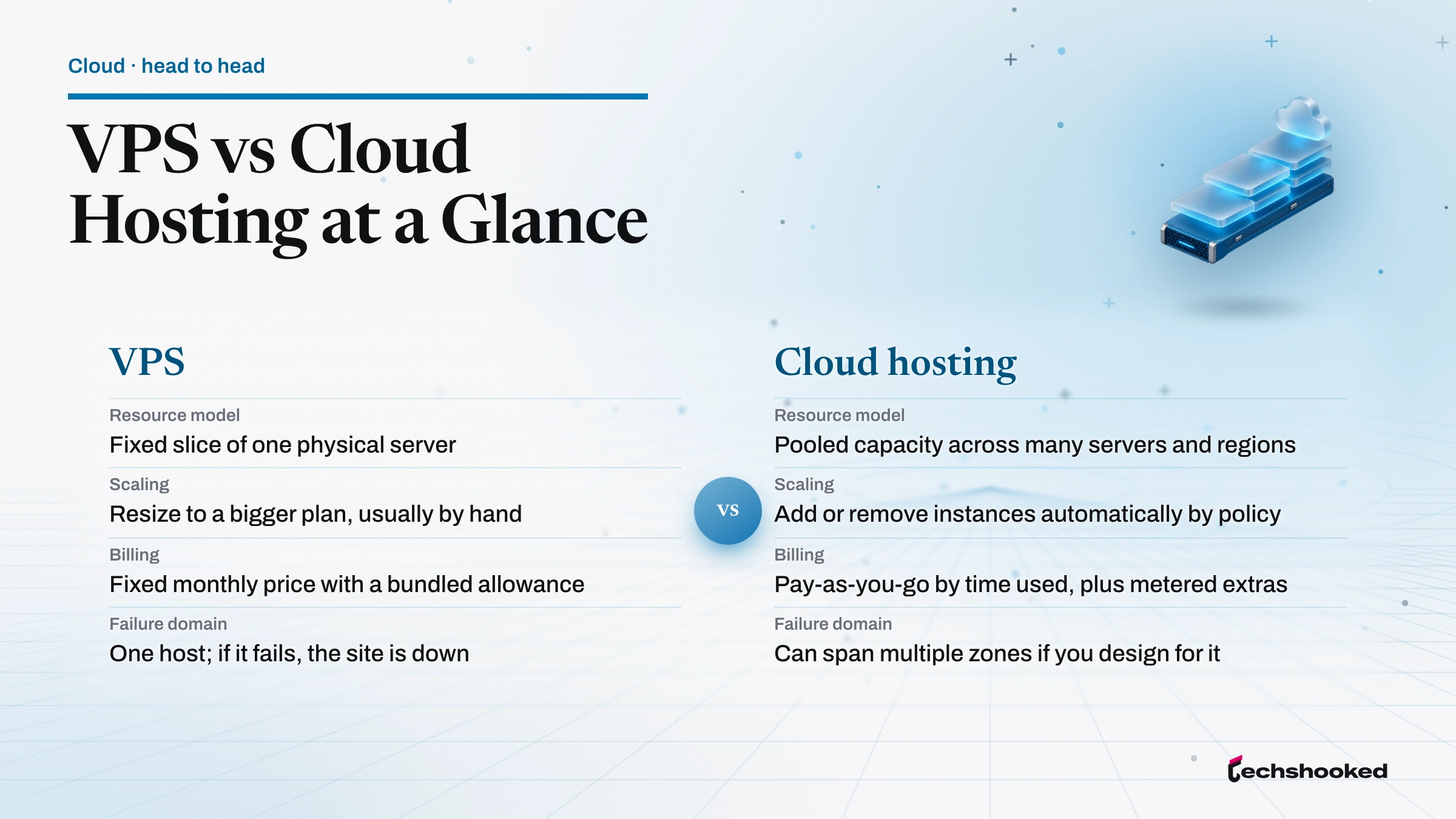
Managed WooCommerce hosting is WordPress hosting where the provider runs the server stack, caching, updates, backups, and security for a store, so the owner works on products and orders instead of server tuning. Nexcess describes it as infrastructure and some application-level functions, such as automatic WordPress updates, being set up and managed for you, per its managed WooCommerce page. WooCommerce cloud hosting is the same idea on cloud servers (Cloudways on DigitalOcean, AWS, or Google Cloud) or on autoscaling platforms that add resources during a sale. For the wider picture, this rundown of how shared, VPS and managed hosting differ covers each hosting type in depth.

Any host must clear WooCommerce's own floor first. The WooCommerce server requirements ask for WordPress 6.9 or greater, PHP 8.3 or greater (tested up to PHP 8.4), MySQL 8.0 or MariaDB 10.6 or greater, a WordPress memory limit of 256 MB, and HTTPS support. Those are minimums, not a production target: a store's real ceiling is how many checkouts it can process at once.
That ceiling is lower than on a blog because a store's most valuable pages cannot be served from page cache. Kinsta, for example, excludes the cart, my-account, and checkout pages from caching, per its WooCommerce page, so every one of those requests runs PHP and queries the database. PHP workers and object caching therefore decide how a store behaves under load, a mechanism this explainer on how PHP workers and caching shape hosting performance unpacks.
- A shared plan is enough for a new store with a handful of orders a week, a small catalog, and no paid traffic yet.
- Managed hosting earns its price once checkout slowdowns cost sales, when you run flash sales or ads that bring a traffic spike, or when nobody on the team wants to own server updates and backups.
- Cloud or autoscaling hosting fits stores with sharp seasonal peaks, where paying for a large server all year wastes money and a small one fails on the busiest day.
How We Evaluate WooCommerce Hosting
We evaluate WooCommerce hosting on seven criteria drawn from the WooCommerce server requirements documentation and the WordPress Hosting Handbook: PHP worker headroom under concurrent checkout load, object caching layer availability, staging environment quality, automated backup granularity, NVMe versus SSD storage, CDN integration and edge-node count, and WooCommerce-specific support expertise. This is criteria-based comparative research using Cloudways, Kinsta, Nexcess, and Bluehost documentation and disclosed plan specifications, not a lab benchmark. The goal is to surface the specifications that decide whether a store handles a traffic spike without a checkout timeout.
- PHP worker headroom. The floor for concurrent checkout requests. Under PHP-FPM with OPcache, each worker handles one request at a time. PHP worker limits translate directly into a hard ceiling on checkout performance during peak minutes.
- Object caching layer. Redis or Memcached bypasses redundant MySQL and MariaDB queries. Managed hosts include one or the other; shared plans usually require manual configuration.
- Staging environment quality. A staging environment must run the same PHP version and extension set as production, or WooCommerce extension compatibility bugs surface only after go-live.
- Automated backups granularity. Daily automated backups are the baseline. Hourly is the standard for stores processing orders continuously.
- NVMe storage versus SATA SSD. NVMe storage matters most on product-catalog queries and cart-session writes; the throughput delta over SATA SSD is significant on modern controllers.
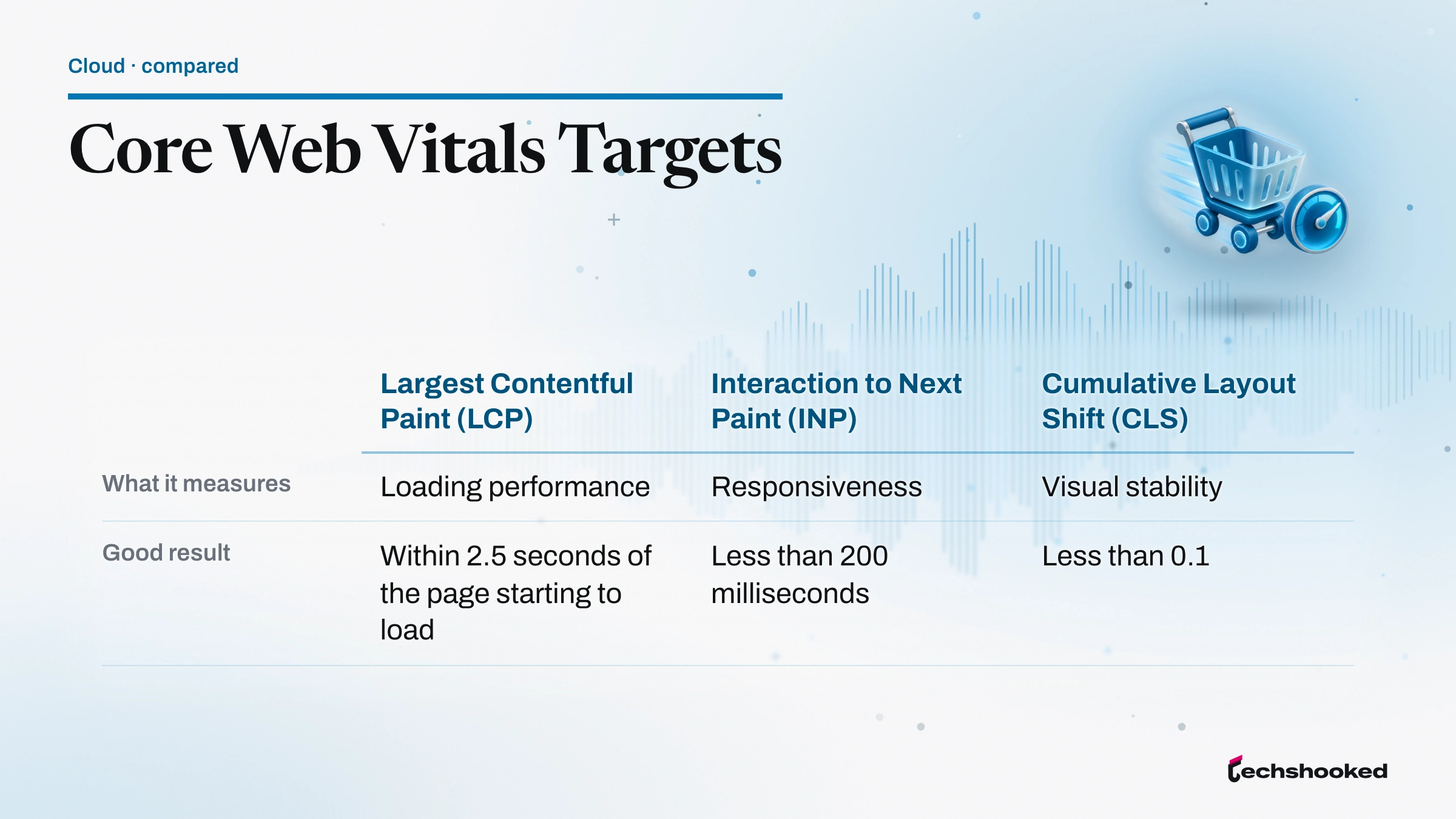
- CDN integration and edge-node count. Cloudflare or a vendor CDN (Kinsta and Nexcess both bundle Cloudflare-powered CDNs) shortens TTFB and offloads media requests, which improves Core Web Vitals scores measured by Google Lighthouse and GTmetrix.
- WooCommerce support expertise. A support team that ships WooCommerce daily beats a generalist help desk when an extension breaks a checkout at 2am.
Cloudways: Best for Growing Stores on a Budget
Cloudways is the managed cloud hosting layer that sits on top of five underlying providers (DigitalOcean, Linode, AWS, Google Cloud, Vultr), so a WooCommerce hosting deployment on Cloudways is really a Cloudways-managed instance on a raw cloud VM. Server provisioning, NGINX and Apache stack configuration, Varnish and Redis, PHP-FPM tuning, and the Breeze caching plugin are all preconfigured. The cheapest DigitalOcean server costs $11 per month per the Cloudways pricing page, with 1GB RAM, 25GB storage, 1TB bandwidth, free SSL, automated backups, and staging, which every Cloudways plan includes. For a store, Cloudways' WooCommerce page recommends a 2GB DigitalOcean server, which the pricing page lists at $24 a month on the DigitalOcean Standard tab. For a growing store that has moved past starter shared hosting, that combination is difficult to beat on entry cost.

- What it is. A managed cloud hosting platform provisioning WordPress and WooCommerce stacks on your choice of cloud provider, with the Cloudways console handling the abstraction layer and Cloudways Managed WordPress as the base image.
- Who it is for. Growing stores that want cloud-grade flexibility, region choice, and vertical server resource scaling without hiring a DevOps engineer.
- Strengths. Low entry price billed by the server you choose; underlying-provider choice; Breeze caching bundled; Cloudflare add-on available; Redis comes free on its Flexible servers and Object Cache Pro is free there as a limited-time offer; free SSL; Cloudways migrates the first site free.
- Honest limitations. Pricing scales with cloud resource consumption and can climb quickly as the store adds traffic and needs a larger DigitalOcean droplet. Free Object Cache Pro starts at 2GB servers, so the $11 entry server is not the one to run a busy store on, and offsite backup storage is billed separately.
- Get started. Try Cloudways.
For stores whose traffic swings hard, Cloudways also sells Autonomous, a Kubernetes-based tier that scales resources up and down without intervention. Per the Cloudways Autonomous pricing page, plans are tiered from $99 a month on Growth, plus usage charges for disk, bandwidth, and autoscaling beyond the baseline ($0.07 per server per hour on Growth). Migration is cheap to try: Cloudways moves the first site free, and its WordPress Migrator plugin moves any number of WordPress sites at no cost.
For teams thinking about the underlying architecture before committing, the cloud architecture for scalable online stores explainer covers the trade-offs on VM sizing, database replication, and horizontal server resource scaling.
Kinsta: Best for High-Traffic WooCommerce Stores
Kinsta is the premium managed WordPress hosting service that WooCommerce hosting shoppers reach for when a checkout SLA matters more than the monthly bill. Kinsta hosts sites on Google Cloud's compute-optimized C2 and C3D machines (C3D is the default for new sites in a growing set of data centers). The Single 20GB entry plan costs $35 per month, or $30 a month billed annually, with the first month free per the Kinsta pricing page, and includes 1 WordPress install, 20GB bandwidth, 10GB storage, and 125GB of Kinsta CDN bandwidth. The pricing page also lists a Launch plan at the same price, with 15GB of bandwidth, 15GB of storage, and an estimated 75,000 visits a month. Kinsta's APM performance monitoring is built into its MyKinsta dashboard, per Kinsta's managed WordPress hosting page.

- What it is. Premium managed WordPress hosting built on Google Cloud C2 and C3D machines, with WooCommerce-compatible infrastructure and SSL via Let's Encrypt or Cloudflare.
- Who it is for. High-traffic WooCommerce stores where the performance SLA, uptime guarantee, and server-level optimization for checkout performance outweigh cost sensitivity.
- Strengths. Google Cloud's compute-optimized C2 and C3D machines for compute-heavy checkout under a traffic spike; Redis object caching available; Kinsta APM included; one-click staging environment with production parity; WooCommerce-fluent support engineers.
- Honest limitations. Premium pricing at the entry tier compared to the rest of this roundup; single WordPress install on the entry tier limits multi-store setups; Redis is a paid add-on on the entry plan rather than bundled.
- Get started. Try Kinsta.
Two store-specific costs sit outside the base price. The Redis object cache that keeps uncached cart and checkout pages fast is a $100 per site per month add-on, per Kinsta's WooCommerce page. And plans are billed on either bandwidth or visits, with the pricing page calling the monthly visit figure an estimate of what the plan's bandwidth supports. A store that goes over its visit, storage, or CDN limits during a sale stays online and pays overage instead, at $0.50 per GB or per 1,000 visits, per Kinsta's overage documentation.
Nexcess: Best WooCommerce-Native Managed Platform
Nexcess, which now sells its WooCommerce plans as Liquid Web by Nexcess, is purpose-built for managed WordPress hosting and WooCommerce hosting, and describes its plans as a WooCommerce-optimized stack. The entry Essentials plan starts at $9 per month, or $8.10 a month billed annually, per the Nexcess Managed WooCommerce hosting page, and covers 1 site, 50,000 monthly visitors, 15GB storage, 2TB bandwidth, 7-day daily backups, and staging sites. The same one-site, 50,000-visit tier costs $19 a month on Pro and $29 on Elite, which add longer backup retention (14 and 30 days) and sandboxed plugin-update testing.

- What it is. A managed host, sold as Liquid Web by Nexcess, purpose-built for WooCommerce and Nexcess Managed WordPress, with staging sites listed on every WooCommerce plan.
- Who it is for. Stores that want a fully managed WooCommerce stack, automatic plugin update compatibility testing, and ecommerce-specific optimization without configuration overhead.
- Strengths. A WooCommerce-optimized stack; WooCommerce extension compatibility testing on Pro and Elite, where plugin updates run in a sandbox with a visual comparison before they reach the live store (useful for extensions such as WooCommerce Subscriptions, WooCommerce Memberships, and WooCommerce Bookings); Object Cache Pro, a WAF, DDoS protection, and an Edge CDN powered by Cloudflare on every plan.
- Honest limitations. Update testing and one-click staging start on Pro and PHP worker autoscaling is Elite-only, so the $9 Essentials plan is the bare managed stack; the tiered plan structure (three tiers, each priced by site count and monthly visits) can be confusing for first-time shoppers; check the data-center location against where your customers are before buying.
- Get started. Try Nexcess.
Nexcess is also the clearest answer to a traffic spike in this roundup. On Elite plans it scales PHP workers automatically during a flash sale, up to 40 workers on the largest plans, with the first 24 hours each month included and autoscaling beyond that billed as usage, per its WooCommerce plan details. The hosting environment is PCI DSS compliant, with an attestation of compliance available on request, though the store's own PCI compliance stays the owner's responsibility.
For a broader view of the platforms behind managed ecommerce stacks, the cloud platform options for e-commerce businesses comparison covers AWS, Google Cloud, and DigitalOcean side by side.
Bluehost: Best Entry-Level WooCommerce Hosting
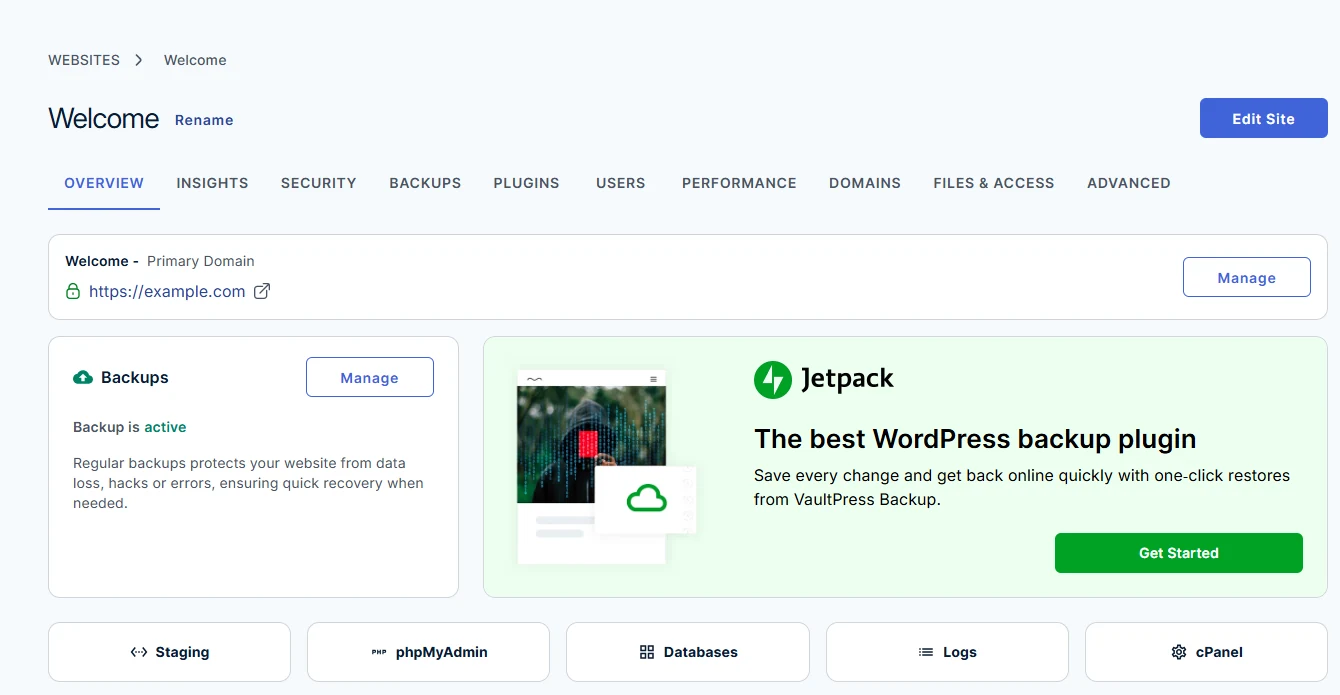
Bluehost is the WordPress.org-recommended budget WooCommerce hosting option, positioned for new merchants who need to test the WooCommerce workflow before committing to managed-hosting spend. The eCommerce Essentials plan lists a $14.99 per month introductory price on a 36-month term per the Bluehost WooCommerce hosting product page, and renews at $21.99 per month on the same 36-month term (or $32.99 per month on a monthly billing cycle) per the Bluehost renewal-price FAQ. That intro-versus-renewal delta matters: the true total cost of ownership over three years tracks the renewal figure, not the teaser rate. WooCommerce comes pre-installed, every plan includes free SSL, daily backups, and one-click staging. Bluehost also appears on WooCommerce's own list of recommended hosts, which describes it as shipping WordPress, WooCommerce, and Jetpack preinstalled.
- What it is. A budget shared and managed WordPress host with dedicated WooCommerce-branded plans, WordPress.org-recommended status, and Automattic-authored WooCommerce pre-installed.
- Who it is for. New stores and micro-merchants testing WooCommerce before committing to managed hosting spend from vendors such as DreamHost or Pressable.
- Strengths. Predictable cost across a 36-month term; WordPress.org recommended; WooCommerce pre-installed on dedicated plans; free SSL, daily backups, and one-click staging on every plan.
- Honest limitations. Shared-hosting PHP worker limits are constrained under concurrent checkout load, so the ceiling arrives quickly for a growing store. Add-ons can raise the effective monthly cost above the advertised plan price. Security tooling is below the level of Sucuri or Wordfence at higher tiers, and the plan is not suitable beyond low order volumes.
- Get started. Try Bluehost.
Other WooCommerce hosts worth a look
Four picks do not cover every store. These hosts are worth a shortlist slot in specific cases, and a general managed WordPress hosting shortlist covers them for sites that do not sell.
- Hostinger, for the lowest first-term price. Its WooCommerce plans start on the Unlimited tier at $3.99 a month introductory and renew at $16.99, with one-click WooCommerce installation and an object cache, per Hostinger.
- WP Engine, for stores that fear checkout failures under load. Its ecommerce plans use EverCache for Woo, which WP Engine describes as cart-aware caching built to prevent checkout failures during traffic spikes, per WP Engine.
- SiteGround and Pressable, for stores that want a host WooCommerce itself names. Both sit on WooCommerce's recommended hosts list alongside Bluehost, Hostinger, WordPress.com, WordPress VIP, and Seravo.
What WooCommerce hosting costs
For one store on an entry plan, hosting runs from about $4 to $35 a month before add-ons. The plugin itself is free and open source, per its WordPress.org listing, so hosting is the main fixed cost of running the store. Four things move the real bill well away from the advertised price:
- Promo versus renewal. Bluehost's eCommerce Essentials renews at $21.99 a month after a $14.99 introductory term, per its renewal-price FAQ; Hostinger's WooCommerce entry plan goes from $3.99 to $16.99, per Hostinger. Nexcess lists $9 a month on its plan page with no separate renewal price shown, Kinsta's first month is free, per its pricing page, and Cloudways bills by the server you choose.
- Billing cycle. Paying a year up front cuts Kinsta from $35 to $30 a month, per Kinsta, and Nexcess from $9 to $8.10, per Nexcess.
- Store add-ons. The object cache is where stores pay extra: Kinsta charges $100 per site per month for Redis, per its WooCommerce page, while Cloudways includes Object Cache Pro from 2GB servers up and bills offsite backup storage at $0.033 per GB, per its pricing page.
- Traffic overage. A sale that blows past the plan limit costs money rather than uptime on most managed plans: Kinsta bills $0.50 per GB or per 1,000 visits, per its overage documentation, and Cloudways Autonomous bills autoscaling beyond baseline from $0.07 per server per hour, per Cloudways.
A fuller breakdown of what managed WordPress plans cost and where the overage fees hide covers price bands and total cost across more providers.
How to Choose WooCommerce Hosting for Your Store
Choosing WooCommerce hosting is a right-sizing exercise: pick the smallest plan that clears the concurrency floor for your projected 12-month peak, then verify the staging environment, backup, and CDN integration posture separately. The other half of the job is keeping a growing WooCommerce store fast on the store side, from cache exclusions to database cleanup. The checklist below separates a host that will support real server resource scaling from one that hits a checkout ceiling under a traffic spike.
- Estimate peak concurrent visitor count over your next 12-month horizon to define a minimum PHP worker floor, and add 25% overhead for background WooCommerce Payments, Stripe, and PayPal callbacks.
- Verify object caching (Redis or Memcached) is included or trivially configurable; do not accept hosts that require manual module installation under a shared environment.
- Confirm staging is available and runs the same PHP version and extension set as production. Extension mismatches are the leading cause of WooCommerce plugin conflicts after migration, especially for WooCommerce Subscriptions and other complex extensions.
- Test automated backups granularity. Daily restores are a baseline; hourly is the standard for stores processing orders continuously.
- Validate CDN edge-node proximity to your primary customer geography using a free TTFB test tool such as GTmetrix or Google Lighthouse, and consider Cloudflare in front of the vendor CDN for extra edge coverage.
- Check the host's WooCommerce extension compatibility documentation or support escalation path before committing, and audit the caching-plugin conflict list (WP Rocket, W3 Total Cache) against the vendor's stack.
- Model the renewal price alongside the intro price so the total cost of ownership is honest. Bluehost's $14.99 introductory rate renews at $21.99 on the same 36-month term, per its renewal-price FAQ, while Nexcess lists $9 a month on its plan page with no separate renewal price shown, so compare three-year totals rather than first-month prices.
Plan the move as carefully as the host. A live store keeps taking orders during a migration, so a cutover that loses an hour of orders costs real revenue. Kinsta includes unlimited free migrations, per its pricing page; Nexcess offers a self-serve migration tool on Essentials and Pro and a specialist migration on Elite, per Nexcess; and Cloudways migrates the first site free. The steps for moving a WordPress site without downtime apply to stores too, with one addition: freeze order-changing admin work during the final sync.
For teams weighing whether to stay on WooCommerce at all, the WooCommerce compared to Shopify and BigCommerce analysis maps the platform choice against traffic, extension ecosystem, and Magento-migration paths.
Further reading
Frequently Asked Questions
Which hosting is best for WooCommerce?
Kinsta suits high-traffic stores, Cloudways suits growing stores on a budget, Nexcess suits owners who want WooCommerce fully managed, and Bluehost suits brand-new stores. The right pick depends on concurrent checkouts, not on homepage speed, so size the plan to your busiest sales hour and confirm the object cache, staging, and backups before you buy.
How much does WooCommerce hosting cost?
Entry plans for one store run from about $4 to $35 a month. Hostinger's WooCommerce plans start at $3.99 a month introductory, Nexcess at $9, Cloudways at $11, and Kinsta at $35. Budget for renewal prices and store add-ons such as a Redis object cache, which can cost more than the plan itself.
Does WooCommerce require different hosting from a standard WordPress site?
Yes. WooCommerce adds database-intensive operations that standard WordPress hosting cannot always sustain under concurrent traffic. Look for hosts offering dedicated PHP workers, a Redis object caching layer, and a staging environment sized for ecommerce workloads.
What PHP version does WooCommerce recommend for best performance?
WooCommerce recommends PHP 8.3 or greater, tested up to PHP 8.4, on its official server requirements page. The same page asks for MySQL 8.0 or MariaDB 10.6 and a 256 MB WordPress memory limit. Shared-hosting plans sometimes default to an older version and require a manual switch in the control panel.
Can I start a WooCommerce store on shared hosting?
Shared hosting can support a low-volume WooCommerce store but lacks the PHP worker headroom needed as traffic grows. Beyond around 50 daily orders or significant concurrent visitors, the resource ceiling creates a checkout bottleneck; migrating to managed hosting later is possible but disruptive, and managed cloud hosting starting at the $11 per month Cloudways entry tier removes that scaling risk early.
Is Shopify or WooCommerce better?
Neither wins outright: Shopify includes hosting in every plan, while WooCommerce is a free, open-source plugin that you run on hosting you choose. WooCommerce gives you full ownership of your store and its data, per its WordPress.org listing, at the cost of managing hosting, updates, and security yourself. The trade-offs are mapped in a separate breakdown of choosing between Shopify and WooCommerce.