Managed WordPress hosting is a specialized web hosting tier that offloads core WordPress infrastructure management, including automatic updates, daily backups, server-level caching, and security monitoring, to the hosting provider. Five providers dominate the category on distinct axes: Kinsta and WP Engine anchor the premium end for high-traffic and enterprise WordPress teams, Cloudways layers a WordPress-optimized management interface over commodity cloud infrastructure, Rocket.net ships Cloudflare Enterprise on every plan, and Hostinger covers the budget tier without dropping the core managed feature set. Traffic tier is the organizing variable throughout, and the five picks below are ranked with that segmentation in mind.
Our top picks at a glance
These five managed WordPress hosting providers are segmented by use case below, by traffic tier, technical control, and budget, rather than crowned into a single overall #1. Provider links on this page are affiliate links; if you buy through one, we may earn a commission. Which providers appear here, and in what order, is an editorial decision that no vendor pays for.
| Provider | Best for | Verdict | Starting price | Get started |
|---|---|---|---|---|
| Kinsta | High-traffic sites and developers | Premium performance, premium pricing | $35/mo (first month free) | Visit Kinsta |
| WP Engine | Enterprise WordPress teams | Deep tooling for agencies and enterprise teams | $30/mo (annual, year one) | Visit WP Engine |
| Cloudways | Cost-flexible performance scaling | Flexible cloud pricing, no VPS hassle | $11/mo (DigitalOcean tier) | Visit Cloudways |
| Rocket.net | Speed-first WordPress deployments | Enterprise CDN without enterprise pricing | $25/mo (promotional rate) | Visit Rocket.net |
| Hostinger | Beginners and budget-conscious owners | Lowest price, core features included | $2.99/mo intro, $10.99/mo renewal | Visit Hostinger |
The comparison table below adds the feature axes buyers weigh most: free site migration, staging environment access, bundled content delivery network (CDN) coverage, and each provider's standout feature.
| Provider | Best for | Starting price | Free migration | Staging | Included CDN | Standout feature |
|---|---|---|---|---|---|---|
| Kinsta | High-traffic sites and developers | $35/mo | Yes, unlimited | One-click | Cloudflare-backed, 125GB | MyKinsta dashboard, New Relic APM |
| WP Engine | Enterprise WordPress teams | $30/mo (year one) | Yes, automated plugin | One-click | Global Edge CDN (Fastly) | ACF Pro bundled free |
| Cloudways | Cost-flexible scaling | $11/mo | First site only | One-click | Cloudways CDN add-on (Cloudflare) | Choice of five cloud providers |
| Rocket.net | Speed-first deployments | $25/mo (promo) | Yes | One-click | Cloudflare Enterprise, all plans | HTTP/3 plus Argo Smart Routing |
| Hostinger | Beginners and budget owners | $2.99/mo intro, $10.99/mo renewal | Yes | One-click | Yes, with DDoS protection | LiteSpeed Enterprise, NVMe SSD, lowest price |
How we evaluate managed WordPress hosting
Our evaluations compare documented caching architecture, staging workflow, update automation depth, support tiers, and pricing transparency across all five managed WordPress hosting providers. The basis is criteria-based comparative research against each vendor's own documentation and published WordPress.org hosting standards, not a multi-week testing program, and we publish no response-time figures of our own; where a claim rests on a vendor's own numbers, the paragraph says so.
- Caching stack architecture: whether each platform's server-level caching runs on Nginx, LiteSpeed Enterprise, or a Varnish-fronted cluster, as documented by the vendor, and what that architecture implies for TTFB and Core Web Vitals under load.
- Staging environment availability: whether a one-click staging environment clones the production database, or just the files.
- Automatic WordPress updates: the scope of automatic WordPress updates for core versus plugins.
- PHP version support: per the WordPress Hosting Team's May 2026 server-compatibility guidance for WordPress 6.9, PHP 8.3.x or 8.4.x is the recommended tier, with PHP 7.4 as the floor; the WordPress.org hosting requirements page lists MySQL 8.0 or MariaDB 10.11 and Nginx or Apache with mod_rewrite as the current baseline.
- PHP worker count: WooCommerce's own hosting guidance recommends 5 to 10 dedicated PHP workers as a starting point.
- Object caching: whether Redis or Memcached sits behind the page cache, distinct from plugin-level caching.
- Content delivery network inclusion: whether a CDN ships by default or costs extra.
- Free site migration: whether the provider migrates an existing WordPress installation at no charge.
- Support quality: ticket-only support versus live chat versus a dedicated WordPress-expert tier.
- Pricing transparency: whether the advertised price is the renewal price or an introductory rate.
Kinsta: best for high-traffic WordPress sites
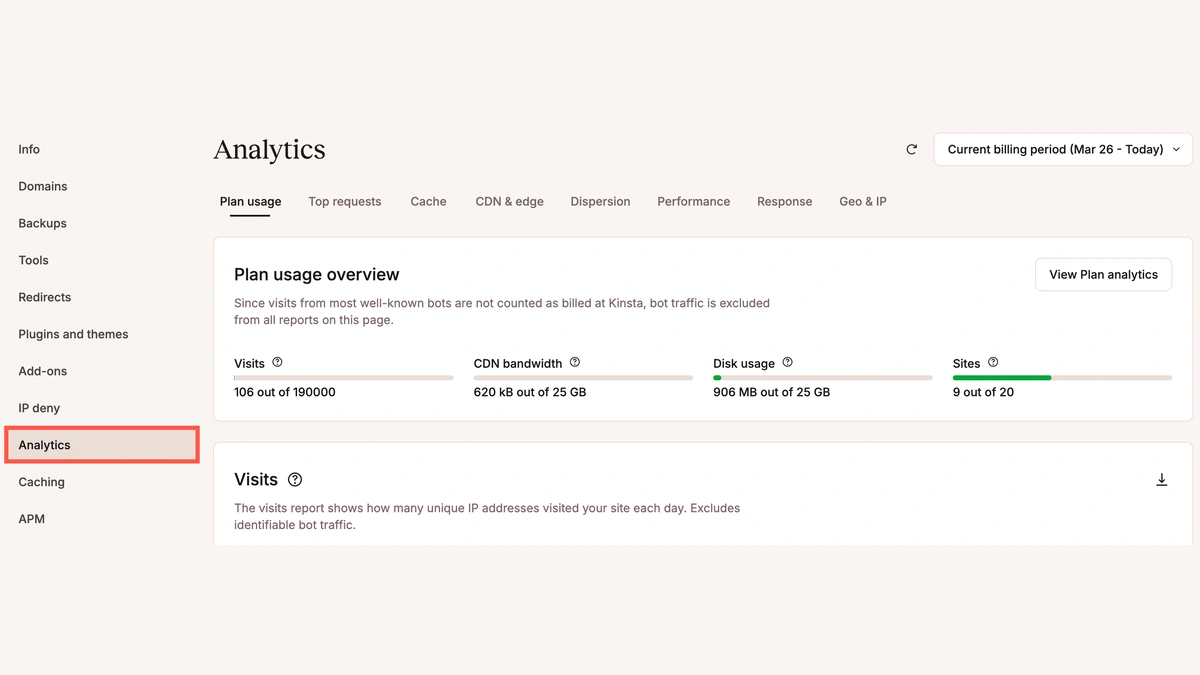
Kinsta is a premium managed WordPress hosting platform built on Google Cloud Platform C2 machines, running Nginx with full-page caching in front of every site. It suits developers and high-traffic sites that need granular control alongside premium performance, rather than a bare-bones control panel. The MyKinsta dashboard bundles application performance monitoring (APM) through a New Relic integration, giving developers a request-level view into slow queries and PHP bottlenecks.
- SSH, WP-CLI, Git, and Composer access: Kinsta exposes a full developer toolchain, including SFTP and phpMyAdmin, on every plan rather than gating it behind an enterprise tier.
- Automatic daily backups and a one-click staging environment: backups run daily with a 14-day retention window on the entry plan, and staging clones the full site, database included.
- Redis object caching available as an add-on: sites that outgrow full-page caching alone can add Redis for database-heavy workloads.
- Cloudflare CDN and WordPress Multisite support: the bundled CDN absorbs static-asset traffic, and Multisite suits agencies running a client network under one install.
Kinsta's honest limitation is cost: it carries the highest starting price in this roundup, and its plugin policy blocks a curated list of plugins considered unstable at scale. Per Kinsta's pricing page, the entry Single 20GB plan starts at $35 per month with the first month free, runs PHP 8.3 or PHP 8.4, and covers one WordPress install, 20GB of bandwidth, 10GB of storage, and 125GB of CDN bandwidth, with unlimited free site migrations and managed WAF and DDoS protection.
WP Engine: best for enterprise WordPress teams

WP Engine is a managed WordPress hosting provider built around enterprise teams and agencies, running EverCache page caching and a curated ecosystem of WordPress-specific tools rather than a generic control panel. It suits agency developers that need collaborative workflows and real developer tooling more than a low sticker price. WP Engine DevKit, built on the Local by Flywheel local-development app, syncs a developer's local environment with the live site's plugin and theme versions.
- Genesis Framework and Advanced Custom Fields (ACF) Pro included: both ship at no extra cost on higher plans, tools agencies would otherwise license separately.
- SSH Gateway access: command-line access runs through a dedicated SSH Gateway rather than direct shell access, a tradeoff aimed at enterprise compliance.
- Global Edge CDN on a Fastly backbone: the bundled CDN is Fastly-based rather than a generic reseller CDN, with edge caching rules configurable per site.
- WP Engine Intelligence and a one-click staging environment: Intelligence surfaces plugin vulnerability and performance data across a client's whole site portfolio.
WP Engine's honest limitation is that plans price by visit count or by site, so an agency portfolio or a traffic spike can push an upgrade sooner than expected. Per WP Engine's plans page, the entry Startup plan runs $30 per month on annual billing for the first year, supports PHP 8.3, and covers one site, 25,000 visits per month, 10GB of storage, and 75GB of monthly bandwidth, with a free automated migration plugin, a global CDN, and one-click staging.
Cloudways: best for cost-flexible performance
Cloudways is a managed WordPress hosting platform that layers a WordPress-optimized management interface over multiple cloud infrastructure providers, including DigitalOcean, Linode, Vultr, AWS (Amazon Web Services), and Google Cloud. It fits developers and growing sites that want WordPress-optimized infrastructure with pay-as-you-go flexibility, without hand-rolling a raw VPS. The stack pairs Varnish cache with Redis and Memcached for object caching, monitored by CloudwaysBot for server-level anomalies.
- Choice of five underlying cloud providers: DigitalOcean, Linode, Vultr, AWS, and Google Cloud all sit behind the same management interface.
- Cloudways CDN on a Cloudflare backbone: the CDN is an add-on rather than bundled by default on every plan, priced by bandwidth.
- LiteSpeed web server option with a one-click staging environment: staging clones the live environment for pre-production testing, with MariaDB or the standard database engine underneath.
- SFTP access: developers get direct file-system access rather than a walled-garden file manager only.
Cloudways' honest limitation is what the management fee does not include: no bundled email hosting, no domain registration, and pay-as-you-go server billing that charges more when a traffic spike pushes resource usage up, rather than a flat monthly cap. Per Cloudways' pricing page, the entry DO1GB plan on DigitalOcean starts at $11 per month, runs PHP 8.3, and includes 1GB of RAM, 25GB of storage, and 1TB of bandwidth, with free SSL and free migration of the first site.
Rocket.net: best for speed-first WordPress deployments

Rocket.net is a managed WordPress hosting provider built around a Cloudflare Enterprise integration, serving every site from Cloudflare's global edge network with HTTP/3 and QUIC support built in rather than layered on top. It suits performance-obsessed owners who want enterprise-grade edge infrastructure without an enterprise price tag. Argo Smart Routing, normally a Cloudflare add-on priced separately, ships on every Rocket.net plan and routes requests around congested internet paths.
- Cloudflare Enterprise on every plan: HTTP/3, QUIC, Argo Smart Routing, and DDoS protection are standard, not an upsell reserved for the top tier.
- Redis available as an add-on: an optional Redis object cache layer suits database-heavy sites beyond what full-page caching alone covers.
- Daily automated backups and a one-click staging environment: a one-click staging environment plus SSH or SFTP access round out the development workflow most agencies expect.
- WP Rocket plugin bundled: the caching plugin ships pre-installed and pre-configured rather than left for the site owner to tune manually.
Rocket.net's honest limitation is track record: it has a smaller installed base than Kinsta or WP Engine, and third-party plugin compatibility occasionally needs testing against Cloudflare's edge rules. Per Rocket.net's pricing page, the entry Starter plan runs $25 per month on the current promotional rate (regular price $30 per month), supports PHP 8.3, and includes unmetered visits, 10GB of storage, free migrations, a 99.99% uptime guarantee, and free SSL. For background on how a content delivery network like Cloudflare handles an attack, see the CDN-based DDoS attack mitigation explainer.
Hostinger: best budget managed WordPress hosting

Hostinger is a budget-tier managed WordPress host that WordPress.org lists among its recommended hosts, describing it as fast, secure, and simple to run. It fits beginners and budget-conscious owners who need core managed features without premium-tier pricing. Hostinger's 2022 Five for the Future pledge described pre-installed themes, a CDN with DDoS protection, and advanced web analytics; the bundle below is what its current plan pages list.
- LiteSpeed Enterprise with LSCache: the LiteSpeed Cache layer, served through LSAPI, delivers page-cache performance closer to Kinsta's Nginx stack than the price implies.
- hPanel control panel: Hostinger's own dashboard replaces cPanel with a simpler interface for domains, email, and one-click installs.
- NVMe SSD storage: the storage tier matches what premium providers ship, even on the entry plan.
- Free SSL via Let's Encrypt: certificates auto-renew with no manual step, standard on every plan.
Hostinger's honest limitation is depth at the entry tier: PHP worker counts on starter plans run lower than Kinsta or WP Engine allocate, and entry-tier support can lag behind a premium provider. Per Hostinger's WordPress hosting pricing page, the entry Premium plan lists an introductory rate of $2.99 per month on a 48-month term, renewing at $10.99 per month thereafter, supports PHP 8.3, and includes 20GB of SSD storage, up to 3 websites, a free domain for the first year, free weekly backups, and CDN access. Quoting only the $2.99 teaser rate understates the real cost: budget the $10.99 renewal. See the choosing a CDN for WordPress sites guide for more.
How to choose managed WordPress hosting
Choosing managed WordPress hosting comes down to traffic tier, technical control needs, and how much infrastructure work you want the provider to own versus handle yourself. The list below walks the variables in the order they typically eliminate options.
- Traffic tier: beginners under 5,000 monthly visitors run comfortably on Hostinger or Cloudways' entry tier; growth sites in the 5,000 to 50,000 range fit Cloudways or Rocket.net; high-traffic sites above 50,000 need Kinsta or WP Engine's dedicated resource allocation, but price the right rung of the ladder, not the entry plan. WP Engine's $30 Startup plan stops at 25,000 visits per month; 50,000-plus means its Professional tier at $55 per month, which covers 75,000, per WP Engine's plans page.
- Technical control needs: confirm SSH, Git, and WP-CLI access if a developer manages deployments; a GUI-only dashboard like hPanel suits a solo owner.
- PHP version requirements: confirm PHP 8.3 or PHP 8.4 is selectable without a support ticket, per the WordPress Hosting Team's current guidance.
- PHP worker count for WooCommerce stores: per WooCommerce's hosting guidance, match PHP worker allocation and object caching to checkout volume, not just storage.
- Staging environment depth: a one-click staging environment that clones the database, not just the files, matters more with custom plugins or a WooCommerce catalog.
- Content delivery network and DDoS protection: confirm whether the CDN and DDoS protection are bundled, and whether Let's Encrypt SSL and TLS renewal are automatic.
- Backup retention window: daily automated backups are close to universal now; the real variable is retention length and restore scope.
- Support quality: ticket-only support suits a technical owner; live chat with WordPress-expert staff matters more for a non-technical, revenue-generating store.
- Budget versus feature tradeoff: confirm the uptime guarantee and the renewal price, not just the advertised introductory rate.
For the underlying mechanics behind TTFB and PHP worker allocation, see the WordPress hosting performance benchmarks.
Further reading
Frequently Asked Questions
Is managed WordPress hosting worth the extra cost?
For sites with over 5,000 monthly visitors or those running WooCommerce stores, the answer is usually yes. Automated core updates, daily backups, server-level caching, and WordPress-expert support offset the premium against the risk and time cost of managing those layers yourself. Below that traffic floor, a well-tuned shared or VPS plan covers most WordPress needs at a fraction of the price.
Do managed WordPress hosts include free SSL and daily backups?
Both are standard across managed WordPress hosting plans, though backup retention windows and one-click restore scope vary by plan tier. Check whether your plan includes offsite backup storage and whether restores count against your data transfer allocation before committing to a provider.
What PHP version should my managed WordPress host support?
WordPress 6.9 sets an absolute minimum of PHP 7.4, but the WordPress Hosting Team recommends PHP 8.3.x or 8.4.x for performance and compatibility with the current release cycle. Any managed WordPress host you evaluate today should run PHP 8.3 or 8.4 by default and let you switch versions without raising a support ticket.
Do managed WordPress hosts handle plugin and core updates automatically?
Automatic updates for WordPress core are a standard managed hosting feature; plugin auto-updates vary by provider. Some hosts run nightly plugin updates against a staging environment before pushing to production; others offer selective auto-update rules you configure per plugin. Confirm the auto-update scope before migrating, especially if you rely on plugins with frequent breaking-change releases.