A gaming monitor is a display device that determines how resolution, refresh rate, and panel technology combine to shape what you actually see and feel during play.
The choice between 1440p, 4K UHD, and ultrawide 3440x1440 is not a matter of picking the largest number. Each resolution class carries a specific GPU rendering load, a different pixel density at typical desk distances, and connection requirements that constrain how high a refresh rate the panel can reach. Panel technology compounds the decision: a mid-range IPS monitor at 1440p at 144 Hz performs very differently from a QD-OLED ultrawide at the same resolution with a sub-millisecond GtG response time, even before adaptive sync enters the equation. Understanding how these variables interact is the foundation of a purchase decision that holds up across GPU generations.
How Display Resolution Shapes Gaming Visuals
A gaming monitor's display resolution determines how many pixels the panel packs into the viewable area, which directly sets image sharpness and the GPU rendering load required to drive it. Three resolution classes dominate the current market: 1440p (2560x1440), 4K UHD (3840x2160), and the ultrawide class anchored by 2560x1080 and 3440x1440. Pixel density at 27-inch diagonal: 1440p delivers roughly 109 pixels per inch; 4K UHD at the same size reaches roughly 163 ppi. That gap is perceptible at close viewing distances. For GPU load, 4K UHD contains roughly 2.25 times as many pixels as 1440p, translating directly into higher per-frame demand on the graphics card. The 4K gaming graphics card guide covers the GPU tier required to drive 4K UHD at playable frame rates.
| Resolution | Pixel count | Pixel density at 27 in | GPU rendering load | Primary use case |
|---|---|---|---|---|
| 1440p (2560x1440) | ~3.7 million | ~109 ppi | Medium | Competitive and immersive gaming at 144 Hz or above |
| 4K UHD (3840x2160) | ~8.3 million | ~163 ppi | High | Open-world and narrative games on a high-end GPU |
| Ultrawide 2560x1080 | ~2.8 million | ~96 ppi at 29 in | Low to medium | Wide field of view on a budget GPU |
| Ultrawide 3440x1440 | ~4.9 million | ~109 ppi at 34 in | Medium to high | Simulation, strategy, and cinematic immersion |
Panel Technology: IPS, VA, OLED, and QD-OLED Trade-Offs
Gaming monitor panel technology sets the ceiling on color gamut coverage, panel response time, and black-level depth independently of resolution class. IPS, VA, TN, OLED, QD-OLED, and WOLED each make a distinct set of trade-offs. Matching panel type to intended workload is as important as the display resolution choice. An ultrawide display adds a further variable: the 21:9 aspect ratio increases the horizontal pixel count at any given resolution tier, which affects both rendering load and game compatibility. For HDR-heavy games, the real-time ray tracing vs traditional rendering comparison covers how HDR rendering requirements interact with panel HDR tier selection.
- IPS (in-plane switching)
- IPS panels deliver wide color gamut coverage, typically 95 to 100 percent sRGB and 85 to 95 percent DCI-P3 in gaming-grade models. Panel response time (GtG) falls in the 1 to 5 ms range. Backlight bleed limits true black reproduction. HDR on IPS gaming monitors aligns with the lower VESA DisplayHDR tiers: DisplayHDR 400 and DisplayHDR 600 are common, while DisplayHDR 1000, DisplayHDR 1400, and DisplayHDR True Black 400/600 are reserved for panels with per-zone or per-pixel emission control (VESA DisplayHDR performance criteria).
- VA (vertical alignment)
- VA panels deliver native contrast ratios of 2500:1 to 4000:1, improving black-level depth over IPS without per-pixel control. sRGB and DCI-P3 gamut coverage is broadly comparable to IPS. Panel response time on VA is slower than IPS at the same price point, producing ghosting in fast scenes. Local dimming zones on VA panels improve HDR contrast, allowing some models to qualify for DisplayHDR 600 or DisplayHDR 1000 certification.
- TN (twisted nematic)
- TN panels offer the fastest GtG response time at the lowest cost but deliver narrow color gamut, typically 72 percent sRGB, and poor off-axis viewing. TN gaming monitors at 360 Hz remain available for competitive esports builds where motion clarity outweighs color accuracy, though IPS and QD-OLED at 1 ms GtG have largely displaced TN in current lineups.
- OLED and QD-OLED
- OLED panels achieve per-pixel self-emission: each pixel turns off individually, delivering near-perfect black reproduction and exceptional contrast. Panel response time drops to fractions of a millisecond, far below the 1 ms benchmark IPS and TN target. QD-OLED (quantum dot OLED) layers a quantum dot film over the OLED emitter array, extending DCI-P3 gamut coverage to over 98 percent while retaining sub-millisecond GtG. WOLED (white OLED with color filter) is a related architecture used in LG's UltraGear ultrawide display lineup. OLED gaming monitors certify under VESA DisplayHDR True Black 400 or DisplayHDR True Black 600 rather than the standard DisplayHDR 1000/1400 tiers, because the True Black specification is designed around per-pixel black measurement (VESA DisplayHDR performance criteria). The LG UltraGear 45GS95QE-B delivers 0.03 ms GtG on its 3440x1440 OLED panel at 240 Hz (LG 45GS95QE-B product page). A QD-OLED ultrawide at 3440x1440 can outperform an IPS 4K UHD panel on motion clarity even at lower pixel density, which matters where MPRT (moving picture response time) is the decisive metric.
Refresh Rate, Response Time, and Competitive Play
Gaming monitor refresh rate and GtG response time are the two performance metrics that matter most to competitive gaming, and both interact with resolution in ways that force hardware trade-offs. Common refresh rate tiers are 60 Hz, 144 Hz, 165 Hz, 240 Hz, and 360 Hz. A 360 Hz panel at 1440p requires the GPU to sustain frame rates that a 4K UHD panel at the same refresh rate would demand significantly more hardware to match. Higher display resolution and higher refresh rate together require more DisplayPort or HDMI bandwidth, which is why 4K UHD at 144 Hz or above demands DisplayPort 2.1 or HDMI 2.1 rather than older versions.
The Alienware AW2723DF demonstrates high-refresh 1440p in practice: it reaches 280 Hz overclocked with 1 ms GtG at 2560x1440 (Dell AW2723DF product page). For QD-OLED at 1440p, the Alienware AW2726DM delivers 240 Hz with 0.03 ms GtG (Dell AW2726DM product page). LG characterizes 144 Hz as the fluid-gameplay threshold and notes competitive players may want 240 Hz (LG UltraGear buying advice).
A practical decision hierarchy for competitive gaming:
- Choose target refresh rate first. Competitive FPS and RTS players use 144 Hz as a baseline; 240 Hz or 360 Hz provides a measurable advantage at the top of competitive play. MPRT at 360 Hz is perceptibly lower than at 144 Hz.
- Select the resolution the GPU can sustain. At 240 Hz and above, 1440p is the practical ceiling for most GPU tiers; 4K UHD at those rates exceeds what all but top-end cards can deliver consistently.
- Match panel type to GtG requirement. QD-OLED and OLED sub-millisecond GtG virtually eliminates motion blur; IPS at 1 to 2 ms GtG suits most players; VA above 4 ms GtG disadvantages fast-paced play; TN at 360 Hz remains viable for pure competitive builds where DCI-P3 gamut is irrelevant.
- Verify DisplayPort or HDMI version on both GPU output and monitor input before purchasing for a target resolution and refresh rate combination.
Adaptive Sync: VESA FreeSync and Nvidia G-Sync
Gaming monitor adaptive sync technology eliminates screen tearing by synchronizing the panel's refresh cycle to the GPU rendering load in real time. Variable refresh rate (VRR) is the underlying mechanism: a fixed-refresh panel shows screen tearing where two frame boundaries collide mid-scan; adaptive sync holds the refresh cycle open until the next frame arrives. AMD FreeSync Premium Pro and NVIDIA G-Sync represent the two dominant branded implementations built on VESA Adaptive-Sync. VESA publishes the Adaptive-Sync and Media-Sync compliance test specifications that define the open standard underlying FreeSync certification (VESA standards overview).
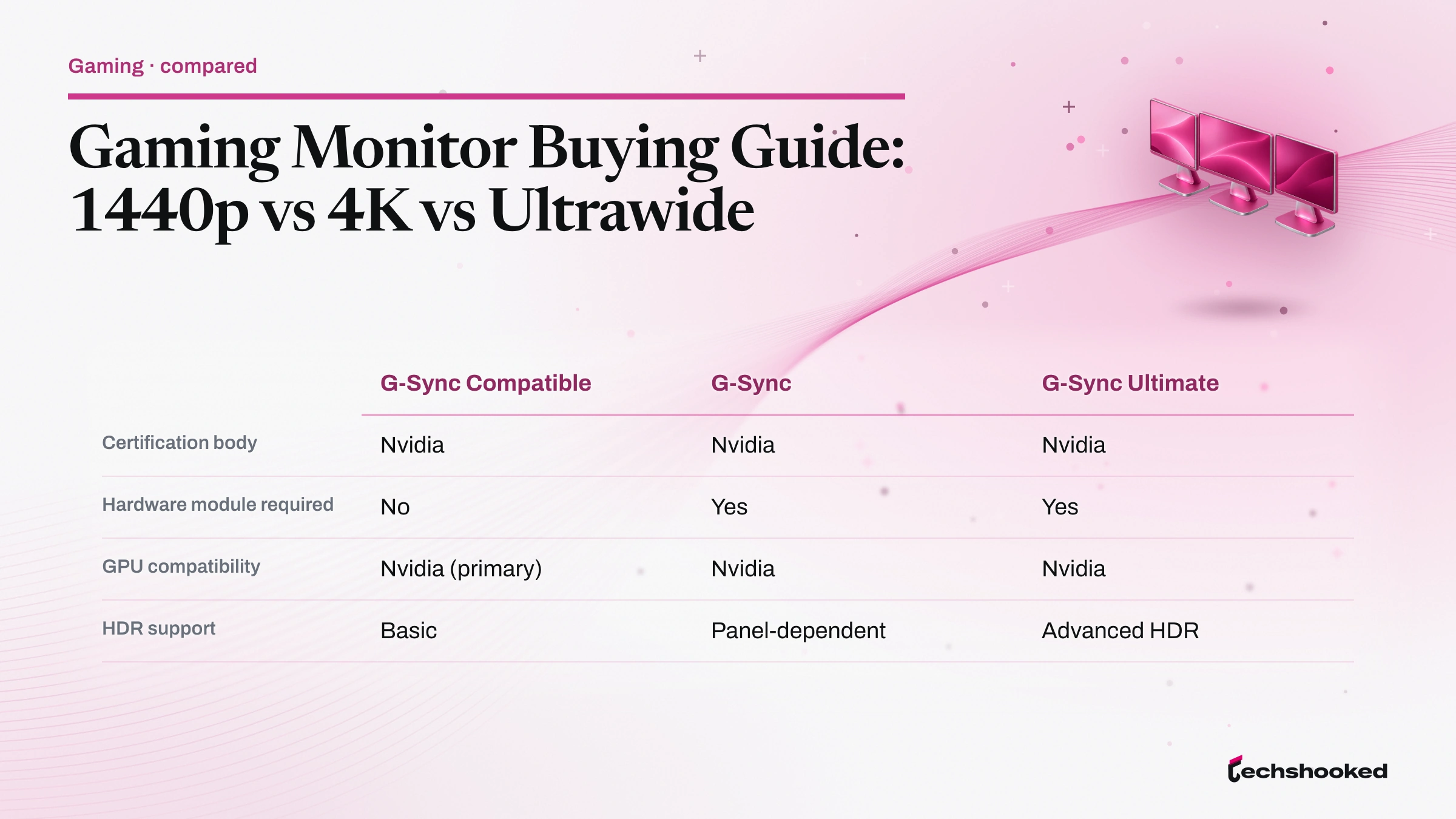
Nvidia G-Sync operates on a proprietary certification model with three distinct tiers. G-Sync Compatible requires no hardware module and supports basic VRR on monitors that pass Nvidia's validation testing. G-Sync adds a proprietary Nvidia processor built into the monitor. G-Sync Ultimate adds advanced HDR support on top of the G-Sync hardware module. The Alienware AW2723DF carries VESA Adaptive-Sync, AMD FreeSync Premium Pro, and NVIDIA G-Sync Compatible certifications simultaneously (Dell AW2723DF product page). Full G-Sync tier requirements: Nvidia G-Sync monitor products page.
| Feature | VESA Adaptive-Sync / FreeSync Premium Pro | G-Sync Compatible | G-Sync | G-Sync Ultimate |
|---|---|---|---|---|
| Certification body | VESA | Nvidia | Nvidia | Nvidia |
| Hardware module required | No | No | Yes | Yes |
| GPU compatibility | AMD, Intel, Nvidia | Nvidia (primary) | Nvidia | Nvidia |
| HDR support | Panel-dependent | Basic | Panel-dependent | Advanced HDR |
1440p vs 4K UHD vs Ultrawide: Which Fits Your Setup
Choosing a gaming monitor resolution class balances pixel density, aspect ratio, color gamut, and GPU rendering load against your primary game genres and GPU tier. LG characterizes 1440p (QHD) as the sweet spot for many gamers and states that 4K UHD is the choice for maximum visual fidelity (LG UltraGear buying advice). An ultrawide display at 21:9 aspect ratio extends horizontal field of view without scaling pixel count as aggressively as 4K UHD, though game compatibility differs from standard 16:9 panels. The rendering pipeline context for display fidelity decisions is covered in the Unity vs Unreal Engine for VR games comparison.
- Competitive FPS and RTS players: 1440p at 144 Hz or above, IPS or QD-OLED, with AMD FreeSync Premium Pro or NVIDIA G-Sync Compatible certification. GPU rendering load at 1440p is low enough for a mid-range GPU to sustain 165 Hz or higher. Ultrawide support in competitive multiplayer is inconsistent. TN panels at 360 Hz remain an option for pure motion-clarity builds, but QD-OLED at 240 Hz with sub-millisecond GtG has largely displaced TN.
- Open-world and narrative games: 4K UHD with an IPS or OLED panel, DisplayHDR 600 or higher, and a high-end GPU tier. Dropping frame targets to 60 Hz opens 4K UHD's pixel density benefit to a lower GPU tier. For GPU selection at 4K, see the 4K gaming graphics card guide.
- Simulation, racing, and strategy: An ultrawide display at 3440x1440 and 21:9 aspect ratio, with 1000R or tighter curvature for immersion, OLED or QD-OLED panel, and 240 Hz refresh. The LG UltraGear 45GS95QE-B and 39GS95QE-B are 3440x1440 OLED ultrawide models at 240 Hz with 800R curvature (LG 45GS95QE-B, LG 39GS95QE-B).
- Mixed-use setups: 1440p ultrawide (3440x1440) balances horizontal immersion with manageable GPU rendering load, full sRGB coverage, and 21:9 productivity. Verify game-specific ultrawide support: some competitive titles and console ports stretch or pillarbox a 16:9 image on a 21:9 panel.
Connection Standards: DisplayPort and HDMI Bandwidth
A gaming monitor's physical connection standard sets a hard bandwidth ceiling on achievable resolution and refresh rate combinations. Choosing the wrong cable or port version bottlenecks performance before the display or GPU becomes the constraint. DisplayPort bandwidth determines whether a given resolution and refresh rate combination is achievable without compression: DisplayPort 2.1 and HDMI 2.1 are the current high-bandwidth options; DisplayPort 1.4 and HDMI 2.0 remain common on mid-range and older hardware. VESA Adaptive-Sync operates over DisplayPort natively; HDMI Forum VRR is a separate specification with its own implementation path. USB-C with DisplayPort Alt Mode is a third connector type that carries DisplayPort signaling over a USB-C cable, enabling single-cable desktop setups where the GPU or laptop output supports it.
- DisplayPort 1.4
- DisplayPort 1.4 supports 4K UHD at high refresh rates using Display Stream Compression (DSC), a VESA standard designed to be visually lossless under normal viewing conditions (VESA standards overview). Without DSC, DisplayPort bandwidth at the 1.4 revision is limited to 4K UHD at lower refresh rates. It remains standard on mid-range GPUs and most current 1440p gaming monitors. For 4K UHD at high-refresh configurations, DisplayPort 1.4 becomes the constraint before the panel or GPU.
- DisplayPort 2.1
- DisplayPort 2.1 delivers up to 80 Gbps of DisplayPort bandwidth, enabling 4K UHD at 144 Hz and above without DSC compression (VESA DisplayPort 2.1 specification announcement). For buyers targeting 4K UHD at 144 Hz or above, DisplayPort 2.1 on both the GPU output and the monitor input is the recommended pairing. VESA Adaptive-Sync over DisplayPort 2.1 retains the full FreeSync Premium Pro feature set where the panel carries that certification.
- HDMI 2.0
- HDMI 2.0 supports 4K UHD at 60 Hz, covering the baseline 4K use case but not high-refresh-rate gaming. HDMI 2.0 is common on older monitors as a secondary input. For competitive 1440p gaming at 165 Hz or above over HDMI, verify the monitor's HDMI version before assuming compatibility.
- HDMI 2.1
- HDMI 2.1 delivers up to 48 Gbps of bandwidth, enabling 4K UHD at 120 Hz and making it the preferred connector for current-generation console gaming at 4K UHD (HDMI 2.1 specification). HDMI Forum VRR is separate from VESA Adaptive-Sync; monitors supporting both carry each certification independently. Verify that GPU output and monitor input share a matching version before assuming a target resolution and refresh rate combination is achievable.
- USB-C (DisplayPort Alt Mode)
- USB-C connectors carrying DisplayPort Alt Mode deliver full DisplayPort signaling, including VESA Adaptive-Sync, over a single cable. Bandwidth depends on the underlying DisplayPort version negotiated between the source and the display. USB-C inputs are most common on productivity-oriented gaming monitors and ultrawides designed for mixed laptop and desktop use.
The practical check before purchase: confirm the DisplayPort or HDMI version on both ends of the cable path. A DisplayPort 2.1 gaming monitor paired with a GPU outputting only DisplayPort 1.4 operates at DisplayPort 1.4 capability. Port version mismatches are among the most common reasons buyers see refresh rates below the monitor's rated maximum.
Further reading
- VESA Standards Overview covers the full Adaptive-Sync and DisplayHDR standard families.
- VESA DisplayHDR Performance Criteria lists every certification tier from DisplayHDR 400 through DisplayHDR 1400 and the True Black variants.
- Nvidia G-Sync Monitor Products details current G-Sync, G-Sync Compatible, and G-Sync Ultimate certification requirements.
- DMCA Takedowns and Copyright for Streamers: Avoid Strikes
- Game Monetization Model: Free-to-Play vs Premium vs Subscription
- Game Testing Tools Comparison: Manual vs Automated QA
Frequently Asked Questions
Is 1440p or 4K UHD better for gaming on a mid-range GPU?
1440p is the stronger choice for a mid-range GPU: the lower pixel count keeps GPU rendering load low enough to sustain 144 Hz or above. 4K UHD pixel density advantage is perceptible at close viewing distances but requires a high-end GPU to maintain smooth frame delivery. If the GPU cannot consistently feed the display's refresh rate at 4K UHD, frame pacing issues offset the sharpness gain.
Are ultrawide monitors supported by all games?
Ultrawide monitor support varies by title and requires per-game verification before purchase. Most modern open-world, simulation, and strategy titles support 21:9 natively at 2560x1080 or 3440x1440, but competitive multiplayer games and some console ports either stretch a 16:9 image or pillarbox it, negating the field-of-view advantage. Check the game's settings menu for a resolution option matching your ultrawide's native resolution before assuming compatibility.
Do I need G-Sync if my GPU is AMD?
No. AMD GPUs use FreeSync, which is built on VESA Adaptive-Sync, so an AMD FreeSync Premium Pro certified monitor is the correct pairing. G-Sync Compatible monitors also support Adaptive-Sync and work with AMD GPUs in FreeSync mode, but the G-Sync module hardware communicates specifically with Nvidia GPUs. Nvidia GPUs can also drive FreeSync monitors in basic Adaptive-Sync mode; the certification tier determines feature completeness, not absolute compatibility.
What DisplayPort version do I need for a 4K 144 Hz gaming monitor?
DisplayPort 2.1 delivers up to 80 Gbps and is the recommended connection for 4K UHD at 144 Hz or above without compression. DisplayPort 1.4 can reach 4K UHD at lower refresh rates using Display Stream Compression (DSC), a VESA standard designed to be visually lossless under normal conditions. HDMI 2.1 at 48 Gbps supports 4K UHD at 120 Hz and is the console gaming alternative. Verify that both the GPU output port and the monitor input port share the same version before purchasing.