
A gaming laptop is a portable computer that integrates a discrete GPU, high-refresh display, and dedicated cooling to sustain frame rates competitive with desktop systems.
Choosing one requires understanding three interdependent variables: how much total graphics power the chassis can sustain under load, how the display converts that power into visible frame rates, and how all of it behaves when the machine is running on battery. Vendors market GPU model names and peak clock speeds, but the figure that determines your actual experience is how much wattage the chassis permits the GPU to draw over an extended session. That sustained wattage number, more than any single specification on a product page, separates a high-performance gaming laptop from one that throttles after the first loading screen.
What Makes a Laptop a Gaming Laptop

A gaming laptop differentiates itself from a general-purpose laptop through three hardware commitments: a discrete GPU, a high-refresh panel, and a cooling system designed to sustain wattage under continuous load. Each component is interdependent. A discrete GPU produces heat proportional to its power draw; the cooling system must remove that heat fast enough to prevent thermal throttling; the high-refresh display only delivers its rated cadence when the GPU can consistently produce enough frames to fill it.
General-purpose laptops use integrated graphics, which share memory bandwidth with the CPU and draw far less power. They are adequate for productivity and light media consumption but cannot sustain the frame rates that competitive or graphically demanding titles require. A gaming laptop's discrete GPU operates as a separate processing unit with its own dedicated memory, enabling parallel rendering workloads that integrated graphics cannot handle at playable speeds.
The high-refresh display matters because a panel that updates 60 times per second cannot show 120 rendered frames per second regardless of GPU output. Matching panel refresh rate to achievable GPU frame rate is part of the buying decision, not an afterthought. The cooling system ties the two together: without adequate thermal capacity, neither the GPU nor the CPU can sustain the power states required for consistent portable gaming performance.
GPU Tier: The Primary Performance Driver

The GPU tier determines the frame-rate ceiling for any title, but the total graphics power (TGP) the chassis allows that GPU to draw determines whether that ceiling is actually reached. A discrete GPU running at reduced TGP due to chassis thermal limits will perform below its rated class. Two laptops carrying nominally the same GPU can deliver measurably different frame rates if their TGP configurations differ by a meaningful margin. For a technical breakdown of how GPU tier translates to resolution and frame-rate targets across categories, the 4K gaming graphics card guide covers the desktop equivalents that inform these tier comparisons.
Laptop GPU tiers broadly divide into three categories, each suited to a different combination of resolution target, title type, and price range:
- Entry-level mobile GPU
- Targets 1080p at moderate settings. Adequate for esports titles and older releases. Sustained wattage in thin chassis is lower, so thermal design has less headroom to work with. Best match for portable gaming on a constrained budget.
- Midrange mobile GPU
- Handles 1080p at high settings and 1440p at medium-to-high settings for most current titles. The most common tier in high-performance gaming laptop configurations. TGP range is wide across manufacturers, so chassis thermal design is the differentiating factor within this tier.
- High-end mobile GPU
- Targets 1440p at maximum settings and 4K at playable frame rates for GPU-limited workloads. Requires the largest chassis formats to sustain full TGP. ASUS documents the TGP configuration and thermal targets for their upper-tier mobile GPU implementations in their ROG Strix SCAR 18 press release, which illustrates how top-tier chassis engineering enables sustained high wattage output across extended sessions.
When comparing laptops within the same GPU tier, prioritize models that publish their configured TGP rather than only the GPU model name. A midrange discrete GPU running at its full rated TGP outperforms the same GPU in a thin-and-light chassis where thermal constraints force the wattage down. The GPU model alone is an incomplete specification.
Thermal Design and Sustained Performance
Thermal design separates gaming laptops that maintain peak performance through a full session from those that throttle within the first few minutes of a demanding scene. When a GPU or CPU hits its thermal limit, the firmware reduces clock speeds to keep temperatures within safe bounds. The result is a drop in frame rate that does not recover until the chip cools, creating inconsistent performance that no display or GPU tier can compensate for.
A well-engineered thermal design sustains the configured TGP without requiring the chip to throttle. Vapor chamber cooling spreads heat across a larger surface area than conventional copper heat pipes, reducing hotspot concentration at the die. Multiple fan arrays and optimized airflow paths exhaust that heat before it accumulates. Chassis material and thickness constrain how aggressive the cooling system can be, which is why high-performance gaming laptops in larger chassis formats can sustain higher wattage than slim designs carrying nominally identical GPUs.
When evaluating thermal design during a purchase decision, consider these factors in order:
- Published sustained TGP: Look for the manufacturer's stated wattage at sustained load, not the boost or peak figure. Sustained wattage is the number that reflects real-session performance.
- Chassis size category: Larger chassis accommodate more heat-pipe surface area and fan diameter. Thin gaming designs trade sustained thermal capacity for portability.
- Cooling system type: Vapor chamber designs generally sustain higher thermal loads than heat-pipe arrays of equivalent footprint. Some manufacturers publish their cooling architecture in product documentation.
- Thermal mode options: Many gaming laptops ship with software-configurable performance modes. Maximum performance modes unlock higher sustained wattage but increase fan noise and surface temperatures.
- Ambient temperature sensitivity: Sustained frame rates in warm environments will be lower than benchmark conditions. Factor in your typical use environment when interpreting sustained performance data.
Honor's recommended gaming laptop specs guide notes that sustained performance under GPU and CPU co-load conditions is one of the most critical evaluation criteria buyers overlook when comparing specifications on the Honor gaming specs resource. The gap between peak and sustained throughput is where chassis quality becomes measurable.
Display: Refresh Rate vs Resolution Trade-Off
Display selection in a gaming laptop involves a direct trade-off: higher resolution raises visual fidelity but requires more GPU headroom to sustain playable frame rates. A high-refresh display at a lower resolution will feel more responsive than a higher-resolution panel if the GPU cannot consistently feed the higher-resolution target with enough frames. The refresh rate determines how often the panel redraws the image; frame rate determines how often the GPU delivers a new frame. Both numbers matter, and the GPU tier determines which resolution target is achievable at a given refresh rate.
For a parallel treatment of how these same resolution and refresh rate trade-offs play out on external displays, the gaming monitor buying guide covers panel technologies and refresh rate tiers for desktop setups.
| Resolution | Refresh rate target | GPU tier required | Best use case |
|---|---|---|---|
| 1080p | High-refresh (144 Hz and above) | Entry to midrange mobile GPU | Esports, competitive shooters, older releases |
| 1440p | High-refresh (144 Hz and above) | Midrange to upper-midrange mobile GPU | Current-gen AAA titles, simulation games at high settings |
| 4K | Standard or high-refresh | High-end mobile GPU at full TGP | Visually demanding titles where frame rate target is 60 fps or above |
Panel technology adds a secondary layer to the decision. IPS panels offer wide viewing angles and accurate color reproduction. OLED panels deliver deeper contrast ratios and faster per-pixel response times, but carry a higher price premium and a burn-in risk under static HUD elements. VA panels offer high contrast in a lower-cost format but often exhibit slower response times that create motion artifacts at high refresh rates. For most gaming use cases on a high-refresh display, IPS or OLED are the practical options.
Response time, measured in milliseconds gray-to-gray, affects ghosting at high frame rates. Panels rated at one millisecond gray-to-gray at their target refresh rate reduce trailing artifacts behind fast-moving objects. At lower refresh rates, the difference between one and five millisecond response times is less perceptible. Prioritize response time only after confirming the resolution and refresh rate target match the GPU tier in the chassis.
Gaming Laptop vs Desktop: When Portability Changes the Equation
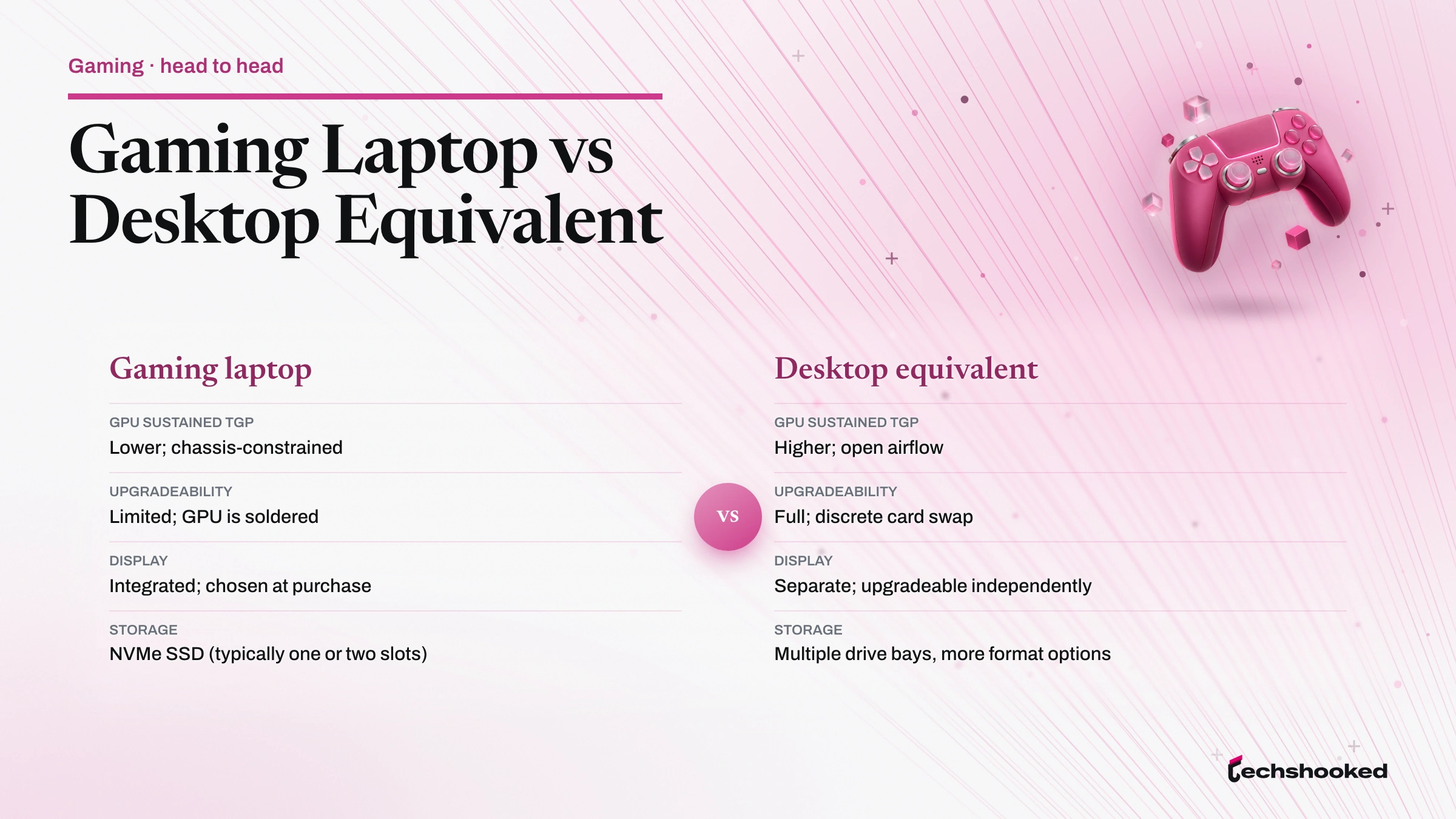
A gaming laptop trades upgradeability and peak sustained throughput for portability and a self-contained form factor that requires no separate display, keyboard, or power management. The gaming laptop vs desktop question comes down to how you weight those two sides. A desktop at the same price point will generally deliver higher sustained performance because desktop chassis have no size or thermal constraints, and desktop GPUs run at higher TGP configurations as a result. The gap narrows at the high end of the gaming laptop market, where larger chassis can sustain wattage closer to desktop-class levels.
Portable gaming carries a fixed set of compromises that no specification resolves entirely. Understanding them before purchase prevents buyer regret:
| Factor | Gaming laptop | Desktop equivalent |
|---|---|---|
| GPU sustained TGP | Lower; chassis-constrained | Higher; open airflow |
| Upgradeability | Limited; GPU is soldered | Full; discrete card swap |
| Display | Integrated; chosen at purchase | Separate; upgradeable independently |
| Storage | NVMe SSD (typically one or two slots) | Multiple drive bays, more format options |
| Portability | Self-contained; battery-capable | Fixed location; AC power only |
| Total cost of ownership | All-in-one; no peripherals required | Add monitor, keyboard, mouse, case separately |
The GPU soldering point is the most consequential long-term constraint. Desktop owners can replace a GPU when a newer generation delivers better performance-per-watt or drops in price. Gaming laptop owners are committed to the GPU tier they purchase. The storage decision is less rigid: most gaming laptops accept NVMe SSD upgrades, and the SSD vs HDD for gaming libraries comparison covers how storage type affects load times and library size.
For buyers who primarily game at a fixed location but want the option to carry the machine occasionally, a high-end gaming laptop with a large chassis makes the trade-off more acceptable. For buyers who need sustained portable gaming performance across multiple daily locations, the thermal constraints of thinner designs require realistic expectations about sustained frame rates.
Battery Life and Power Reality
Battery endurance during active gaming is substantially lower than the figures vendors publish for productivity workloads, because the discrete GPU draws sustained power that a notebook battery cannot sustain at full TGP. Productivity battery tests run the integrated graphics or the GPU at minimal load. Gaming activates the discrete GPU at sustained wattage, which draws from the battery at a rate the pack is not sized to support for extended sessions. Portable gaming on battery is viable for shorter sessions or at reduced performance settings, not as a substitute for plugged-in operation.
Managing battery expectations before purchase reduces the risk of disappointment:
- Ignore productivity battery ratings for gaming scenarios: A machine rated at ten hours for web browsing may deliver under two hours under full GPU load. The two figures measure different power states.
- Use performance modes strategically: Dropping to a balanced or battery-saver performance mode on battery reduces sustained wattage to the GPU, extending battery life but reducing frame rate. This trade-off is acceptable for less demanding titles or lower-stakes sessions.
- Use hybrid graphics when available: Some gaming laptops can disable the discrete GPU and route display output through integrated graphics for productivity tasks, preserving battery for portable gaming sessions later.
- Plan for AC proximity in competitive scenarios: If frame rate consistency matters, plan to be near a power outlet. Battery gaming introduces voltage variability that further constrains sustained wattage to the GPU.
Battery capacity, measured in watt-hours, affects how long a reduced-TGP gaming session lasts on a charge. Larger chassis tend to accommodate higher-capacity batteries alongside larger cooling systems, which is another dimension of the size-versus-portability trade-off at the core of the gaming laptop vs desktop decision.
Choosing the Right Gaming Laptop for Your Use Case
Selecting a gaming laptop comes down to matching GPU tier and thermal design to your target resolution and the titles you play most. A buyer whose library is exclusively esports titles at 1080p does not need the sustained wattage budget or chassis size of a high-end mobile GPU configuration. A buyer targeting 1440p high-refresh gaming across current-generation releases needs a midrange-or-above mobile GPU in a chassis that publishes its sustained TGP. High-performance gaming at 4K requires the largest chassis category and the highest GPU tier available in the laptop form factor.
For peripheral choices that complement any gaming laptop configuration, the gaming peripherals comparison guide covers input devices and audio that pair with portable setups.
Work through these decision steps before committing to a configuration:
- Set your resolution target first: 1080p, 1440p, or 4K. This determines which GPU tier range is relevant before you look at specific products. Refresh rate target follows from resolution once you know which GPU tier can sustain it.
- Match chassis size to thermal requirement: If your GPU tier requires sustained high wattage, select a chassis size category that supports it. A thin gaming laptop at the same GPU tier will deliver lower sustained frame rates.
- Confirm published TGP for the specific configuration: Manufacturers sometimes offer the same model in multiple TGP configurations. Verify which configuration you are purchasing, not just which GPU family the product belongs to. ASUS publishes configuration-level specifications on their product pages, which is a useful reference for understanding how TGP varies across SKU variants within a product family on the ASUS TUF product specification page.
- Evaluate the display specification against your GPU tier: A high-refresh display is only useful if the GPU can sustain frame rates that approach the panel's cadence. A 1080p high-refresh panel is a better match for a midrange mobile GPU than a 4K panel that the GPU cannot adequately feed.
- Account for portability requirements: If you carry the machine frequently, chassis weight and battery capacity matter. If the machine lives on a desk with occasional travel, prioritize thermal design over carry weight.
- Plan for storage expansion: Most gaming libraries grow over time. Verify the number of available NVMe slots before purchase rather than relying on initial capacity alone.
The decision architecture is consistent across budget levels. Entry-tier buyers optimize refresh rate at 1080p. Mid-tier buyers optimize sustained TGP at 1440p. High-end buyers optimize thermal design to sustain the full wattage budget of a top-tier discrete GPU at 4K. Each tier has a clear set of criteria; the differences are in which trade-offs are acceptable, not in the framework for evaluating them.
References
- ASUS ROG Strix SCAR 18 press release: press.asus.com
- ASUS TUF Gaming product specifications: asus.com
- Honor recommended gaming laptop specs: honor.com
Further reading
Frequently Asked Questions
Can a gaming laptop match desktop performance for demanding titles?
A high-end gaming laptop can match or approach a similarly configured desktop for GPU-limited workloads. Sustained CPU-heavy loads reveal a performance gap caused by thermal constraints and a lower configurable total graphics power ceiling. Cooling system design is the deciding factor: laptops that sustain higher wattage to the GPU over longer sessions close the gap considerably. For most titles at 1080p and 1440p, a current-gen upper-midrange gaming laptop delivers frame rates that are competitive with a desktop at the same price point.
What display specification matters most for smooth gameplay on a gaming laptop?
Refresh rate is the single most impactful display specification for gameplay smoothness, because it determines how frequently the panel updates the image. A high-refresh 1080p panel will feel more responsive than a 4K panel at the same frame rate. Resolution, response time, and panel technology (IPS vs. OLED vs. VA) affect image quality and color accuracy, but refresh rate drives the tactile feel of input-to-output latency.
Is battery life a realistic concern for gaming laptop buyers?
Battery life during gaming is significantly shorter than during productivity workloads because the GPU draws sustained power under load. Most gaming sessions on battery sacrifice both frame rate and thermal headroom compared to plugged-in operation. Buyers should treat battery life figures from productivity benchmarks as irrelevant to gaming endurance and plan to game plugged in when performance matters.