A VR gaming setup is a head-mounted display that renders stereoscopic 3D environments for immersive gaming experiences. The consumer market has settled into three distinct platform families: standalone hardware led by the Oculus Quest line, console-tethered hardware anchored by PlayStation VR2, and PC-tethered hardware represented by the HTC Vive Pro 2. Each family makes different trade-offs across price, visual fidelity, tracking precision, and the size of its game catalog, and the right choice depends almost entirely on what hardware already sits in the room. This VR platform comparison evaluates the three families on the specifications that actually change the experience, then walks through the buying decision and the physical setup each one demands.
What a VR Headset Actually Does
A virtual reality headset combines two small high-density displays, lenses that focus those displays at infinity, and a tracking system that locates the wearer's head and hands in physical space. The virtual reality headset feeds each eye a slightly offset image to produce stereoscopic depth, then updates that image at the refresh rate of the panel (typically 90 Hz to 120 Hz) so head movement feels continuous rather than choppy. High motion-to-photon latency can provoke cybersickness, and a widely repeated recommendation is to keep it below 20 milliseconds, per the review Latency and Cybersickness: Impact, Causes, and Measures. A Review (Frontiers in Virtual Reality, 2020).
Tracking is the second axis. Older systems used outside-in tracking, where external sensors watched the headset; modern systems use room-scale tracking, where cameras on the head-mounted display (HMD) watch the room. The distinction shapes setup complexity, accuracy, and play-area flexibility, and it sits underneath every other decision a buyer makes about a VR gaming setup. For developers building the content that runs on these headsets, the engine choice carries similar weight, as covered in the Unity vs Unreal Engine for VR games breakdown.
- HMD (head-mounted display): the headset itself, including panels, lenses, and on-board sensors.
- Inside-out tracking: position tracking driven by cameras on the headset, requiring no external hardware.
- 6DoF (six degrees of freedom): tracking that captures both rotation and translation of the head and hands, as opposed to 3DoF, which captures rotation only.
Oculus Quest VR Headset: Standalone Platform
The Oculus Quest VR headset family, now sold under the Meta Quest brand, defines the standalone VR category. The HMD contains its own Snapdragon-class mobile processor, storage, battery, and inside-out tracking cameras, so a Quest works out of the box with no PC and no console attached. Meta ships two consumer models: the Quest 2, which remains the volume product, and the Quest 3, the higher-resolution successor with color passthrough for mixed-reality applications (Meta Developer Documentation).
The appeal of a Quest-based VR gaming setup is operational simplicity. There is one device to charge, one store to install games from, and one boundary to draw on the floor. The trade-off is rendering performance: a mobile chip cannot match a desktop GPU, so visuals on native Quest titles are noticeably simpler than the same titles streamed from a PC. Both Quest 3 and Quest 2 support Air Link and Link cable streaming to a Windows PC, which converts the standalone VR device into a PC-tethered VR display when the user wants higher fidelity.
- Display: LCD panels with per-eye resolution of 1832 x 1920 on Quest 2 and 2064 x 2208 on Quest 3.
- Refresh rate: up to 120 Hz on Quest 2 (90 Hz default) and 120 Hz on Quest 3.
- Tracking: inside-out tracking with four (Quest 2) or six (Quest 3) on-board cameras; 6DoF for HMD and motion controllers.
- Storage: 128 GB or 256 GB on Quest 2; 128 GB or 512 GB on Quest 3.
- Price: Quest 2 retails in the $200 to $300 range; Quest 3 starts around $500 for the 128 GB SKU.
- Account requirement: a Meta account is mandatory for setup and store access.
PlayStation VR Headset: Console-Native Platform
The PlayStation VR headset, now in its second generation as PlayStation VR2, plugs into a PlayStation 5 over a single USB-C cable and inherits the console's GPU for rendering. PSVR2 is the only mainstream consumer VR headset shipping with OLED panels, which deliver true blacks and higher contrast than the LCD displays used by Quest and Vive. The system also adds per-eye foveated rendering driven by on-board eye tracking, headset rumble, and adaptive-trigger Sense controllers (PlayStation VR2 product page).
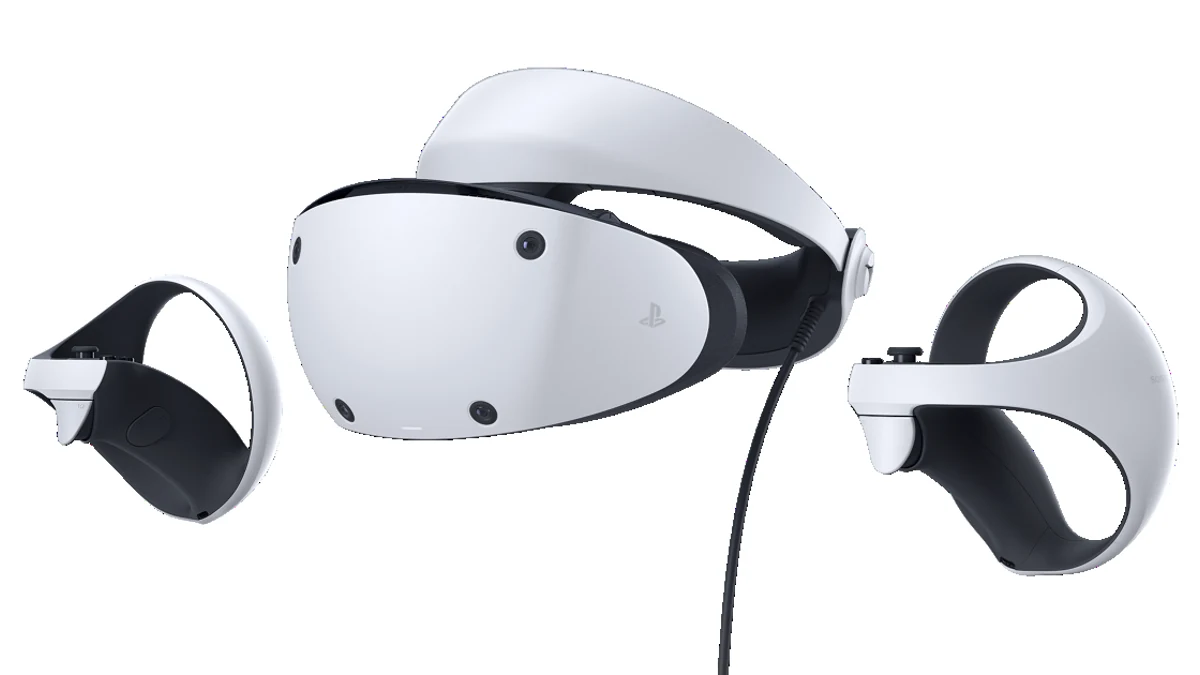
The PlayStation VR ecosystem trades flexibility for polish. There is no wireless mode, no PC compatibility out of the box (Sony released a beta PC adapter ), and no large back-catalog from the original PSVR. What buyers get instead is first-party titles built specifically for the hardware, plug-and-play setup, and the highest-quality consumer panels shipping in VR. For households that already own a PS5, the marginal cost of entering VR is the headset and nothing else.
- Display: OLED panels at 2000 x 2040 per eye, HDR-capable.
- Refresh rate: 90 Hz and 120 Hz modes.
- Field of view: approximately 110 degrees diagonal.
- Tracking: inside-out tracking via four headset cameras; eye tracking for foveated rendering.
- Controllers: Sense controllers with adaptive triggers, finger-touch detection, and haptic feedback.
- Requirements: PlayStation 5 console; single USB-C tether; no external base stations.
- Price: approximately $550 at MSRP, frequently discounted through Sony promotions.
HTC Vive VR Headset: PC-Tethered Platform
The HTC Vive VR headset family represents the high end of PC-tethered VR. The current flagship, the HTC Vive Pro 2, pairs dual 2448 x 2448 LCD panels with a 120 Hz refresh rate and a 120-degree field of view (FOV), the widest of the three platforms covered here. Tracking uses SteamVR base stations (Lighthouse 2.0), an outside-in system that sweeps the room with infrared lasers and delivers sub-millimeter accuracy for room-scale tracking tracking tracking (HTC Vive Pro 2 product page).
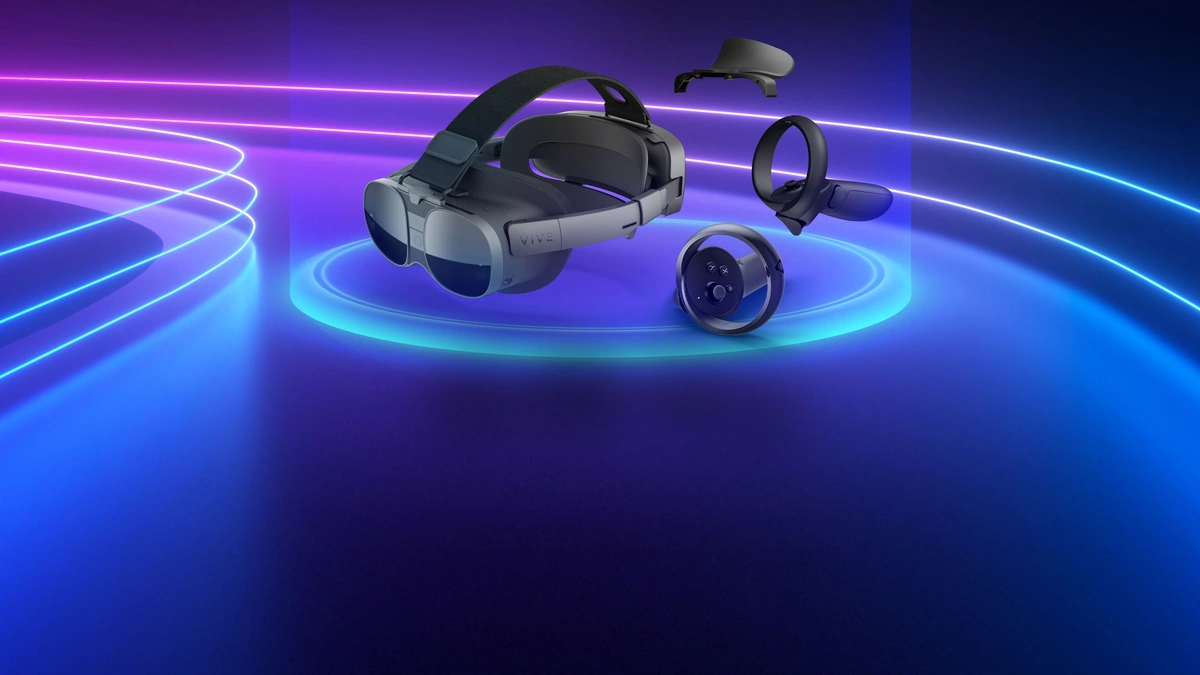
The HTC Vive headset slots into the SteamVR ecosystem, giving owners access to the full Steam VR catalog plus any OpenXR title. Visual fidelity is the platform's selling point, and the base station tracking remains the reference standard for precision. The cost picture is the trade-off: the Vive Pro 2 full kit (headset, controllers, two base stations) lands above $1,000, and it assumes a gaming PC capable of driving 5K resolution at 120 Hz. Total cost of ownership for a PC-tethered VR rig at this tier comfortably exceeds $1,500 once the PC is counted.
- Display: dual LCD panels at 2448 x 2448 per eye (5K combined).
- Refresh rate: 90 Hz and 120 Hz modes.
- Field of view: up to 120 degrees diagonal.
- Tracking: outside-in tracking via SteamVR base stations (Lighthouse 2.0); supports up to four base stations for large play areas.
- Controllers: Vive Controllers (bundle) or third-party Valve Index Knuckles via SteamVR.
- Requirements: Windows gaming PC, DisplayPort 1.2, USB 3.0, GPU at GTX 1080 / RTX 2070 class or higher.
- Price: full kit pricing in the $1,000 to $1,400 range depending on bundle.
VR Headset Comparison: Side-by-Side Specs
Putting the four mainstream models on one grid clarifies where the VR platform comparison actually lives: panel type, tracking method, and what additional hardware the buyer must already own. Field of view, refresh rate, and resolution per eye are the three specifications that most directly shape perceived image quality during play.
| Headset | Price | Display | FOV | Display refresh | Tracking | Requires | Wireless |
|---|---|---|---|---|---|---|---|
| Oculus Quest 2 | $200-$300 | LCD, 1832 x 1920 per eye | ~97 deg | 72/90/120 Hz | Inside-out, 4 cameras | None (standalone) | Yes |
| Meta Quest 3 | $500-$650 | LCD, 2064 x 2208 per eye | ~110 deg | 90/120 Hz | Inside-out, 6 cameras | None (standalone) | Yes |
| PlayStation VR2 | ~$550 | OLED HDR, 2000 x 2040 per eye | ~110 deg | 90/120 Hz | Inside-out + eye tracking | PlayStation 5 | No |
| HTC Vive Pro 2 | $1,000-$1,400 (kit) | LCD, 2448 x 2448 per eye | ~120 deg | 90/120 Hz | Outside-in, SteamVR base stations | Gaming PC | Optional (adapter) |
The spec gap between standalone and PC-tethered systems has narrowed, but the input devices, tracking precision, and rendering ceiling still separate the tiers.
How to Choose a VR Gaming Setup for Your Use Case
Selecting a VR gaming setup is a sequence of constraints more than a search for a single winner. Budget, existing hardware, target game library, available room, and willingness to manage a tether each narrow the field. The platform a buyer already owns usually narrows the field fastest: PSVR2 plugs into a PlayStation 5, while a gaming PC already runs SteamVR-compatible headsets.
- Set the budget honestly. Include the headset, any required console or PC upgrade, and a spare battery or grip if applicable. A standalone VR rig can land under $300; a top-tier PC-tethered VR rig can exceed $1,500.
- Audit existing hardware. A PS5 owner has a $550 path to console VR. A gaming PC owner with an RTX 2070 or better has access to the full SteamVR library. A household with neither leans standalone.
- Map the target game library. Sony first-party VR titles are exclusive to PSVR2. Beat Saber, Resident Evil 4 VR, and the Quest-native catalog live on Meta hardware. Half-Life: Alyx and the broader SteamVR catalog favor PC-tethered systems.
- Measure the play space. Confirm a cleared area of at least 2m x 1.5m before committing to room-scale play. Base station setups also need wall or shelf mounting points at roughly head height.
- Weigh tether tolerance. A cable adds fidelity but constrains rotation and pulls during fast turns. Wireless standalone or wireless PC-VR (via Air Link) avoids the issue at the cost of compression artifacts and battery life.
Buyers leaning toward PC-tethered VR should pair the headset decision with GPU planning; our 4K gaming graphics card guide covers the cards that drive high-resolution VR comfortably. For motion controller alternatives and broader peripheral context, the gaming peripherals comparison covers the controller ecosystem that extends beyond bundled hardware.
VR Gaming Setup and Space Requirements
A VR gaming rig is as much a room-planning exercise as a hardware purchase. Each platform enforces its own play-area boundary system, but all three rely on the same physical fundamentals: a cleared floor, predictable lighting, and enough ceiling clearance for raised arms. Room planning therefore matters as much as platform choice when comparing the three setups.
- Clear the floor. Allocate a minimum of 2m x 1.5m for standing experiences and 3m x 3m for full locomotion. Remove rugs, low tables, and pet beds from the active area.
- Set lighting for inside-out tracking. Quest and PSVR2 cameras need consistent ambient light. Avoid direct sunlight on the headset and avoid fully dark rooms; both confuse the tracking cameras.
- Mount base stations for Vive. Place two SteamVR base stations diagonally opposite at roughly 2m height, angled down 30 to 45 degrees. Wall mounts are more stable than light-stand tripods for long-term use.
- Manage the cable. Tethered setups benefit from an overhead pulley or ceiling hook that lifts the cable above shoulder height, removing the loop that catches under feet during turns.
- Draw the boundary. Configure Meta Guardian, PSVR2 Play Area, or SteamVR Chaperone before the first session. Re-run the boundary setup whenever furniture moves.
Downloadable VR titles have grown large enough that storage planning matters; the SSD versus HDD comparison for gaming libraries sets out the storage tier appropriate to a VR-heavy install base.
Further reading
Frequently Asked Questions
What are the main trade-offs of the Vive headset compared to standalone headsets?
The Vive system Pro 2 delivers higher visual fidelity and sub-millimeter room-scale precision via base station tracking, but it requires a capable gaming PC (GPU at GTX 1080 level or above) and separate base station hardware. Total cost of a PC-tethered VR system can exceed $1,500 when PC hardware is included. Standalone headsets like the Oculus Quest 2 run their VR workload on-board, eliminating the PC dependency but operating at lower rendering performance and visual fidelity.
How do I choose between a standalone and a PC-tethered system headset?
Choose standalone (the Oculus Quest line) for a self-contained VR setup with no additional hardware cost and easy portability. Choose PC-tethered (Vive line, or Quest via Air Link or Link cable) if a capable gaming PC is already in the house and access to the full SteamVR library at higher graphical fidelity is the priority. Console VR (PSVR2) is the right fit for a PS5 owner who values first-party exclusive titles and plug-and-play setup.
What play-space do I need for room-scale VR gaming?
Room-scale VR requires a cleared area of approximately 2m x 1.5m (6.5ft x 5ft) for standing experiences; 3m x 3m (10ft x 10ft) is recommended for full locomotion games. All three platforms enforce software boundary systems (Meta Guardian, PSVR2 Play Area, SteamVR Chaperone) that alert the player when approaching the edge. Ceiling height should exceed 2.3m to avoid headset contact during raised-arm gestures.