A headless CMS is a content management architecture that decouples the editorial backend from the presentation layer, delivering structured content via APIs to any frontend framework or device.
Traditional platforms bundle the backend and the theme engine into a single system. A headless content management system keeps those two responsibilities separate: editors write and organize content in one place; developers consume it through a content delivery API and render it wherever they need. The result is a content repository that any channel can draw from without a rebuild. The three platforms most frequently evaluated for this architecture are Contentful, Sanity, and Strapi, each reflecting different priorities around hosting control, editorial workflow, and content modeling.
Understanding Headless CMS
A headless CMS is built around one design principle: the content repository has no opinion about how its data is displayed. Editors work inside a structured interface, publishing documents that the content delivery API exposes to any consumer. That consumer might be a Next.js web app, a React Native mobile screen, a digital kiosk, or a voice assistant. The decoupled architecture treats each surface identically, serving the same structured payload through a predictable endpoint. The headless ecommerce systems explainer covers how this pattern extends to commerce storefronts specifically.
How Does a Headless CMS Work?
The request-response cycle is direct. An editor saves a content item in the backend. The API-first content layer indexes that item and makes it available at a versioned endpoint. The frontend framework sends an HTTP request, receives structured JSON, and renders it using its own templates. Because the rendering step lives entirely outside the CMS, teams can swap frontend frameworks or add new channels without touching the editorial backend.
- Content Repository
- The backend database and editorial interface where writers create, organize, and publish content items as structured documents.
- Content Delivery API
- The HTTP endpoint (REST or GraphQL) through which frontend clients request and receive content payloads. The content delivery API is the only bridge between the repository and the presentation layer.
- Frontend Framework
- The rendering layer chosen by the development team: Next.js, Nuxt.js, Gatsby, SvelteKit, or any other JavaScript framework that fetches data from the API and assembles the UI.
- Decoupled Architecture
- The design pattern that separates content storage and management from content rendering. Decoupled architecture enables independent deployment cycles for backend and frontend teams.
Pros and Cons of Headless CMS
A headless CMS expands delivery options while moving operational responsibility from the platform vendor to the development team. That tradeoff is the central consideration for any team evaluating this architecture.
Benefits of Using a Headless CMS
Omnichannel publishing is the most cited benefit. Because content enters the system once and exits through the content delivery API, the same article can power a web app, a mobile app, and a smart TV interface without editorial duplication. Multi-channel delivery also simplifies localization: structured content fields carry locale metadata independently of any template. Beyond reach, decoupled architecture lets frontend and backend teams deploy on separate schedules, reducing release bottlenecks. Horizontal API scalability pairs with CDN caching so the content delivery layer handles traffic spikes independently of the editorial backend, as Google Cloud documents in its headless commerce architecture guide.
Drawbacks of Headless CMS
The editorial workflow suffers when content editors have no built-in preview. Traditional CMS platforms render a live preview inside the editor; a headless content management system requires a separately built preview endpoint, which adds development time and maintenance overhead. A self-hosted CMS layers on additional operational complexity: database provisioning, server security, and upgrade cycles become the team's responsibility. API call costs can also compound at scale for cloud-hosted options, particularly at high publish frequencies.
| Dimension | Benefits | Drawbacks |
|---|---|---|
| Content reach | Omnichannel publishing: web, mobile, IoT, digital signage | Each new channel needs a dedicated frontend build |
| Frontend choice | Any frontend framework: React, Vue, Svelte, or static generators | No built-in theme; development team builds the full presentation layer |
| Scalability | Horizontal API scaling independent of content storage | Traffic spikes require infrastructure planning beyond the CMS |
| Content versioning | Version-controlled structured content with audit trails | Content preview requires a custom preview endpoint per frontend |
| Deployment cadence | Frontend and backend deploy independently | Coordinating two codebases increases integration surface area |
| Operational cost | SaaS options remove server management overhead | API call volume drives costs at scale; self-hosted CMS adds DevOps load |
Use Cases for Headless CMS
A headless CMS fits well when multi-channel delivery is a requirement rather than a future aspiration, or when the frontend team has strong opinions about their rendering stack. API-first content delivery is a core pattern for modern digital experience platform builds, where content must reach multiple surfaces simultaneously.
Industries Benefiting from Headless CMS
Retail and e-commerce teams adopt headless architecture to run custom storefronts on top of commerce backends, keeping product catalog management separate from the shopping experience. The Next.js and Shopify headless implementation guide details the technical pattern for that stack. Media organizations use structured content and omnichannel publishing to syndicate articles to web, mobile, email, and partner platforms from a single source of truth. Enterprise SaaS companies run product documentation portals through headless APIs so documentation teams can update content without coordinating frontend releases.
- E-commerce storefronts: Custom Shopify or commerce frontends pull product and editorial content from a headless content management system via API, enabling brand-specific UX without platform template constraints.
- Media and publishing: Multi-region syndication routes the same structured content through regional frontends, each applying local formatting rules without touching the editorial backend.
- IoT and smart device UIs: Devices with limited rendering capability request lightweight JSON payloads from the content delivery API, displaying only the fields they can process.
- Mobile app content backends: Native iOS and Android apps share the same content repository as the web frontend, eliminating content duplication across platforms.
- Digital signage: Signage controllers poll the API on a schedule, displaying current campaign content without requiring on-device content management software.
- SaaS product documentation portals: Documentation teams update structured content in the editorial backend; the frontend framework rebuilds and deploys the documentation site on each publish event.
Comparing Headless CMS to Traditional CMS
Key Differences
A headless CMS and a traditional CMS solve the same editorial problem through opposite architectural decisions. A traditional CMS like WordPress couples content storage to a templating engine; the database, the theme layer, and the content delivery API all live inside the same application. The WordPress REST API documentation shows how WordPress can expose a content delivery API surface, but the platform was designed with a monolithic model first.
A headless content management system inverts that relationship. The content repository is the only shared layer; each frontend maintains its own decoupled architecture and rendering logic. Teams gain frontend flexibility and native multi-channel delivery but give up built-in preview, built-in routing, and the shallow learning curve of a traditional CMS. For teams without dedicated frontend developers, a traditional CMS delivers faster time-to-content with lower operational complexity.
| Dimension | Headless CMS | Traditional CMS |
|---|---|---|
| Architecture model | Decoupled architecture: content repository separate from presentation | Monolithic: backend and frontend in one application |
| Frontend flexibility | Any frontend framework via API | Platform templating engine (PHP, Liquid, Handlebars) |
| Content preview | Requires custom preview endpoint per frontend | Built-in preview inside the editor |
| Developer requirement | High: frontend team builds the full rendering layer | Low to medium: themes and plugins handle most UI |
| Time to first content | Longer: frontend must be built before content is visible | Shorter: themes provide immediate rendering |
| Scaling model | Horizontal API scaling at the content delivery layer | Vertical server scaling tied to the monolithic app |
| Multi-channel support | Native: one API serves all channels | Plugin-dependent: each new channel needs integration work |
| Cost model | Usage-based API calls plus frontend hosting | Fixed hosting cost for the monolithic application |
Contentful, Sanity, and Strapi: Platform Comparison
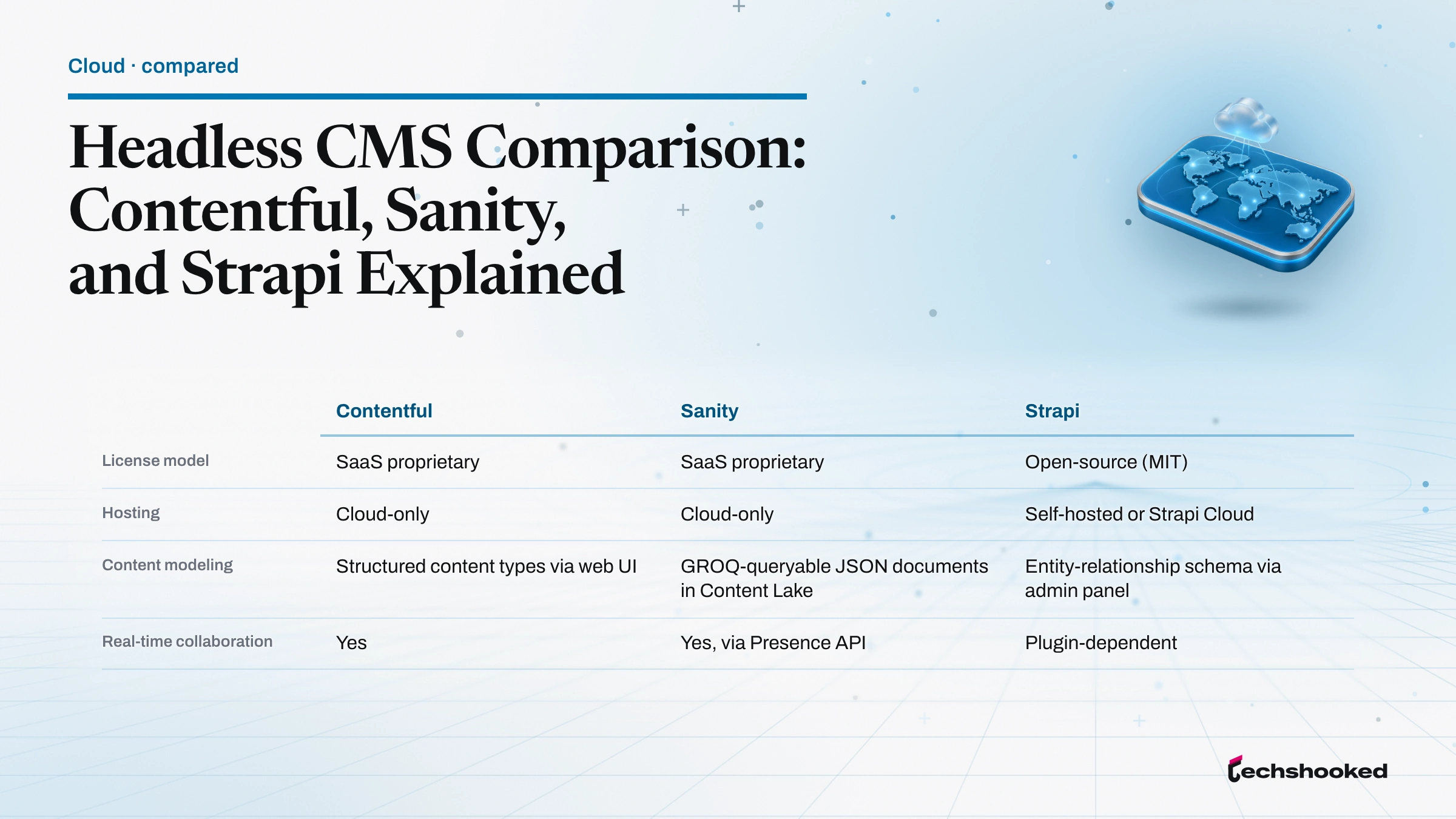
The headless CMS market divides broadly into managed SaaS options and open-source self-hosted CMS platforms. Contentful and Sanity occupy the managed end; Strapi is the primary open-source option in this comparison. Each reflects a different set of priorities around content modeling, editorial workflow, and deployment control.
| Dimension | Contentful | Sanity | Strapi |
|---|---|---|---|
| License model | SaaS proprietary | SaaS proprietary | Open-source (MIT) |
| Hosting | Cloud-only | Cloud-only | Self-hosted or Strapi Cloud |
| Content modeling | Structured content types via web UI | GROQ-queryable JSON documents in Content Lake | Entity-relationship schema via admin panel |
| Real-time collaboration | Yes | Yes, via Presence API | Plugin-dependent |
| Content-editor UX | Polished enterprise interface | Developer-first; customizable Studio | Functional admin panel; less refined |
| API support | REST and GraphQL | GROQ and GraphQL | REST by default; GraphQL via plugin |
| Free tier limits | Capped records, locales, and roles | Capped documents, datasets, and seats | Unlimited (self-hosted) |
| Paid tier entry | Enterprise pricing on request | Growth plan per user per month | Strapi Cloud with custom pricing |
| Community size | Large | Medium | Large |
Contentful targets enterprise marketing teams that need a polished editorial workflow out of the box. Its content modeling UI is one of the most mature in the category, integrating with Salesforce, HubSpot, and broader martech tools without custom code. The free Community plan covers 25,000 records, 2 locales, and 2 roles; enterprise pricing is on request (Contentful pricing). Teams that spend most of their budget on marketing operations rather than engineering find Contentful's investment justified by the reduction in developer hours needed for editorial tooling.
Sanity centers on its Content Lake architecture, which stores content as structured JSON documents queryable with GROQ (Graph-Relational Object Queries), its purpose-built query language for describing exactly what an application needs (Sanity Content Lake documentation). Sanity Studio is a fully customizable multiplayer interface, making real-time collaboration a native capability. The free plan supports 10,000 documents, 2 datasets, and 20 users; the Growth plan adds capacity per user per month (Sanity pricing). Media and publishing teams with complex content relationships gravitate toward Sanity because GROQ lets them query nested references across content types without multiple round trips. The headless CMS options for React developers article covers React-specific integration patterns across these platforms.
Strapi is the open-source option in this comparison. Its backend runs as an HTTP server built on Koa, a Node.js framework, and exposes content through REST and GraphQL APIs (Strapi backend customization documentation). GraphQL requires the official plugin; REST is available by default. Strapi can be deployed on traditional hosting servers or through Strapi Cloud; it requires PostgreSQL, MySQL, or SQLite and does not support MongoDB or any NoSQL databases (Strapi deployment documentation). The self-hosted CMS path eliminates per-seat licensing costs entirely, making Strapi the most viable option for development teams that want full backend customization and infrastructure control. The CMS platform comparison for publishers examines content modeling tradeoffs for media-scale teams in more detail.
Choosing the Right Headless CMS for Your Team
A headless CMS selection depends on five concrete factors. Teams that skip one tend to discover the mismatch after onboarding, when switching costs are highest.
- Team composition: A high developer-to-editor ratio favors Sanity or Strapi, where content modeling requires technical input. A primarily editorial team benefits from Contentful's polished editorial workflow, which minimizes developer involvement in day-to-day content operations.
- Hosting preference: Teams with cloud-first infrastructure lean toward Contentful or Sanity (cloud-only). Teams requiring data residency control or wanting to avoid recurring SaaS costs choose Strapi as a self-hosted CMS, deploying on their own servers or via Strapi Cloud (Strapi quick-start guide).
- Content complexity: Simple page-based sites with a handful of content types fit any platform. Multi-locale, multi-dataset, or deeply relational structured content models are where Sanity's GROQ query language and content modeling capabilities offer measurable advantage over a basic admin panel.
- Budget: Strapi's self-hosted path carries zero licensing costs. Sanity's free tier is generous for small teams. Contentful's free Community plan caps the number of roles, which limits access for larger editorial teams before enterprise pricing applies.
- Integration requirements: Contentful has the deepest native integrations with enterprise martech platforms. Sanity and Strapi rely more on custom API integrations or community plugins for third-party connections, shifting integration work to the development team.
Free tiers on all three platforms support proof-of-concept work. The Strapi quick-start guide walks through a working API in minutes with a hosted demo, making it the lowest-friction starting point for teams that have not yet committed to a self-hosted CMS deployment. Contentful and Sanity both provide sandbox environments within their free plans.
Migration from a traditional CMS adds a practical constraint. Content that lives in a monolithic system's database must be restructured as API-first content before a headless content management system can serve it correctly. Teams running large content libraries should budget export, transformation, and validation time alongside the frontend build.
Further reading
- Strapi backend customization. Koa-based HTTP server architecture, REST and GraphQL API configuration.
- Sanity Content Lake documentation. structured data model, GROQ query language, real-time delivery.
- Ghost JAMstack documentation. using Ghost as a headless CMS with Next.js, Gatsby, and Nuxt.js; API pagination notes for the current major release.
- Contentful pricing and plans. free Community plan limits, enterprise tier details.
- Google Cloud headless commerce architecture. API-first content delivery patterns for digital experience platform builds.
- Ecommerce Platforms Compared: Shopify, WooCommerce, BigCommerce, and Adobe Commerce
- Enterprise E-Commerce Platform Selection: Shopify Alternatives Compared
- How To Choose Between Shopify And WooCommerce: An SMB TCO Decision Framework
Frequently Asked Questions
What is the difference between a headless CMS and a traditional CMS?
A headless CMS separates the content repository from the presentation layer and delivers content via API to any frontend. A traditional CMS couples backend and frontend into a monolithic system with built-in templating. The headless model offers multi-channel delivery and frontend freedom but requires developer resources to build the presentation layer, as the Strapi backend customization guide describes.
How does Contentful pricing compare to Sanity and Strapi?
Each platform uses a different commercial model. Contentful and Sanity offer free tiers with paid plans scaling by usage and seats, while Strapi is open-source and free to self-host with paid managed hosting through Strapi Cloud. Check current rates on the Sanity pricing page and the Contentful pricing page, since plan limits change.
Can I use Ghost as a headless CMS?
Yes. Ghost works as a headless CMS with frontend frameworks including Next.js, Gatsby, and Nuxt.js, returning content via its API. Membership functionality is not compatible with headless setups, and large content sets require pagination, as noted in the Ghost JAMstack documentation.
Which headless CMS is best for teams with limited developer resources?
Contentful suits content teams with limited developer resources, thanks to a polished editorial workflow, built-in preview, and marketing-platform integrations. Sanity is more developer-first and Strapi's admin panel is functional but less refined for non-technical editors, as the Strapi quick-start guide illustrates.
Does Strapi support GraphQL and REST APIs?
Yes. Strapi exposes a REST API by default and adds GraphQL through the official plugin, both usable for create, read, update, and delete operations. It requires a SQL database such as PostgreSQL, MySQL, or SQLite rather than a NoSQL store, per the Strapi deployment guide.