An OLED monitor is a display panel technology that uses self-emissive pixels to deliver near-infinite contrast, near-instant pixel response, and wide color volume without a backlight. Mini-LED and IPS panels take a fundamentally different approach, each trading away some of those properties to gain advantages in brightness or cost. The gap between all three has narrowed in recent years, but the trade-offs that defined each technology persist. Choosing the wrong panel type for a specific workflow costs money, image quality, or longevity, and the right answer depends on how each purchase weights contrast, brightness, and total ownership risk.
How OLED, Mini-LED, and IPS Panels Work
OLED, Mini-LED, and IPS panels each manage light in fundamentally different ways, and those differences drive every trade-off a buyer encounters. The light-control architecture at the pixel level determines contrast ceiling, brightness headroom, and power behavior simultaneously. Understanding what separates these three approaches makes every downstream specification comparison legible. The same light-control split carries over to living-room screens, where OLED, Mini-LED and RGB Mini-LED TVs trade contrast against brightness in much the same way.

- OLED (Organic Light-Emitting Diode)
- A self-emissive panel where each pixel generates its own light using organic compounds. Because each pixel can switch off completely, OLED achieves near-infinite contrast without any backlight layer. The absence of a backlight also reduces panel depth and eliminates light bleed at display edges. Self-emissive operation carries the trade-off of brightness limitations under automatic brightness limiting circuits.
- Mini-LED
- A backlight system, not a stand-alone panel type. Mini-LED uses thousands of small LED elements arranged behind a standard LCD matrix to create more granular local dimming zones than conventional edge-lit or full-array LCD designs. The LCD panel on top of the backlight is typically IPS or VA glass. Higher zone density narrows the blooming halo that appears around bright objects on dark backgrounds, but cannot eliminate it entirely because backlight zones illuminate multiple pixels simultaneously.
- IPS (In-Plane Switching)
- A liquid-crystal alignment approach used in LCD panels. IPS aligns liquid crystals horizontally in-plane, producing wide viewing angles and consistent color across most of the panel surface. IPS displays use a conventional backlight, which limits their contrast ceiling but also avoids burn-in risk entirely. The manufacturing scale of IPS glass keeps prices lower than OLED at equivalent resolutions and sizes.
Contrast and Black Levels
OLED monitors produce contrast by switching individual pixels off entirely, a capability no LCD backlight system can replicate. When a pixel is off, it emits no light and registers as a true black, producing contrast depth that qualitative descriptors like "near-infinite" are not marketing language but a measurable property of the technology. LCD panels, including those using Mini-LED backlighting, produce black by blocking backlight output through liquid crystal layers; that blocking is never complete, so some backlight leaks through to the pixel surface even in the darkest scene areas.

Mini-LED narrows this gap by subdividing the backlight into local dimming zones, each controlled independently. A zone covering a dark region dims or turns off, improving the effective black floor of that area. The limitation is blooming: a bright object near a dark zone causes adjacent zones to partially illuminate, creating a visible halo effect around high-contrast edges. Zone count directly affects how visible that halo is, but the effect does not disappear entirely at any commercially available zone density.
| Attribute | OLED | Mini-LED | IPS |
|---|---|---|---|
| Contrast mechanism | Per-pixel self-emissive shutoff | Zone-level local dimming over LCD matrix | Liquid crystal blocking of backlight |
| Black level depth | True black (pixel off) | Near-black in dimmed zones | Dark gray, dependent on backlight leak |
| Blooming risk | None | Moderate; depends on zone count | None (backlight is uniform; no zone boundaries) |
| Typical contrast tier | Near-infinite | High | Moderate |
Brightness and HDR Performance
Mini-LED monitors typically reach higher sustained peak brightness than OLED panels, an advantage that shapes HDR performance in well-lit rooms. Self-emissive displays use automatic brightness limiting (ABL), a circuit that reduces per-pixel luminance when large areas of the screen display bright content simultaneously, in order to control heat and protect panel longevity. The practical effect is that while an OLED panel can produce very high brightness on a small highlight area, full-frame brightness is constrained by ABL in ways that Mini-LED backlights are not.
The VESA DisplayHDR certification program defines tiered performance levels that let buyers compare HDR capability across panel types on a standardized scale. The tier names, DisplayHDR 400, DisplayHDR 600, and DisplayHDR 1000, specify minimum brightness thresholds and other criteria codified at displayhdr.org/performance-criteria/. Mini-LED monitors commonly reach the upper DisplayHDR tiers in full-field measurements; OLED monitors cluster at the mid-to-upper tiers depending on the display area being measured, and IPS panels without local dimming typically qualify at the entry tier.
| Attribute | OLED | Mini-LED | IPS |
|---|---|---|---|
| Sustained peak brightness | Moderate full-frame; high on small highlights | High full-frame and highlight | Moderate; limited by backlight design |
| DisplayHDR tier range | Mid to upper tiers; OLED-specific variants exist | Mid to upper tiers | Entry tier without local dimming |
| ABL behavior | Reduces full-screen brightness under high load | Minimal; backlight does not self-limit | None; backlight brightness is fixed |
| Blooming risk under HDR | None | Visible at zone boundaries in high-contrast scenes | None |
Color Accuracy and Gamut Coverage
IPS panels have historically led in color consistency for professional work, though OLED monitors now match or exceed IPS on wide color gamut coverage. The IPS advantage has always rested on three properties: consistent pixel response across the panel surface, stable viewing angles that preserve color at off-axis positions, and a mature supply chain of factory-calibrated panels targeting DCI-P3 (the digital cinema color standard) and AdobeRGB primaries. These properties make IPS the default choice in color-critical workflows where predictable output matters more than absolute vividness.
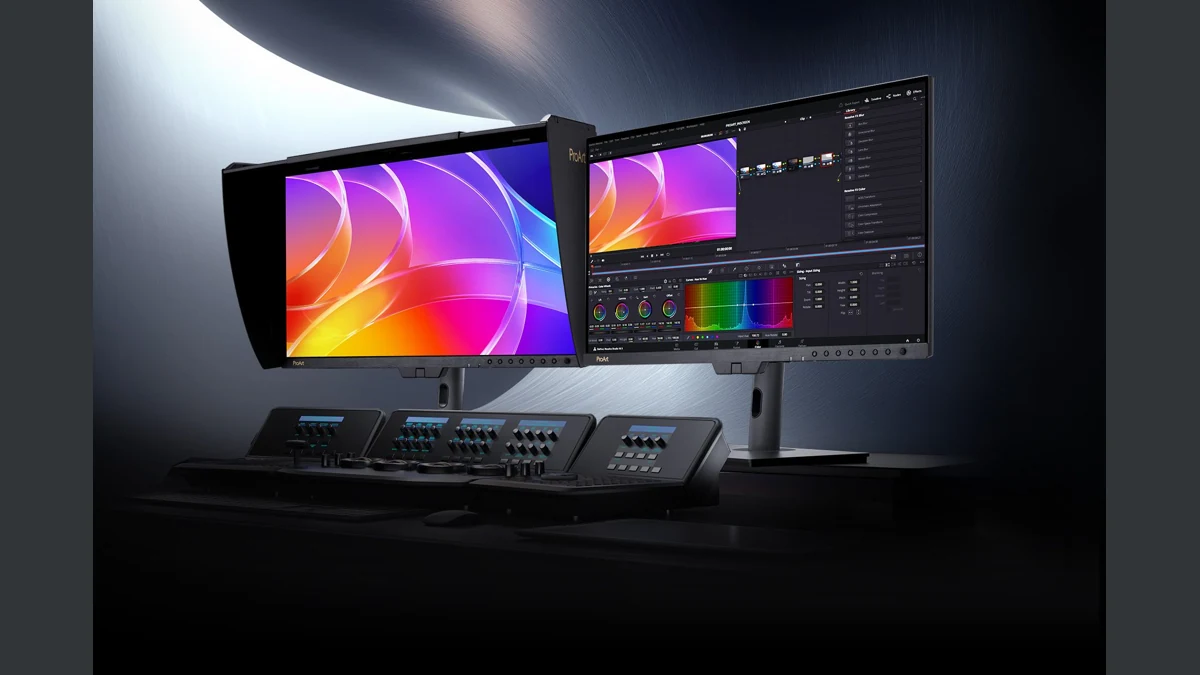
OLED monitors now cover DCI-P3 at competitive levels and deliver high color volume, meaning luminance and saturation hold up simultaneously across a wide range of scene brightness. The limitation is ABL: when a large bright area activates the limiting circuit, color accuracy can shift slightly from the calibrated reference state. For mixed productivity and media work, the difference is rarely visible, but for print proofing or color-grading workflows requiring absolute accuracy, the variability under ABL is a real calibration concern.
Mini-LED panels derive their color from the LCD substrate beneath the backlight. When the substrate is IPS glass, the color accuracy profile mirrors a conventional IPS display. A Mini-LED backlight does not itself affect color gamut, but higher-quality builds frequently pair the backlight with wide color gamut (WCG) LCD glass that targets DCI-P3 primaries, producing results comparable to standalone IPS. The backlight's role is contrast and brightness, not color fidelity.
Motion Clarity and Refresh Rate
OLED monitors respond faster at the pixel level than any LCD panel, including Mini-LED, which reduces motion blur independently of refresh rate. On an LCD, liquid crystals require finite time to transition between states, and that transition time sets a lower bound on pixel response time that no overdrive setting eliminates entirely. An OLED pixel transitions at near-organic switching speed, which is orders of magnitude faster. That speed difference is perceptible in fast-moving content as reduced smearing on high-contrast motion edges.
Pixel response time is, however, only one factor in perceived motion clarity. The following factors collectively determine how motion looks on screen, ranked by their practical impact on most users:
- Pixel response time. How quickly a single pixel transitions between states. OLED leads; IPS and Mini-LED trail. Fast response reduces trailing artifacts on moving edges.
- Refresh rate. How many frames the display draws per second. Higher rates reduce inter-frame persistence regardless of panel type. At high refresh rates, even IPS motion blur becomes significantly reduced.
- Overdrive tuning. A setting that pushes pixel transitions faster to counteract LCD transition lag. Overdrive that is too aggressive produces inverse ghosting artifacts, making calibration important on Mini-LED and IPS panels.
- Sample-and-hold display behavior. All modern panels hold each frame static until the next refresh, which causes perceived motion blur independent of pixel response. Black frame insertion or variable backlight strobing can reduce this artifact, but introduce brightness trade-offs.
Panel Longevity and Burn-In Risk
Burn-in is the defining longevity trade-off for OLED monitors, and understanding the risk accurately shapes long-term buying decisions. Self-emissive organic compounds degrade at different rates depending on how much light each pixel produces over its lifetime. Pixels that display bright static elements consistently, such as a taskbar, a game HUD, or a channel logo, age faster than surrounding pixels. Over extended periods, differential aging creates permanently visible outlines that persist even when the display shows other content. This mechanism is called image retention at the reversible stage and burn-in once the degradation becomes fixed.
Mini-LED and IPS panels use inorganic LED backlight sources and liquid crystal layers that do not share this degradation mechanism. Backlight LEDs can dim over many years of use, but the degradation is uniform and does not produce persistent image artifacts. For users running fixed on-screen overlays at high brightness, Mini-LED or IPS carry meaningfully lower longevity risk. OLED manufacturers have responded with multiple mitigation approaches built into current-generation panels:
- Automatic brightness limiting (ABL). Reduces luminance on static bright regions, slowing differential pixel aging.
- Pixel-shift orbiting. Moves the image by sub-pixel increments periodically, distributing wear across adjacent pixels and delaying the onset of fixed outlines.
- Periodic panel care cycles. Automated routines run at display shutdown that exercise all pixels uniformly, helping even out accumulated luminance differences.
- Screensaver activation. Interrupting static content display after short idle periods reduces cumulative exposure of fixed-brightness pixels.
- Brightness discipline. Operating the display at moderate brightness levels in static-element workflows dramatically extends uniform pixel life, since organic compound degradation rate is non-linear with luminance.
For mixed-use workflows combining gaming, video, and variable desktop content, practical burn-in risk with modern mitigations enabled is low for most users. The risk profile becomes meaningful for workflows with persistent fixed-brightness overlays running at high luminance for many hours daily.
Which Panel Type Fits Your Use Case
Choosing between OLED, Mini-LED, and IPS comes down to the three variables each use case weights most: contrast depth, sustained brightness, and total cost. No single panel technology wins on all three simultaneously. The right choice shifts depending on room lighting, content type, workflow, and how much longevity risk a buyer is willing to manage.
- Dark-room gaming and cinematic content. An OLED monitor delivers the sharpest contrast experience for this use case. Near-infinite contrast and near-instant pixel response produce visually distinct results in dark scenes and fast motion. Burn-in risk is manageable with mitigations enabled for mixed-use sessions. For system context, pairing an OLED with the right processor also matters: the CPU vs GPU performance for productivity and gaming guide covers how to balance the compute side of a gaming build.
- Bright-room HDR or outdoor-facing setups. Mini-LED sustains higher peak brightness over large screen areas and reaches the upper DisplayHDR tiers under full-field measurement conditions. In a room with strong ambient light, the higher brightness ceiling overcomes ambient washing that limits OLED HDR impact. Buyers comparing full-system costs can reference desktop CPU selection for productivity and gaming for the surrounding build.
- Color-critical professional work with budget constraints. IPS remains the most cost-efficient path to factory-calibrated wide color gamut coverage. Panel uniformity, consistent viewing angle behavior, and a broad selection of calibrated models make IPS the default for photo editing, video grading, and design workflows where budget limits OLED consideration.
- Mixed productivity with controlled static elements. An OLED monitor with ABL, pixel-shift, and care cycles enabled is viable for productivity use when the workflow varies between desktop, video, and gaming. The condition is brightness discipline and avoiding fixed-luminance overlays at high settings for extended continuous sessions.
- Highest refresh rate gaming at lowest price. IPS at high refresh rates represents the most accessible entry point for competitive gaming. Pixel response is slower than OLED but overdrive tuning on current IPS panels keeps motion artifacts acceptably low at high frame rates. For a full component budget breakdown that includes the display tier decision, the gaming PC component selection guide covers how the monitor fits into the broader parts list.
References
- VESA DisplayHDR Performance Criteria: tier definitions and test specifications for DisplayHDR 400, 600, and 1000.
- VESA DisplayHDR FAQ: certification scope, OLED-specific variants, and test methodology details.
- VESA: About DisplayHDR: program context and standards body background.
- LG: Mini-LED vs OLED Monitor Comparison: vendor primary source on OLED panel characteristics and Mini-LED technology.
Further reading
Frequently Asked Questions
What is the difference between OLED and Mini-LED monitors?
OLED uses self-emissive pixels that switch off individually to produce true blacks. Mini-LED is a backlight system layered onto a standard LCD panel that uses thousands of smaller LEDs to improve local dimming. The practical result is that OLED delivers higher native contrast and faster pixel response, whereas Mini-LED can sustain higher peak brightness without the burn-in risk associated with self-emissive displays.
Is OLED better than Mini-LED for gaming?
OLED is generally preferred for gaming in controlled-light environments because its near-instant pixel response eliminates motion blur and its per-pixel contrast produces sharp dark scenes. Mini-LED is often the better choice for bright rooms or HDR gaming where sustained high brightness matters more than ultimate contrast depth. IPS remains the most affordable entry point for high refresh rate gaming without either technology's trade-offs.
Do OLED monitors suffer from permanent burn-in?
OLED panels can develop permanent image retention if static interface elements, taskbars, or logos remain on screen at high brightness for extended periods. Modern OLED monitors include built-in mitigations including automatic brightness limiting, pixel-shift orbiting, and periodic panel care cycles. For mixed productivity and media use, keeping brightness moderate and enabling these features significantly reduces practical burn-in risk, but users with fixed on-screen overlays should weigh Mini-LED or IPS as lower-risk alternatives.
Which panel type is best for color-accurate work?
IPS panels have long been the standard for color-critical work because their wide viewing angles maintain color consistency across the panel. They are also available with factory-calibrated wide-color-gamut (DCI-P3 or AdobeRGB) profiles. OLED monitors now also offer high color volume and accurate gamut coverage, often exceeding IPS in perceived vividness, but require careful calibration because self-emissive panels can exhibit slight color-shift under automatic brightness limiting.